URL Link Previews for Gmail™ by cloudHQ icon

URL Link Previews for Gmail™ by cloudHQ

by cloudHQ

v1.0.2.9 Updated Dec 8, 2025 672KiB
CWS
8K
Users
★ 4.59
44 reviews
#8716
of 207.5K
communication
#124 of 4.4K

Description

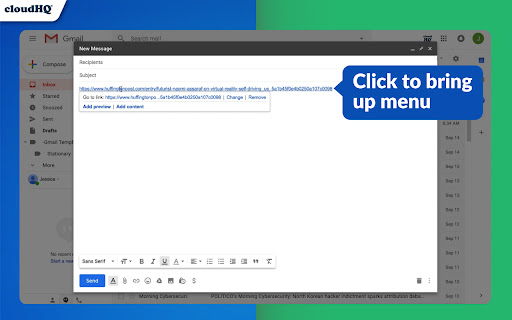
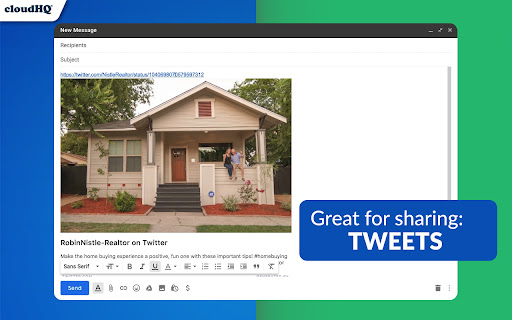
Share visually appealing previews, or the full contents of a URL link directly in your email. Here is how it works: - paste URL in your Gmail™ compose window - select "Preview", "Content", or "Preview" - we will automatically embed preview of the URL link into your email This includes private website URLs like: unpublished blog posts, pre-market listings for real estate, private legal contracts, and anything else that has a weblink! Sending attractive URL link previews, or a URL's full webpage content directly in your email, will help you get your message across in a visual way that people will appreciate. This is great for: -Realtors: Send your VIP clients a sneak preview for what's about to hit the market -Writers: Try sharing your unpublished blog posts with a graphic artist to make images or movies -Job Seekers: Try applying for a job by email with your LinkedIn profile and include its full content! -Business Owners: Did you get a contract that only you can see, but you want an outside opinion? Share it! -Salespeople: Sending emails with links to your products are boring! Send it with a visual preview! cloudHQ. Helping your productivity, 1 click at a time. cloudHQ website: https://www.cloudhq.net/ App website: https://www.gmail-url-link-preview.com/ Pricing: https://www.gmail-url-link-preview.com/pricing Support page: https://support.cloudhq.net/category/browser-extensions/gmail-url-link-preview Blog: https://blog.cloudhq.net Gmail is a trademark of Google LLC. Use of this trademark is subject to Google Permissions. cloudHQ is trademark of CloudHQ LLC. https://www.cloudhq.net/trademark
URL Link Previews for Gmail™ by cloudHQ screenshot 1URL Link Previews for Gmail™ by cloudHQ screenshot 2URL Link Previews for Gmail™ by cloudHQ screenshot 3URL Link Previews for Gmail™ by cloudHQ screenshot 4

Reviews (3 cached)

★☆☆☆☆2021-08-06
David Schwartz

I like what this extension does; However I can't get the "Add Content" to work. "Add Preview" works fine. "Add Content" doesn't do anything. I've refreshed the browser tab and still "Add Content" is non-functional. This extension somehow caused a number a parts of Feedly.com to be non-functional. That is despite limiting the extension's access only to gmail. I've deleted the extension. It was definitely the cause of the problem. Pity. Because I liked what it did when it worked.

★☆☆☆☆2021-05-31
Aanel Victoria

Does not work. The "add preview" link is disabled. The only options are "add content" (which means adding the whole web page) or "add screenshot" (which means add a screenshot of most of the webpage.

★★★☆☆2018-09-26
John Campbell

love the idea, and i love all cloudHQ add-ins ... but every time I compose or reply to an email it creates a sample message for "Gmail URL Link Preview". I'm guessing this is meant to be a first-run-only feature ... but I can't figure how to switch it off. I'll have to disable the extension for a while to see if this problem gets fixed, but I'll be back shortly - I'm v excited if this works.

Permissions (6)

Permissions

activeTab Can access the current tab when you click the extension background clipboardRead Can read from your clipboard scripting Can inject scripts into web pages storage Can store data locally in your browser tabs Can see your open tabs and their URLs

Details

Version 1.0.2.9
Updated Dec 8, 2025
Size 672KiB
First Seen Mar 30, 2026

More by cloudHQ

Popular in communication

Popular Extensions