
Description


Reviews (45 cached)
I dont have all day long to see the result...sorry.....tooooooooooo slow
Could have made a point of it being a 60 email limit before I spent half hour waiting for it to convert!
I dont need or want another account. Deleted immediately, useless extension.
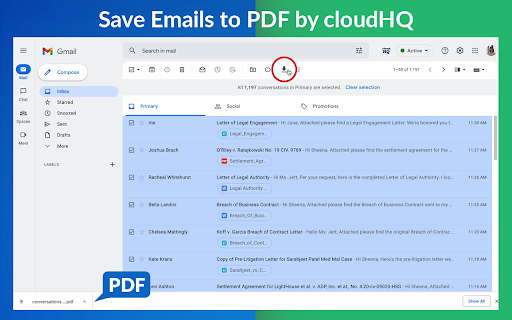
This doesn't work, don't waste your time. first of all It wants access to all of your Gmail accounts, which made suspect but I need a tool to save my emails in a faster way, so I gave this a try anyway. after giving this permission to my account I marked all the emails I wanted to safe as pdf, and look like everything goes fine... then it sends you to their dashboard where it "works" on collecting the emails and transforming them into PDFs. it was loading for hours, then it automatically paused when I refreshed the page when I wanted to check if it's done - after clicking on "continue" it paused again after a few minutes, provides no work done which makes think this is a way to get access to emails. after you remove this useless app from your chrome go to your security and 3rd party access and remove the access you gave them to start working with them.
What a waste of time. Don't bother getting this extension unless you plan to pay for it. Downloaded this plugin and started to save a label from gmail into one pdf. There were about 650 emails in this folder and the export took over an hour and a half. Once it was done, I clicked download just to be presented with a message requiring purchase before downloading. If the extension had warned this would require a purchase beforehand I would have considered it or decided not to waste my time beforehand. Now I'm about 2 hours into this project and this company is holding this ransom for $$$. Yes, I had read what was included in the free subscription and it says "Merge multiple emails to one PDF" and "Limited to 50 PDF conversions per month" but apparently they limit each pdf to 60 emails but don't disclose this until you've already wasted a huge amount of time. I don't normally leave bad reviews but this has really wasted my time and impacted my day severely. Thanks for nothing.
Must create an account just to even use it? NOPE.
No mention of price in the Chrome store - tried creating two pdfs with email batches I needed. Got message CloudHQ required $14.99 for me to proceed. I was never able to access any PDF to test the service. Took time and energy to install and use service with no results. :-(
Gives zero indication that free export is limited to 60 emails, so I grabbed over a hundred. Now not only can I not download my hundred emails, but I can make no attempt at saving a fewer number because it says I have already gone over my limit.
You need to sign up for an account just to use the plugin, you're limited to 50 conversions per trial account, and the guy probably harvests all your messages anyway given the ridiculous amount of EULA paperwork he makes you "sign" and agree to. No way this dude is NOT selling your information to the lowest bidder for a quick buck. Signed - a journeyman IT professional
Freemium model is unreasonable, opaque, and confusing. I installed the extension, approved the terrifying TOS, and decided to do ONE "conversion" as a test. My one conversion was a label containing 550 emails. It took about five hours. When I went to download my one conversion, it said that it exceeded my free monthly allocation of 50 conversions/month. So a "conversion" is not a process, it's an EMAIL. So just say it, CloudHQ. You're willing to convert 50 EMAILS a month. And I can do that with print to PDF. I don't need your service for that. ALSO - you want $15/month PER extension per user? Even with your package prices, you're more expensive that the entire Office suite and you're just a suite of (possibly) handy utilities. But I'll never know because you won't let me try it even once. I can't even try a smaller batch now because I'm already past my free allocation and you haven't let me download ANYTHING. So no - I can't recommend this extension and I sincerely wish I had not accepted your terms in order to try your product.
good
scam
bait and switch, it dont function unless you sign up, that's not free that's extortion, why need account. Bait and switch are illegal in many states
I have NEVER been treated so poorly by a company in my life. I purchased CloudHQ, had a customer support session. The guy on the other line, who later told me he was the CEO, was the RUDEST person on earth. Our call was set for the day before the Holiday, so maybe he was upset that he had to work, but I really can't begin to explain the rudeness and his condescending tone to me! His dialect was so very bad that I could not understand him. I think he was upset that I had to ask him several times to repeat himself because I could not understand his dialect--but what else could I do? Anyways, I could barely get a sentence out without him interrupting me and when I informed him that what he was explaining was not what my question was about, he started yelling at me and said, "I already know what you need but guess what, I don't think you like our product so I am going to refund your account and don't ever use our product again." Guys---Im so NOT kidding you. I was like, how in the world did we get to this point??!! Only because I nicely stated to him that his response was not in line with my question and it took awhile before I could understand his dialect?!!?! It went from 0-1000 and I am STILL trying to figure out what the heck just happened. When he told me that he was refunding my money, I was like, "Hold on, what just happened? I only had a question." He cut me off and started YELLING at me. Like I said, I don't know if this guy was having a bad day or what, but I wanted to use the program, just had a question. In 52 years I've never had a more horrible experience. I then emailed the company to let them know what happened and the same guy responded--guess what, he apparently is the CEO. I guess CEO's don't like responding to questions? I was ever more appalled. But there are a lot of other programs out there and google now can do the same thing,,,,for free!
I agree that this is a slick tool that suits a need - and would like to echo the complaint that the freemium model of "the first one's free" is totally opaque from the get-go. I get that everything can't be free, but if you're going to charge for use, please PLEASE make this clear from the onset. It totally sucked to be excited to use this new tool only to be greeted with a bright red banner telling me to pay for my hostage zipped emails. Great, charge away. Just tell me first.
It also saves "from: <email address>" and those useless things.
unfortunately this extension will only convert one email at a time. Though menus appear to allow combining emails into one PDF, that feature does not work. I did contact support via email exchanges and they suggested disabling all extensions except cloudHQ, which I did, and still no success.
doesnt work, screws up chrome!
Chosed to create pdf from few mail threads. Hour later got a link and, after loging in, info that I have to pay. And my limit for a month is gone. Wasted me an hour on Sunday. Don't even know if it works.
This extension should disclose that it requires you to grant cloudhq access to your gmail account. There is zero chance I will be doing that.
Just installed, trying to save 10 mails to PDF. It says: We give 50 PDF saves a month for free, but it looks like you need more than that. UPGRADE
This is spyware! It claims to just convert emails to pdf. But when trying to create an account, it wants to manage my contacts and also the ability to delete and manage my email!! I have several stand-alone tools that convert anything to pdf, and NONE of them needs access to my contacts! This is physhing-ware
ok
it cannot convert in Thai language
Failed every time I tried to save an email
Not for multiple gmails, and you have to create an account to use it
Only prints single emails, not emails threads. Does nothing that I can't do more easily with the print menu to the top right of any email in Gmail. And that way I don't have to take the risk of giving permissions to manage my email (including deleting it) to anyone.
It looks to good to be true and so far is. I opted to merge all conversations but I get a folder with all the attachements with no merged pdf at all. Bummer
I never got past "Loading (might take a few seconds)" when trying to print my first set of about 10 short Gmail conversations to PDF. There's nothing to click for help or information. Any advice for me? My computer is up-to-date on Win 10 & Chrome. I give it two stars because a lot of people seem happy with it.
I felt bated and switched. I tried to use is on a folder of several emails and it took forever to make the PDF and then once it did, it wanted me to pay $14.99. No thanks! Maybe if I would have know up front.
60 PDFs allowed now? Really? What am i supposed to do with that?
You need to establish an account with CloudHQ to just use the extension. I can't see if it passes your mail through their computers or not. Also, there's a limit to # uses unless you "upgrade", i.e., pay a monthly fee. None of this is mentioned up front.
seems like a great tool, but I never got it working. It kept asking me to sign in and clicking that button just reloaded GMail. Even after removing cookies and cache, nothing worked. I was signed in to CloudHQ but as said, nothing helped.
Doesn't work for me. When clicking "save as pdf" a new window opens and asks me to create an account, which doesn't work when I click on it.
works good once and then I started getting the 50 free but you need more ad. I wrote a blog to get more but the account I need to save from has that message
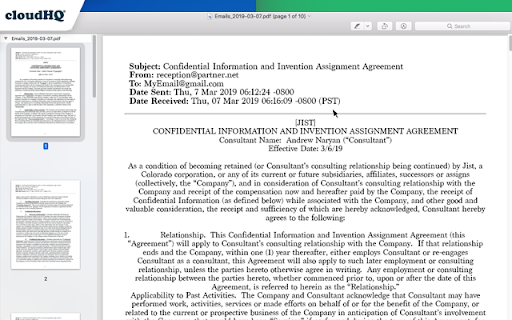
OK for casual use but not for the business class users. I have the same problem. The program changes email data. Time and date info changed to CET,CEST time zones (Europe?) on some of my emails in a string, but not all. Makes it unusable for legal purposes. I sent samples into Cloud Support as they requested of me - they responded promptly. They know about the problem. Waiting for a fix from them. Other than that, the extension seems to work OK. It deserves a higher rating except for the faulty date and time problem.
I would have rated this much higher, except it sometimes fails to correctly capture and reprint the correct time and dates of emails. Instead of just copying the US time/date "sent" displayed on my emails, it converted many to eastern European time zones and dates. Uugh! Not sure if it's a recent program glitch or they really want it to convert time zones from US into European time zones. But that made it useless for record keeping purposes.
no buttons showed, might have compatibility issue with boomrang gmail-to-trello
not working as mentioned by them.
Pictures in the gmail is cut when it appears in the pdf
It's a great service but what they don't mention until the 11th hour is that you are limited to 60 emails in one file. For more than that it's $15/month. Something to keep in mind, because it would be nice to know that ahead of time.
They don't mention that you only get 60 emails merged to PDF. They want you to subscribe to get past the 60. I would only want to use this one time for a legal matter and how it's telling me to subscribe. Not happy.
I tried it and every time I tried it would error and now it says I used up my 100 emails a month. ------ UPDATE: Turns out it did work even though it showed an error it took about 10 mins for it to email me a .zip with the emails in it. Well one out of 3 tries worked anyways, I lost how many more I can download because when the service gave the error the other 2 times :/
As already told to the creators, there is a nasty bug-like in not allowing specific characters in the emails' subjects. It'd be nice to bypass this limitation, possibly allowing the extension to eliminate such chars before commuting the emails in pdfs. Another limitation is the browser. As a Mac user, I utilize mostly Safari and so... A third possible improvement: the extension usable in a client environ, such a (Mac user again) MAIL. Thanks anyway for your work and the good app. Regards. Giovanni
Works well; no issues. Well done
Permissions (3)
Permissions
Details
| Version | 1.1.2.22 |
| Updated | Nov 28, 2025 |
| Size | 1.41MiB |
| First Seen | Mar 27, 2026 |
More by cloudHQ





Popular in workflow



Popular Extensions

