
⚠️Requests 4 sensitive permissions ✅1M+ users ✅Recently updated
User Count Trend
Loading...
Description
Adobe Acrobat is the industry-leading PDF solution, used by millions of people. Use Acrobat PDF tools right in Google Chrome to get the best PDF viewing experience and get more done while browsing. You can add comments to PDFs, including sticky notes, text, and highlights—all for free.
If you need more advanced Acrobat features, you can try tools to export to and from PDF, create a PDF, merge PDF documents, organize a PDF, reduce PDF size, and more. Working with PDFs online has never been so easy.
HOW TO USE THE ACROBAT CHROME EXTENSION
1. Install the Acrobat extension for Chrome.
2. Pin the extension for quick access.
3. Open any PDF in your browser.
4. Select an Acrobat tool.
VIEW, DOWNLOAD, PRINT, and STORE PDFs
• Get the best PDF viewing experience with the Acrobat PDF reader.
• Download or print with a quick click.
• Sign in to store your files online for fast access to PDF files from anywhere.
EDIT PDFs WITH COMMENTS FOR FREE
• Add PDF notes, text, and comments, including sticky notes and highlights.
• Write on PDF documents by adding text or drawings using PDF editor features.
FILL AND SIGN FORMS FOR FREE
• Open a PDF in Adobe Acrobat Reader to fill and sign forms on your desktop.
• Easily complete PDF forms with the Acrobat form filler feature.
• E-sign documents with your signature or initials.
TRY TOOLS TO BE MORE PRODUCTIVE IN CHROME
Try premium tools for even more PDF power.
• Use our PDF converter tool to convert PDFs to and from Microsoft Word, Excel, and PowerPoint, as well as JPG and other file formats.
• Create a PDF from a document or image, including converting JPG to PDF.
• Combine files into a single PDF file or split a PDF.
• Organize your PDF. Delete, rotate, or reorder PDF pages.
• Compress a PDF to reduce its file size.
• Send documents to others to e-sign online fast.
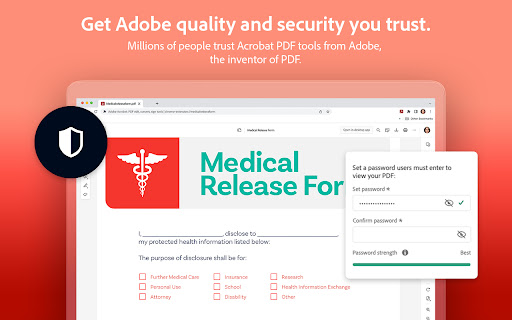
• Protect a PDF document by adding a password.
You can also sign up for a free trial at https://www.adobe.com/tryacrobat.
WHAT’s NEW:
• Edit your PDFs in Acrobat Chrome Viewer
• Fill and Sign forms for free
• Support for opening local PDF files in extension
Terms & Conditions: Your use of this application is governed by the Adobe General Terms of Use (http://www.adobe.com/go/terms_en) and the Adobe Privacy Policy (http://www.adobe.com/go/privacy_policy_en) and any successor versions thereto.


Reviews
Loading reviews...
Permissions (15)
Permissions
alarmsℹ Can schedule periodic background tasks bookmarksℹ Can read and modify your bookmarks contextMenusℹ Can add items to the right-click menu cookiesℹ Can read and modify browser cookies downloadsℹ Can manage and monitor downloads fileSystem historyℹ Can read and modify your browsing history nativeMessagingℹ Can communicate with programs on your computer offscreen scriptingℹ Can inject scripts into web pages sidePanel storageℹ Can store data locally in your browser tabsℹ Can see your open tabs and their URLs webNavigationℹ Can monitor navigation events webRequestℹ Can observe and analyze network traffic
Details
| Version | 26.2.2.1 |
| Updated | Mar 16, 2026 |
| Size | 4.98MiB |
| First Seen | Mar 22, 2026 |
Ad space
More by Adobe Inc.

Popular in workflow

Microsoft Defender Browser Protection
by Microsoft Corporation
2M
★ 4.15
workflow
2M
★ 4.15
workflow

Pop up blocker for Chrome™ - Poper Blocker
by dingosolutions
2M
★ 4.76
workflow
2M
★ 4.76
workflow

Screen Recorder
by Erich Behrens
2M
★ 3.75
workflow
2M
★ 3.75
workflow

Keep Awake
by extensions@chromium.org
1M
★ 4.00
workflow
1M
★ 4.00
workflow

Tab Resize - split screen layouts
by Peter Shin
1M
★ 4.31
workflow
1M
★ 4.31
workflow
Popular Extensions
Adobe Acrobat: PDF edit, convert, sign tools
by Adobe Inc.
330M
★ 4.40
workflow
330M
★ 4.40
workflow

Cisco Webex Extension
by cisco.chromestore
24M
★ 2.34
social
24M
★ 2.34
social

Kami for Google Chrome™
by Kami
17M
★ 4.56
education
17M
★ 4.56
education

uBlock Origin
by Raymond Hill (gorhill)
15M
★ 4.70
privacy
15M
★ 4.70
privacy

Custom Cursor for Chrome™
by BLife Team LLC
5M
★ 4.67
fun
5M
★ 4.67
fun