
Microsoft Defender Browser Protection
Chrome Web Store v1.664 Updated Feb 16, 2025 240KiB
User Count Trend
Loading...
Description
Currently supported region(s): United States
The Microsoft Defender Browser Protection extension helps protect you against online threats, such as links in phishing emails and websites designed to trick you into downloading and installing malicious software that can harm your computer.
If you click a malicious link in an email or navigate to a site designed to trick you into disclosing financial, personal or other sensitive information, or a website that hosts malware, Microsoft Defender Browser Protection will check it against a constantly updated list of malicious URLs known to Microsoft.
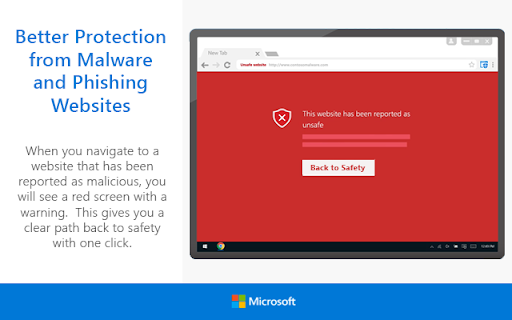
If the malicious link matches one on the list, Microsoft Defender Browser Protection will show a red warning screen letting you know that the web page you are about to visit is known to be harmful, giving you a clear path back to safety with one click.
Privacy statement: https://privacy.microsoft.com/en-us/privacystatement
• Continuously updated list of reported harmful sites
• Protects against phishing sites and socially engineered malware sites
• Real-time indicator of harmful sites and website status
• V1.62 – Initial Release
• V1.63 – Fixed Chromebook issue
• V1.65 – Added “Report Suspicious Site” feature, and ability to
demonstrate the extension’s protection
• V1.66 – Improve protection and performance. Add Group Policy
controls.

Reviews
Loading reviews...
Permissions (3)
Permissions
storagetabswebNavigation
Details
| Version | 1.664 |
| Updated | Feb 16, 2025 |
| Size | 240KiB |
| First Seen | Mar 21, 2026 |
Ad space
More by Microsoft Corporation

Popular in workflow

Pop up blocker for Chrome™ - Poper Blocker
by dingosolutions
2M
★ 4.76
workflow

Keep Awake
by extensions@chromium.org
1M
★ 4.00
workflow

Tab Resize - split screen layouts
by Peter Shin
1M
★ 4.31
workflow

eID Chrome Extension
by e-Contract.be BV
800K
★ 1.65
workflow

Google Docs Quick Create
by David Mihal
500K
★ 4.38
workflow
Popular Extensions

uBlock Origin
by Raymond Hill (gorhill)
15M
★ 4.70
privacy

DuckDuckGo Search & Tracker Protection
by DuckDuckGo
4M
★ 4.24
privacy
Microsoft Defender Browser Protection
by Microsoft Corporation
2M
★ 4.15
workflow
Pop up blocker for Chrome™ - Poper Blocker
by dingosolutions
2M
★ 4.76
workflow

WPS浏览器助手:文档在线阅读编辑
by 金山PDF
2M
★ 2.90
tools