
Description
Reviews (8 cached)
stop button and delete from disk button wont work
The makers of this site stole all of my files and information and wanted me to buy it back. If you want to avoid this same fate, do not fall for this extension. Use a more trusted accelerator.
The speed is not much different than single thread download and it sometimes corrupts the file on resume. It does not provide the original download URL of the file either so one has to go find it again from the source.
It doesn't work
It does nothing
Download is working fine but where is the file? It's not available in Downloads folder. And option file location is opening "Downloads" Folder where file is not present.
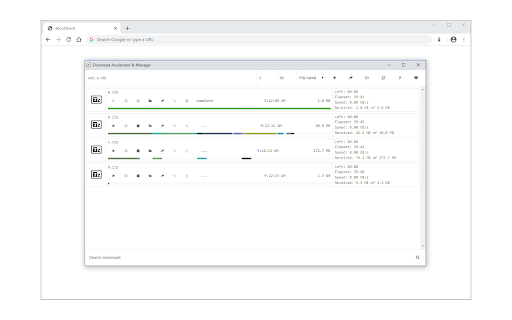
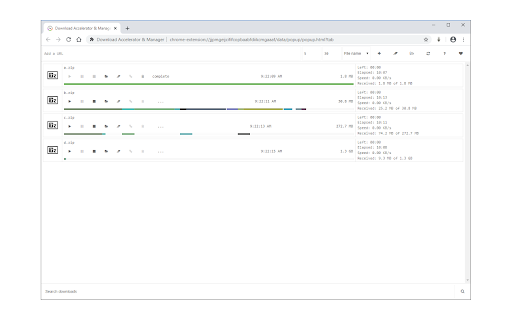
Outlining some of the observations that I have made during my use of this addon/plugin: Compared to using the experimental "parallel" downloads in chrome:flags (or edge:flags), it isn't any faster on the websites I have tested it with. Most websites throttle by client rather than by connection nowadays so unless you have your connection on a rotating host, acceleration will not happen unless the server isn't throttling. It needs the ability to add/remove parallel connections on-the-fly because some websites actually will reduce speed if more than one connection is made, to the point where the overhead for each connection causes the overall transfer rate to be LESS than just a single connection. This happens on a site-by-site basis, so the user needs to be able to increase or decrease the thread count during transfers (not stopping, deleting, restarting, and hoping). The "web" user interface is lacking some key elements that make it harder to use compared to other browser interfaces. There should be things like a right-click menu or at least not putting up the default menu. There is a great need for a list that is more compact, that has headers, etc. What I DID like - It does seem to be pretty clean in its organization and function, and the web interface does have one advantage: it can be styled with stylus. - It does do what it says it does, and correctly, and for websites that don't throttle on a client basis, it does actually work. Best parts, so far: - No annoying ads or hassles, a harmless donation button is the way to go! - Not a bloated resource hog, a great trait for any plugin! If I were a fan of "touch" style interfaces, I might actually like the interface, but I'm not -- sorry. In the end it is an OK program. These kinds of plugins are dying because the web has become "wise" to them trying to get around throttling. If accelerators are to ever be a thing again, there will have to be some sort of index of known identical file signature so the accelerator can pull from multiple known sources. Feels like a pipe dream right now though (we are talking about EVERY file online, imagine how many signatures)
Copy link location missing
Permissions (6)
Permissions
Details
| Version | 0.1.9 |
| Updated | Aug 21, 2025 |
| Size | 161KiB |
| First Seen | Mar 26, 2026 |
More by Muyor


Popular in tools



Popular Extensions




