WPS PDF - Read, Edit, Fill, Convert, and AI Chat PDF with Ease icon

WPS PDF - Read, Edit, Fill, Convert, and AI Chat PDF with Ease

by www.wps.com

v1.0.0.52 Updated Sep 30, 2025 4.55MiB
CWS
7M
Users
★ 4.45
167 reviews
#35
of 186.7K
tools
#2 of 57.9K
⚠️Requests 4 sensitive permissions 1M+ users

Description

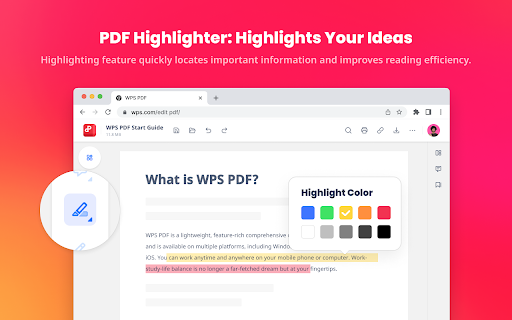
WPS PDF, part of the WPS Office suite with over 600 million monthly active users worldwide, offers an efficient approach to managing PDFs. Now integrated into Google Chrome, it enables effortless handling of PDF files across both desktop and web platforms, ensuring a consistent and powerful user experience. By adding the extension in Chrome, you can gain instant access to a wide range of tools, including various editing tools, parallel translate, fill & sign, chat PDF, drawing highlights, adding comments, making notes, and more. More features are waiting for your exploration here. How to Use the WPS PDF Chrome Extension: • Install and pin WPS PDF Chrome Extension • Open your PDFs in browser • Browse and process your PDFs View, Download, Print, and Store PDFs • Get the best PDF viewing experience online with WPS PDF extension. • Download or print your PDFs with a quick click. • Sign in to store your PDF files for fast access to them from anywhere. • Find your PDFs instantly. Edit PDFs • Add notes, text comments, and highlights to improve your work efficiency. • Use drawing tools to freely mark your ideas on your PDFs. • Unlock full PDF edit tools in WPS Office desktop, such as managing pages, extracting PDFs, protecting PDFs, combining PDF files, compressing PDFs, and more. Fill and Sign PDFs • Open a PDF file in WPS PDF extension and then fill or sign it in your WPS Office desktop. • Easily complete a form within WPS Office Fill & Sign feature. • E-sign your documents with your signatures or initials. Explore More Popular Premium Tools to Elevate Your Performance in Chrome PDF Parallel Translate • Supported by reliable LLMs with various languages. • Provide precise and layout-preserved translation. • Side-by-side comparison for intuitive reading and checking. Chat PDF • Extract essential information and provide concise summaries through insight. • Gain deeper insights and suggestions by asking the intelligent AI. • Provides credible and accurate AI responses backed by supporting citations. PDF Converter Offers over a dozen PDF solutions on the WPS online platform. Enjoy quick and high-quality PDF conversions to streamline your workflow. • Convert PDF to Word • Convert PDF to Excel • Convert PDF to PPT • Convert Word to PDF • Convert Excel to PDF • Convert PPT to PDF • Convert JPG to PDF Besides the PDF converter here, you can also find PDF tools such as compressor, splitter, merger, and more.
WPS PDF - Read, Edit, Fill, Convert, and AI Chat PDF with Ease screenshot 1WPS PDF - Read, Edit, Fill, Convert, and AI Chat PDF with Ease screenshot 2WPS PDF - Read, Edit, Fill, Convert, and AI Chat PDF with Ease screenshot 3WPS PDF - Read, Edit, Fill, Convert, and AI Chat PDF with Ease screenshot 4

Reviews (13 cached)

★☆☆☆☆2026-01-03
Syed Raiyan

Doesn't have dark mode.

★☆☆☆☆2025-12-10
Yann Buffet

Toolbar keeps getting in the way of the PDF, just remove it or add an option to hide/remove it completely.

★☆☆☆☆2025-11-13
Vedran 1212

It doesn't have edit

★☆☆☆☆2025-08-22
KC 1920

I wish I could give this a ZERO. Whatever you do, do NOT sign up for the 7 day trial. They'll charge the entire program. They steal your money & charge you for the entire thing. Their Facebook page is full of hundreds of people who had their money stolen by WPS. It took them one or more weeks of fighting with the company to get their money refunded. Their PDF is the absolute WORST. You can easily waste hours on this joke of a program

★☆☆☆☆2025-03-21
Akiko Hayami

Malware

★☆☆☆☆2024-11-11
Caspin Jones

BS! Stay away!

★☆☆☆☆2024-11-07
T

Because there is no star for ZERO....app still won't open files on my MAC

★☆☆☆☆2024-10-29
Brian Cooper

Makes you download additional software isn't as advertised

★☆☆☆☆2024-10-12
Tabor Brandon

it's practically an ad, and doesn't seem to do anything more than what the base browser can do.

★☆☆☆☆2024-08-28
Glass Ge

All I want to know is, why automatically installed to my Chrome? Even without any reminder popped up, seriously, bro?

★☆☆☆☆2024-07-11
Oleg Sorokin

You need to buy it to save your PDF! Do not waste your time!

★★★☆☆2025-09-30
Ishad Rana

Please add Dark mode option to the extension.

★★★☆☆2024-09-14
S D

I can't enable dark mode and even dark reader can't force it go it dark, I gave in 3 stars. Not sure about data collection either as it is WPS Product.

Permissions (10)

Permissions

cookies Can read and modify browser cookies declarativeNetRequest Can block or redirect network requests downloads Can manage and monitor downloads gcm history Can read and modify your browsing history nativeMessaging Can communicate with programs on your computer storage Can store data locally in your browser tabs Can see your open tabs and their URLs webNavigation Can monitor navigation events webRequest Can observe and analyze network traffic

Details

Version 1.0.0.52
Updated Sep 30, 2025
Size 4.55MiB
First Seen Mar 31, 2026