Open With Download Manager icon

Open With Download Manager

by Muyor

v0.1.6 Updated May 13, 2025 28.21KiB
CWS
80K
Users
★ 3.61
324 reviews
#1198
of 120.7K
tools
#204 of 37.4K
⚠️Requests 1 sensitive permission

Description

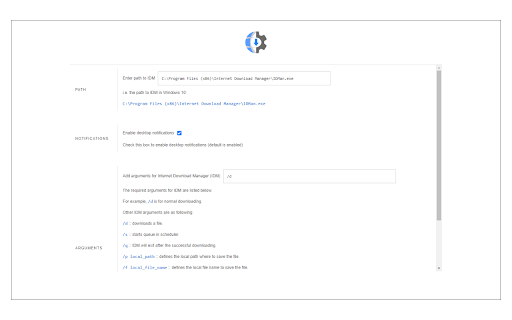
Open With Download Manager is a browser extension that enables you to open and download a desired item with the Internet Download Manager application. Important note: Open With Download Manager extension does NOT belong or relate to IDM and has NO affiliations with Internet Download Manager or IDM at all. It is an unofficial extension that is developed and maintained independently by its author. To operate with this addon you need a native-client patch to connect your browser with the native IDM application in your OS. Please read the following to get more info on how to install native-client and operate with this add-on. 1) after installing the add-on, you need to connect it with native applications (i.e. IDM) on your machine. If you do not have IDM, please head to (internetdownloadmanager.com/download.html) and install IDM on your machine. Once you have IDM, you need to make the connection between IDM and your browser. 2) to make this connection, a separate patch is provided on GitHub. Please download and install this patch from: https://github.com/alexmarcoo/open-in-native-client/releases Follow the instruction in the above GitHub repo to download and install the related patch to your system. After installing, the "Open With Download Manager" add-on, your browser can communicate with IDM on your machine (i.e. Windows OS). 3) before using the add-on, please open the option's page and make sure the path to IDM is correct based on your operating system. For example, the path to IDM in Windows 10 is: C:\Program Files (x86)\Internet Download Manager\IDMan.exe Next, please follow the below steps to open and download desired links in IDM. a. Right-click on a download link and then click on the - Download With IDM - from the context menu. b. IDM has several input arguments to enhance downloading desired files. The default argument for downloading is: /d. To get more info about other arguments please open the add-on option's page and read section arguments. Please note that you need to add parameters comma separated, for example, to automatically download a file write: "/d,/n" in the designated area. c. you can set the IDM path in your machine from the options page. To report any bug, please fill out the bug report form on the add-on's homepage (https://mybrowseraddon.com/open-with-dm.html).
Open With Download Manager screenshot 1

Reviews (42 cached)

★☆☆☆☆2026-03-21
KRISHAN KANT YADAV

virus fake extension

★☆☆☆☆2026-03-10
Ashok Kumar

NOT THE REAL ONE

★☆☆☆☆2026-03-10
Jeck

virus

★☆☆☆☆2025-05-27
Pawan Saini

fake one don't install

★☆☆☆☆2024-08-10
obuj pakhi

fake idm.don't working

★☆☆☆☆2024-07-15
Krishan Kumar

fu*ck you hacker

★☆☆☆☆2024-07-13
vinit kumar

fake

★☆☆☆☆2024-07-13
Neeraj

virus don't install

★☆☆☆☆2024-07-13
Neha Kumari

NOT WORKING FAKE

★☆☆☆☆2024-07-07
Chandrashekhar Saini

fake

★☆☆☆☆2024-07-06
Shashi Kant

not working

★☆☆☆☆2024-06-21
Sanjay Saini

time waste

★☆☆☆☆2023-05-20
mohammad Tawalbeh

hhh

★☆☆☆☆2023-01-06
Google User

Third party extension for IDM manager. "Open With Download Manager is a browser extension that enables you to open and download a desired item with the Internet Download Manager application."

★☆☆☆☆2022-03-05
Man Hu

github error

★☆☆☆☆2021-08-21
Hosty

I am using Opera portable and successfully installed the "open-in native client" but this extension still tells me it does not detect it... please consider fixing this issue in an update, if u care enough..

★☆☆☆☆2020-10-15
TechTech

zero

★☆☆☆☆2020-08-28
Black Diamond

hated it

★☆☆☆☆2020-03-27
Eng esam

doesn't work

★☆☆☆☆2020-02-19
ناقد Critic

Doesn't work

★☆☆☆☆2019-11-11
Amr Almarakby

It Doesn't Work,

★☆☆☆☆2019-11-08
Annush Polot

Doesn't work

★☆☆☆☆2019-09-17
Arpan Chakraborty

not working

★☆☆☆☆2019-08-03
Mithun Mohonta

Don't Work.

★☆☆☆☆2019-07-02
Nguyen Thi

bad

★☆☆☆☆2019-06-08
ismet soner عصمة سونر

can't grap videos at social media sites

★☆☆☆☆2019-05-16
黄志濠

so bad

★☆☆☆☆2019-04-27
Youssef Ahmed

not working just remove it

★☆☆☆☆2019-04-14
sign fu

doesn't work. i have set the path, and nothing happend

★☆☆☆☆2019-03-30
Acelynn_

Nah Its not working

★☆☆☆☆2019-03-09
Dan Linh

doesn't work

★☆☆☆☆2019-03-02
PTC پیشتازان توسعه کامران

it stops each time i click on it :|

★☆☆☆☆2019-01-20
Faiza K

not working

★☆☆☆☆2018-12-25
Black Gold

Chrome 71. Doesn't work

★☆☆☆☆2018-09-07
Rohit Bhardwaj

Did not liked the extension. It does not work let the download option of Google Chrome open.

★☆☆☆☆2018-08-03
Rum Tran Anh

not works just removed

★★☆☆☆2023-06-10
Surendra Adhikari

good

★★☆☆☆2019-06-07
Greg Zeng

Did not work with Slimjet. Windows 10 Home Single Language (x64) Version 1903 (build 18362.116) Dell XPS-15 (L521x, 2013). i7, 16 GB DDR3, HDD (4TB), SSD (1TB).

★★☆☆☆2019-04-12
Zili Xu

"An error has occured please make sure path is correct in the options page", Could you tell me how to fix this problem?

★★★☆☆2023-07-11
Isuru Bandara

nice

★★★☆☆2022-07-10
Prudhvi Sai

nicejob

★★★☆☆2020-03-24
Viraj Creations

good

Permissions (4)

Permissions

contextMenus Can add items to the right-click menu nativeMessaging Can communicate with programs on your computer notifications Can show desktop notifications storage Can store data locally in your browser

Details

Version 0.1.6
Updated May 13, 2025
Size 28.21KiB
First Seen Mar 27, 2026


