
Description
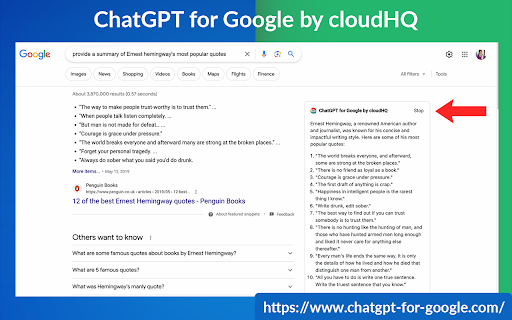
This extension gives you ChatGPT query responses alongside Google search engine results.
This extension is easy to use and enhances your Google search experience.
Features:
✅ OpenAI Responses alongside your Google search results
✅ A summary of search results
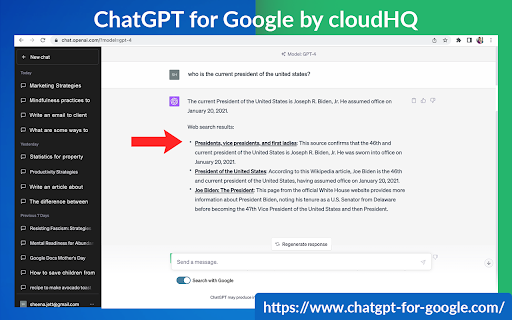
✅ Supplement responses with data after 2021 via search results
✅ OpenAI API and multiple version support
✅ Toggle on/off as desired
✅ Copy to clipboard
~~~How to use it~~~
1. Get an OpenAI account here if you don't already have one: https://chat.openai.com/chat and create an account
2. Install this extension
3. Open Chrome and search for anything in Google Search
4. AI-generated responses alongside conventional search engine results will be displayed on the right side of your window
5. When in ChatGPT, simply type in your prompt, and the results will be ChatGPT's response, and will then provide you with a Google Search summary on the subject (very helpful for up to date information)
~~~FAQ~~~
1. What is ChatGPT?
ChatGPT is a computer program created by OpenAI that can generate human-like text. It's like a super-advanced version of autocorrect: it predicts and generates what it thinks should come next in a conversation or a piece of writing. This is useful for many things, such as writing emails, creating content, answering questions, and even tutoring in different subjects. It's important to note that it doesn't know any personal data unless you tell it during the conversation, and it doesn't know specifics about the documents it learned from.
2. What does this extension do?
This browser extension is developed by cloudHQ LLC. The extension enhances search engine results with the power of artificial intelligence from OpenAI. The extension operates by displaying AI-generated responses alongside conventional Google search engine results, offering users an enhanced search result experience.
3. Is this extension free to use?
Yes, the extension is free to use.
4. Is this extension integrated with other cloudHQ products?
Yes. This extension is fully integrated with other cloudHQ products such as Save Emails to PDF by cloudHQ, Export Emails to Sheets by cloudHQ, and more.
5. Do I need an OpenAI (chat.openai.com) account?
Yes, you need to have an OpenAI account to use this extension. Go to https://chat.openai.com/chat and create an account.
If you choose to use an API, you need to have a developer account. You can create it here: https://platform.openai.com/
We hope you enjoy your new search result experience and find it helpful for your overall knowledge about anything you wish to know about.
cloudHQ. Helping your productivity, 1 click at a time.
cloudHQ website: https://www.cloudhq.net/
App website: https://www.chatgpt-for-google-search.com/
Pricing: https://www.chatgpt-for-google-search.com/pricing
Support page: https://support.cloudhq.net/category/browser-extensions/chatgpt-for-google/
FAQ page: https://support.cloudhq.net/
Blog: https://blog.cloudhq.net
cloudHQ is trademark of cloudHQ LLC. https://www.cloudhq.net/trademark


Reviews (2 cached)
★☆☆☆☆2024-05-08
Eric Ketzer
(Edit Sept 24th 2024) Still not working. (Edit: June 13th) Sadly, it doesn't connect to ChatGPT anymore. Probably since GPT-4o is there... (Initial review) So far, it works perfectly. (only bad thing, it seems to be missing a trigger option that would allow to chose to search manually. Not everything that I type in Google search I want it to be searched automatically by ChatGPT.)
★★★☆☆2024-01-02
Jeremy Simpson
This GPT Chrome extension is as buggy as a windshield during a hailstorm. But with ReplyPal, it's clear skies all the way!
Permissions (4)
Permissions
background scriptingℹ Can inject scripts into web pages storageℹ Can store data locally in your browser tabsℹ Can see your open tabs and their URLs
Details
| Version | 2.0.2.38 |
| Updated | Dec 4, 2025 |
| Size | 1.04MiB |
| First Seen | Mar 25, 2026 |
More by cloudHQ

Gmail™ Email Templates by cloudHQ
by cloudHQ
200K
★ 4.17
communication
200K
★ 4.17
communication

Save Emails as PDF by cloudHQ
by cloudHQ
100K
★ 4.26
workflow
100K
★ 4.26
workflow

Multi Email Forward by cloudHQ
by cloudHQ
80K
★ 4.08
communication
80K
★ 4.08
communication

Auto BCC for Gmail™ by cloudHQ
by cloudHQ
60K
★ 4.24
communication
60K
★ 4.24
communication

Backup and Sync Google Drive to other clouds
by cloudHQ
50K
★ 4.24
workflow
50K
★ 4.24
workflow
Popular in tools

Zotero Connector
by Zotero
8M
★ 3.96
tools
8M
★ 3.96
tools

Browsec VPN - Free VPN for Chrome
by Browsec
7M
★ 4.44
tools
7M
★ 4.44
tools

AnyDoc Translator - Translate Web and PDF
by www.wps.com
7M
★ 4.58
tools
7M
★ 4.58
tools

WPS PDF - Read, Edit, Fill, Convert, and AI Chat PDF with Ease
by www.wps.com
7M
★ 4.45
tools
7M
★ 4.45
tools

Video DownloadHelper
by Aclap
5M
★ 4.43
tools
5M
★ 4.43
tools
Popular Extensions

Adobe Acrobat: PDF edit, convert, sign tools
by Adobe Inc.
331M
★ 4.40
workflow
331M
★ 4.40
workflow

AdBlock — block ads across the web
by AdBlock
62M
★ 4.48
workflow
62M
★ 4.48
workflow

迅雷下载支持
by Shenzhen Xunlei Network Technology Co., Ltd.
59M
★ 2.77
workflow
59M
★ 2.77
workflow

Grammarly: AI Writing Assistant and Grammar Checker App
by Grammarly
42M
★ 4.50
communication
42M
★ 4.50
communication

Adblock Plus - free ad blocker
by eyeo GmbH
41M
★ 4.39
workflow
41M
★ 4.39
workflow