Color Temperature (Change Lux) icon

Color Temperature (Change Lux)

by Benni

v0.1.9 Updated May 20, 2025 74.84KiB
CWS
7K
Users
★ 3.77
26 reviews
#9276
of 207.6K
tools
#1821 of 64.6K

Description

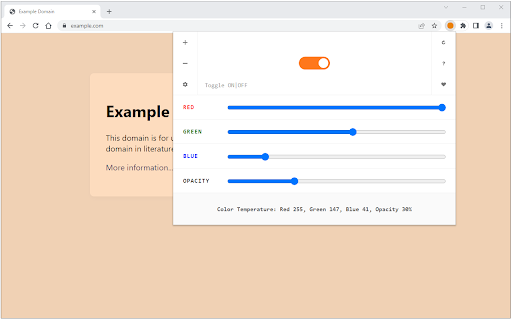
Color Temperature (Change Lux) extension protects your eyes by adding a warm color to websites (i.e. at night time or when the ambient is dark). Using this addon you can avoid excessive blue light and also it makes you sleep much better by protecting you from the blue glow of your computer screen. Some features: 1. Easily change the color temperature of your screen from cool to warm colors (fitted for day or night time). 2. Toolbar panel UI has the required tools to adjust the color temperature. 3. There is also an ON|OFF switch to easily switch the addon ON or OFF. 4. This addon applies color temperature to all websites, but you can add the desired site(s) to a whitelist table to exclude them from color changing. 5. There are also some keyboard shortcuts to enhance adding websites to the whitelist table. 6. Options page for this addon has several settings to adjust. To report bugs, please fill out the bug report form on the addon's homepage (https://mybrowseraddon.com/screen-color-temperature.html).
Color Temperature (Change Lux) screenshot 1

Reviews (4 cached)

★☆☆☆☆2022-06-10
Juan Garcia

Doesn't work

★★☆☆☆2020-08-28
Tim Holloway

It's just another temp adjuster. When adjusting the colours, it flickered then returned to the original, orangish colour most of the time. It's basically garbage. I wanted to get rid of the green tint of my newish ASUS Flip C434 but this is a garbage extension that is less accurate or useful than the night light setting built into Chrome OS. See for yourself!

★★☆☆☆2018-10-13
Casper Voogt

It doesn't seem to work at all ... tried in Chrome on Mac as well as on ChromeOS..

★★★☆☆2024-02-19
Michael Kardash

Works, but with some annoying bugs that require extra setup to circumvent. It seems like this extension filters over individual web elements rather than a whole screen at once, which leads to a visibility bug where some elements lose the filter when the mouse enters/leaves the element zone. Enabling hardware acceleration fixes this issue, but causes a major issue when watching streamed videos on YouTube or Twitch. Video streams will intermittently pause for an entire second. I recommend enabling hardware acceleration and whitelisting all video streaming sites if you want to use this extension.

Permissions (1)

Permissions

storage Can store data locally in your browser

Details

Version 0.1.9
Updated May 20, 2025
Size 74.84KiB
First Seen Mar 26, 2026

