
✅Recently updated
Description
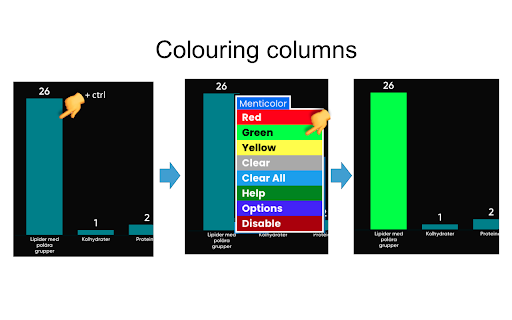
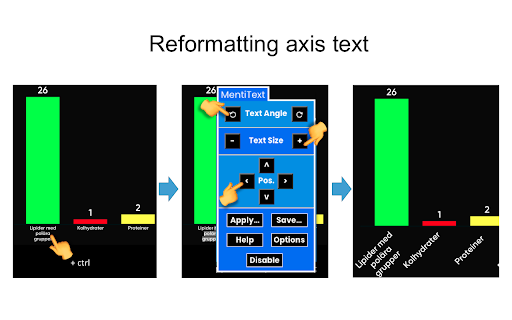
Allows you to customise result displays in the online voting platform Mentimeter. Right-click (or ctrl-click) on a graph column or some axis text to bring forward a contextual menu with formatting options. The contextual menu also offers a link to an extensive on-screen help document (also available as pdf at https://drive.google.com/drive/folders/1mtQjLuPcNKdS0DCRbR87ye9yex_DXZEP?usp=sharing).
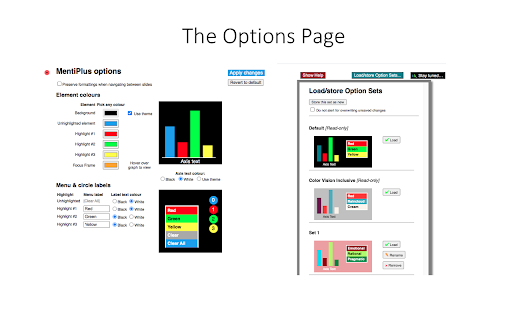
As of v 4.0, MentiPlus also features an Options Page, where you can select your own highlight colours, graph background colour, and contextual menu labels.
As of v 4.4, MentiPlus can be instantly disabled and re-enabled by choices from the contextual menus.
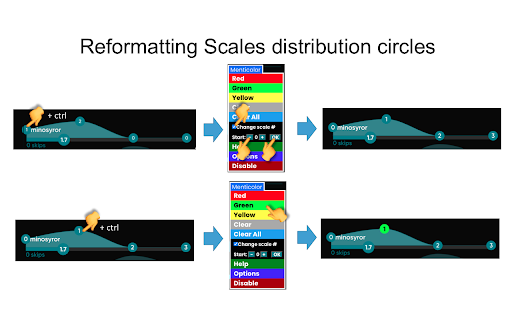
As of v 4.6, all the four layout types in the Mentimeter results view (Bars, Pie, Donut, and Dots) can be highlighted by MentiPlus. Highlight colours will be preserved when changing layout. NOTE: changes to the Mentimeter platform as of early 2026 have made it impossible to support formatting of Dots. Formatting of Scales are also no longer supported.
Version 4.11 restores MentiPlus functionality following a major restructuring of the Mentimeter page code in late 2024 which temporarily disabled MentiPlus.
This extension was developed in an educational setting to be able to highlight correct and incorrect answers by colouring the respective columns. The text formatting functionality was developed to handle the sometimes very tiny axis text generated by Mentimeter.
Please visit the MentiPlus Facebook page, https://www.facebook.com/MentiPlus-108267884332773 for news and tips, check out the MentiPlus YouTube channel https://www.youtube.com/channel/UCZHfqC5yf8NxOU6g66hNUwQ for short instructive demos, and join the Google group https://groups.google.com/d/forum/mentiplus for support, questions etc.

Reviews
Loading reviews...
Permissions (1)
Permissions
storageℹ Can store data locally in your browser
Details
| Version | 4.12.0 |
| Updated | Mar 17, 2026 |
| Size | 1.92MiB |
| First Seen | Mar 30, 2026 |
More by Old Pike Software

Canvas Quick Student View
by Old Pike Software
2K
★ 5.00
workflow
2K
★ 5.00
workflow

Canvas Modules Organiser
by Old Pike Software
308
★ 5.00
education
308
★ 5.00
education

Canvas Quick Student View (any host name)
by Old Pike Software
241
★ 0.00
education
241
★ 0.00
education

Canvas Page Folders
by Old Pike Software
163
★ 5.00
education
163
★ 5.00
education

Google Keyword Highlighter
by Old Pike Software
24
★ 0.00
functionality
24
★ 0.00
functionality
Popular in communication

Grammarly: AI Writing Assistant and Grammar Checker App
by Grammarly
42M
★ 4.50
communication
42M
★ 4.50
communication

Loom – Screen Recorder & Screen Capture
by Loom
8M
★ 4.58
communication
8M
★ 4.58
communication

QuillBot: AI Writing and Grammar Checker Tool
by quillbot
5M
★ 4.69
communication
5M
★ 4.69
communication

DeepL: translate and write with AI
by team-browser-extensions
4M
★ 4.73
communication
4M
★ 4.73
communication

Email Tracker by Mailtrack®
by Mailsuite
3M
★ 4.42
communication
3M
★ 4.42
communication
Popular Extensions

Adobe Acrobat: PDF edit, convert, sign tools
by Adobe Inc.
331M
★ 4.40
workflow
331M
★ 4.40
workflow

AdBlock — block ads across the web
by AdBlock
62M
★ 4.48
workflow
62M
★ 4.48
workflow

迅雷下载支持
by Shenzhen Xunlei Network Technology Co., Ltd.
59M
★ 2.77
workflow
59M
★ 2.77
workflow
Grammarly: AI Writing Assistant and Grammar Checker App
by Grammarly
42M
★ 4.50
communication
42M
★ 4.50
communication

Adblock Plus - free ad blocker
by eyeo GmbH
41M
★ 4.39
workflow
41M
★ 4.39
workflow