
⚠️Requests 1 sensitive permission ✅Highly rated
Description
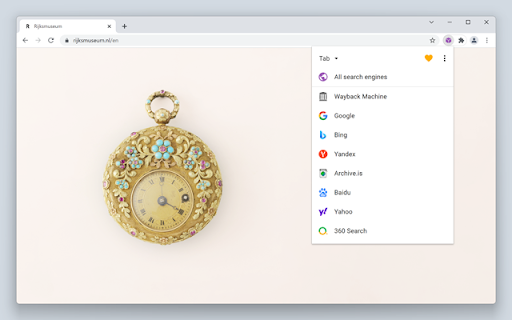
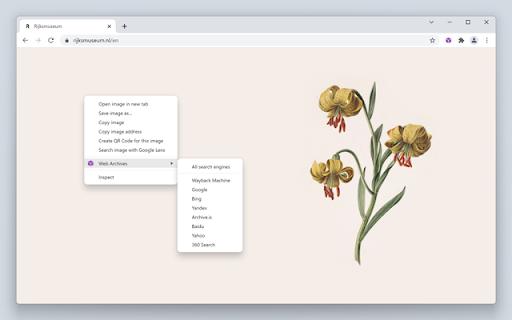
Web Archives is a browser extension that enables you to find archived and cached versions of web pages. Searches can be initiated from the context menu and the browser toolbar.
Web Archives is an open source project made possible thanks to a community of awesome supporters. If you'd like to support the continued development of the extension, please check out https://armin.dev/go/patreon
A diverse set of archive and cache sources are supported, which can be toggled and reordered from the extension's options. Visit the wiki for the full list of supported search engines.
https://github.com/dessant/web-archives/wiki/Search-engines
PRO TIP: search for a link without visiting the web page by right-clicking on the link and searching from the context menu.
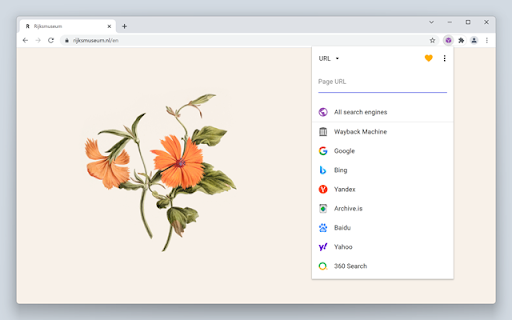
A handful of search modes are offered that serve different use cases. The search mode can be set independently for the context menu and the browser toolbar from the extension's options.
Search modes:
• Tab: search for the web page opened in the active tab. This is the default search mode.
• URL: search for a custom page URL.
The extension is also available for Edge and Safari: https://github.com/dessant/web-archives#readme
The URL you select during a search is sent to the requested service, such as the Wayback Machine. Visit the extension's privacy policy for more information.
Reviews are not monitored for bug reports, please use GitHub for issues and feature requests.
https://github.com/dessant/web-archives

Reviews (1 cached)
★★☆☆☆2024-12-23
Luna Andaluza
Not very useful if you want a recently cached version (of the last few days or weeks) of a page. Since Google and Bing stopped providing this, this extension doesn't offer for most pages a valid alternative.
Permissions (10)
Permissions
activeTabℹ Can access the current tab when you click the extension alarmsℹ Can schedule periodic background tasks contextMenusℹ Can add items to the right-click menu declarativeNetRequestℹ Can block or redirect network requests notificationsℹ Can show desktop notifications scriptingℹ Can inject scripts into web pages storageℹ Can store data locally in your browser tabsℹ Can see your open tabs and their URLs unlimitedStorage webRequestℹ Can observe and analyze network traffic
Details
| Version | 7.3.0 |
| Updated | Feb 18, 2026 |
| Size | 575KiB |
| First Seen | Apr 1, 2026 |
More by Armin Sebastian

Buster: Captcha Solver for Humans
by Armin Sebastian
700K
★ 3.85
tools
700K
★ 3.85
tools

Search by Image
by Armin Sebastian
300K
★ 4.06
tools
300K
★ 4.06
tools

Clear Browsing Data
by Armin Sebastian
20K
★ 4.06
developer
20K
★ 4.06
developer

Video Quality Settings for YouTube™ (HD/4K)
by Armin Sebastian
10K
★ 3.89
tools
10K
★ 3.89
tools

Autoplay Settings for YouTube™
by Armin Sebastian
6K
★ 3.30
tools
6K
★ 3.30
tools
Popular in tools

Zotero Connector
by Zotero
8M
★ 3.96
tools
8M
★ 3.96
tools

Browsec VPN - Free VPN for Chrome
by Browsec
7M
★ 4.44
tools
7M
★ 4.44
tools

AnyDoc Translator - Translate Web and PDF
by www.wps.com
7M
★ 4.58
tools
7M
★ 4.58
tools

WPS PDF - Read, Edit, Fill, Convert, and AI Chat PDF with Ease
by www.wps.com
7M
★ 4.45
tools
7M
★ 4.45
tools

Video DownloadHelper
by Aclap
5M
★ 4.43
tools
5M
★ 4.43
tools
Popular Extensions

Adobe Acrobat: PDF edit, convert, sign tools
by Adobe Inc.
331M
★ 4.40
workflow
331M
★ 4.40
workflow

AdBlock — block ads across the web
by AdBlock
63M
★ 4.48
workflow
63M
★ 4.48
workflow

迅雷下载支持
by Shenzhen Xunlei Network Technology Co., Ltd.
59M
★ 2.77
workflow
59M
★ 2.77
workflow

Grammarly: AI Writing Assistant and Grammar Checker App
by Grammarly
42M
★ 4.50
communication
42M
★ 4.50
communication

Adblock Plus - free ad blocker
by eyeo GmbH
41M
★ 4.39
workflow
41M
★ 4.39
workflow