Photo Transfer App icon

Photo Transfer App

by ERCLab, LLC

v1.0 Updated Jul 9, 2014 122KiB
CWS
10K
Users
★ 3.21
117 reviews
#5382
of 207.1K
art
#63 of 2.8K
⚠️Not updated in over 2 years

Description

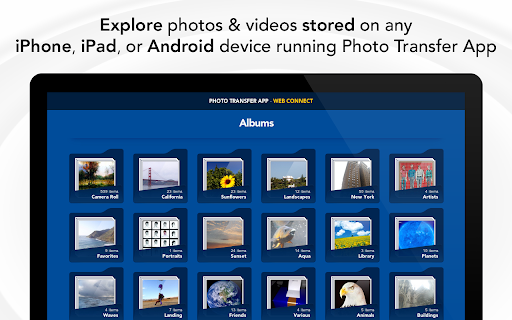
Photo Transfer App allows you to quickly copy photos and videos between your iPhone, iPad or Android to and from any computer using your local wifi network. Features include: ► Easily transfer pictures and videos from your iPhone, iPad or Android touch to your Computer ► Upload photos and videos from your Computer to your iPad, iPhone or Android - Photos are saved to the 'Camera roll' album on iOS and to the Gallery on Android ► Transfer photos & videos in all directions over Wifi (Device to/from Computer, Device to/from Device) ► Preserves photo metadata in all transfer directions (EXIF information, location, etc) ► Transfer photos in full resolution ► Use this Chrome app or our powerful desktop application (for Mac or PC) to transfer and backup your photos ► Your photos and videos are transferred directly from device to device using your local wifi network. They are not stored in an external server and they never leave your local wifi network keeping your photos safe Other features of the mobile app: ► Quickly move photos from iPhone to iPad and viceversa (requires app on both devices: ► Transfer HD videos in from iPhone or iPod Touch to your iPad and viceversa Other features of our free desktop app for Mac and PC (separate download) ► Backup all your photos and videos to your computer using our desktop application Requirements & limitations: * To transfer photos using this app YOU MUST HAVE ‘Photo Transfer App’ installed on your iPhone, iPad or Android. The cost of the iOS app is $2.99 (USD) and $1.99 (USD) for the Android app * Access to a properly configured wifi network is required for this application to work. Some public or private wifi networks may be configured to block communication between devices preventing the transfer connection to be established ------------------------ You can see some videos of how the app works on our website: http://www.phototransferapp.com And our support forum: http://www.getsatisfaction.com/photo_transfer_app ------------------------
Photo Transfer App screenshot 1Photo Transfer App screenshot 2Photo Transfer App screenshot 3Photo Transfer App screenshot 4Photo Transfer App screenshot 5

Reviews (21 cached)

★☆☆☆☆2019-04-18
Dodi Lawson

does not see pictures on my phone - not useful!

★☆☆☆☆2017-03-04
JOHN RAFTER

followed the instructions...nothing worked

★☆☆☆☆2017-02-19
Pete Gollin

could not even get started...directions horrible.

★☆☆☆☆2017-02-03
Edgar Lipscomb

When it opens it's almost great. that's when it opens.

★☆☆☆☆2017-01-20
Mrs O

doesn't work and doesn't troubleshoot

★☆☆☆☆2016-08-12
vincenzo reina

merdoso

★☆☆☆☆2016-08-06
Loaded Orygun

never connected

★☆☆☆☆2016-06-16
C Lawson

Too complicated for guys like me.

★☆☆☆☆2016-06-08
CountryGal

Sucks. You can only transfer five photos at a time. It could not detect my PC. Wen I tried to purchase the full app, it would not let me from google play on my PC and on my phone.

★☆☆☆☆2016-02-01
Fred Grossenbach

These days I expect easy, automatic, and intuitive from any app. This is definitely NOT any of these. My devices do not talk, there is no help button on the app. Uninstall.

★☆☆☆☆2015-12-20
Sharon Hayman

Unlike Ms. Poncher, my experience has been a nightmare. Even though I've followed every step, every instruction, every trouble shooting suggestion, this will still not work to transfer photos from my phone to my computer. A wasted $2.99 plus time. Once upon a time in a Windows version far far away, all I had to do was plug in my phone to the computer and any new photos automatically transferred. No longer.

★☆☆☆☆2015-06-14
M Chpmn

can only transfer 5 pics at a time! screew this!

★☆☆☆☆2015-06-06
BlakeVampire101

GET DROPBOX!!!!

★☆☆☆☆2015-05-07
Gisel Lazo

sucked!!!!

★☆☆☆☆2015-02-22
Neverland IX

This app is horrible. who would pay $2.00 to download their photos that they made. This app is terrible.

★☆☆☆☆2015-01-26
Stephen Lowry

wanted money for android download

★★☆☆☆2017-04-11
Deirdre Therese

It is a headache to connect the PC to my device. Then you have to upgrade to transfer more than 5 pics. My camera has over 650 images. I will try something that doesn't take all day. If connecting was assured I might spring for the paid version.. but it isn't so....

★★☆☆☆2015-08-31
lhgiles

The transfer from my Android phone to my ChromeBook was pretty quick, taking only about 5 minutes to transfer about 76 picture files (150MG). However, I am unable to open the photos or copy and paste them onto a USB for a backup. Honestly, $2 is cheap to pay for an upgrade to transfer more than 5 photos at a time!

★★☆☆☆2015-08-15
kim thunert

Well...since it won't install on my phone (android), I can't use it!!!

★★★☆☆2016-10-09
Brenda Phipps

Not bad!

★★★☆☆2015-01-13
Melissa Villarreal

good but i still dont see my picture

Permissions (2)

Permissions

webview

Host Permissions

https://itunes.apple.com/us/app/photo-transfer-app-easily/id365152940?mt=8&uo=4&at=10l6cN Can access itunes.apple.com websites

Details

Version 1.0
Updated Jul 9, 2014
Size 122KiB
First Seen Mar 26, 2026

