A ChatGPT AI powered email writing assistant.
"I love writing emails!" - said no one ever.
Works with Outlook, Gmail, and Zendesk!
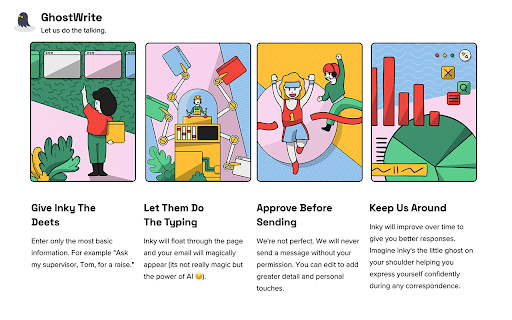
GhostWrite is an AI that writes your emails utilizing ChatGPT & other AI technologies. Reply, compose, and write emails instantly from just a few words. GhostWrite AI uses artificial intelligence to automate the writing process, so you can spend more time on the things that matter.
ChatGPT is great, but you need AI where you do your work most. Install GhostWrite and get access to powerful AI smart replies, full length compositions, and more!
Do you also want to draft entire emails from a few bullet points? Tired of writing the same follow up and reply? You can do all of that with just one tool. GhostWrite is a full suite of AI email tools that let you:
📄 Generate full-length emails from short phrases/bullets
✍️ Write professional sounding emails instantly in your tone
✅ Automatically correct your grammar and spelling by writing for you
📝 Save and re-use email templates generated by AI
↩️ Automatically draft a full-length reply in one click
💌 Support for Microsoft Outlook, Gmail, and more!
What are you waiting for? Never write another email again!
Install GhostWrite today!
---
Boost Your Productivity with AI-Powered Email Writing
Writing emails is one of the most time-consuming tasks in any professional’s day. Whether you’re responding to clients, reaching out to prospects, or handling internal communications, drafting the perfect email takes time and effort. That’s where GhostWrite AI comes in.
With GhostWrite AI, you can say goodbye to the frustration of writer’s block and wasted time. Our ChatGPT-powered AI email assistant helps you write clear, professional, and engaging emails in seconds. Whether you need to draft a response, create a follow-up email, or craft a brand-new message, GhostWrite takes your input and turns it into a polished email, ready to send.
✨ Why Use GhostWrite AI for Email Writing?
✅ Saves Time – Instead of spending hours composing emails, GhostWrite allows you to generate full messages with just a few words or bullet points.
✅ Improves Email Quality – Get well-written, grammatically correct, and professional emails every time.
✅ Works Directly in Gmail, Outlook & Zendesk – No need to switch apps. GhostWrite integrates seamlessly into your email client.
✅ AI-Powered Smart Replies – Draft intelligent responses that fit your conversation’s context instantly.
✅ Personalized Tone Adjustments – Choose from formal, friendly, concise, persuasive, and more to match your voice.
✅ Automates Repetitive Emails – Tired of sending the same follow-ups and introductions? GhostWrite makes it easy to automate recurring email templates.
✅ Supports Multiple Languages – Communicate effortlessly with clients and colleagues worldwide.
✅ Data Privacy & Security – Your emails remain private and secure. GhostWrite does not store or share your email content.
📝 How GhostWrite Works: AI-Powered Email Automation
1. AI-Powered Compositions
Need to draft a new email? Simply type a few words, and GhostWrite will generate a professional message that matches your intent. Whether you’re crafting a cold email, a job application, or a follow-up, GhostWrite AI helps you create emails that get results.
2. One-Click Smart Replies
Why spend time thinking about the perfect response? GhostWrite analyzes incoming emails and suggests appropriate, well-structured replies. Whether it’s a quick acknowledgment or a detailed response, our AI makes email communication effortless.
3. Tone and Style Customization
GhostWrite understands that different situations require different tones. Whether you need a formal, friendly, persuasive, or casual email, GhostWrite tailors the text to match your voice and the context of the conversation.
4. Instant Grammar and Spell Check
Never send an embarrassing email again. GhostWrite automatically checks for spelling, grammar, and clarity to ensure your emails are polished and professional.
5. AI Email Templates & Automation
Save time with AI-generated templates for common email scenarios:
Follow-ups – Stop manually drafting follow-up emails. Let AI do the work.
Cold Outreach – Craft compelling outreach emails in seconds.
Job Applications – Write cover letters and professional introductions effortlessly.
Meeting Requests – Schedule meetings with clear and concise emails.
Customer Support Responses – Improve response times with automated, helpful replies.
🚀 Who Can Benefit from GhostWrite AI?
GhostWrite is designed for busy professionals in every industry:
🔹 Sales & Marketing Teams – Send high-converting cold emails, follow-ups, and proposals instantly.
🔹 Customer Support Agents – Generate quick, accurate, and helpful responses.
🔹 Business Executives & Managers – Streamline communication and improve email efficiency.
🔹 Freelancers & Entrepreneurs – Save time on client communication and proposals.
🔹 Job Seekers – Craft polished job applications and networking emails effortlessly.
🔹 Students & Academics – Write professional emails to professors and colleagues.
💡 AI Email Writing for Every Use Case
Whether you’re writing a quick reply, drafting a newsletter, or sending an important business proposal, GhostWrite AI makes email writing stress-free and efficient.
✉️ Cold Emailing? Generate compelling introductions that get responses.
✉️ Follow-Up Emails? Never forget to follow up with automated drafts.
✉️ Customer Support? Reduce response time and improve satisfaction.
✉️ Sales Pitches? Write persuasive outreach emails with AI assistance.
🔥 Try GhostWrite AI Today – Write Emails Faster & Smarter!
Join thousands of professionals using GhostWrite AI to transform their email workflow. Whether you’re using Gmail, Outlook, or Zendesk, GhostWrite integrates seamlessly into your inbox to help you write better emails in less time.
Stop wasting time on email writing – let AI handle it for you!
💻 Install GhostWrite Now and Never Write Another Email from Scratch Again!