Phantom - GMB Audit Tool icon

Phantom - GMB Audit Tool

by Phantom - GMB Audit Tool

v1.5.11 Updated Jan 8, 2026 598KiB
CWS
10K
Users
β˜… 4.11
72 reviews
#5381
of 207.1K
tools
#991 of 64.4K
⚠️Requests 1 sensitive permission

Description

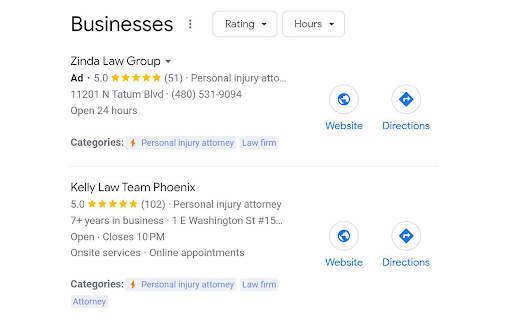
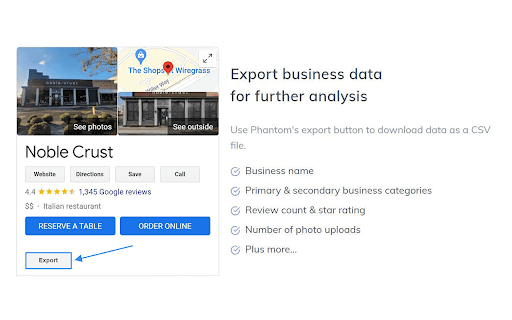
Phantom is a GMB audit tool that provides enhanced insight in Google Search & Maps. Perform an audit and benchmark against top ranking competitors to easily identify SEO opportunities for your Google Business Profile. Currently, the Phantom Chrome Extension supports the following features: ⚑Google Business Categories - Find primary and secondary categories for any Google Business Profile. This is one of the biggest ranking factors for Local 3-Pack and Maps. πŸ“ Export Business Data - Export data from any Google Business Profile including business name, primary business category, any additional categories, website URL, review count, star rating, total number of photo uploads, and address information. ⭐ Review Audit - Run a review audit to get in-depth insights regarding Google reviews. This feature makes it possible to analyze review frequency and other metrics. This also makes it possible to download all Google Reviews from any business profile. Total reviews, review frequency, and quality of review all have a major impact on rankings. πŸ“£ Post Audit - Perform a post audit to better understand how competitors are leveraging Google Business Posts. This includes frequency, linked landing pages, and a visual graph that represents strategy. πŸ“Έ Photo Audit - The photo audit makes it possible to analyze media uploads. This includes the frequency, total amount of uploads, and other helpful metrics. Photo uploads can help drive engagement to your business profile to improve visibility in Google Search & Maps. πŸ“ Note: You can enable or disable Phantom's functionalities by clicking the extension icon. Please, visit our website to request additional features, submit constructive feedback, or open a support ticket.
Phantom - GMB Audit Tool screenshot 1Phantom - GMB Audit Tool screenshot 2Phantom - GMB Audit Tool screenshot 3

Reviews (14 cached)

β˜…β˜†β˜†β˜†β˜†2026-02-19
Aas shopify

Not working

β˜…β˜†β˜†β˜†β˜†2026-01-23
Juned Sumra

Not working anymore.

β˜…β˜†β˜†β˜†β˜†2025-11-12
JosΓ© Luis Valerio Roncagliolo

The Savings Audit feature isn't working for me. I'm still waiting for the results and nothing has appeared. I'm disappointed.

β˜…β˜†β˜†β˜†β˜†2025-10-08
K J

not working, waiting on "saving reviews" for a long time and not giving any download link, tried "Restart audit" and tried several places same issue.

β˜…β˜†β˜†β˜†β˜†2025-10-03
Mazedur Rahman (Himel)

When I request for Audit Review, Its not responding properly. Its showing only "saving reviews" for a long time. But ultimately not giving any data.

β˜…β˜†β˜†β˜†β˜†2025-06-26
Eric Moryoussef

Hasn't worked for about two months now. Kept getting error "modal not found" until recently. Now, that seems to be resolved, but review audits still don't work as it gets stuck on the "audit complete" page and won't load further past that point. I submitted a support ticket over 3 weeks ago and got no response, which led to me leaving this review. Will gladly update my review to 5 stars once the issues are resolved

β˜…β˜†β˜†β˜†β˜†2025-06-09
M

Please fix the modal problem, thanks will update review!

β˜…β˜†β˜†β˜†β˜†2025-06-09
Jason Zhang

Modal not found keep popping up after clicking on "Review Audit"

β˜…β˜†β˜†β˜†β˜†2025-06-08
Maaz Memon

Clicking on "Review Audit" always turns up with - modal not found

β˜…β˜†β˜†β˜†β˜†2025-04-29
tamas medgyesi

not working.. modal not found

β˜…β˜†β˜†β˜†β˜†2024-08-08
Local Seo

Not working

β˜…β˜†β˜†β˜†β˜†2024-07-26
Joe

useless..

β˜…β˜…β˜†β˜†β˜†2024-01-19
Chetan Rao

All it does is export a CSV with name, category, website URL, maps link, review count, star rating, address, and zip code. Not really all that useful. Not sure why the other reviewers are gushing. There are better tools out there.

β˜…β˜…β˜…β˜†β˜†2025-01-06
Marco Herr

Makes total sense - however, it is not applicable to Service Area Businesses. It simply does only show with Google Business entries that have a phyisical adress. Pity. Maybe fix this?

Permissions (2)

Permissions

cookiesβ„Ή Can read and modify browser cookies storageβ„Ή Can store data locally in your browser

Details

Version 1.5.11
Updated Jan 8, 2026
Size 598KiB
First Seen Mar 26, 2026