
✅Recently updated
Description
* Please note: The input method only works for ChromeOS, but you can use the text conversion features on Chrome for Window/macOS/Linux.
McBopomofo (小麥注音) is a smart phonetic (zhuyin/注音) Chinese Input Method Editor that offers another choice for inputting Chinese.
It has following features
- Comparing to the built-in Zhuyin IME, McBopomofo's behavior to handle punctuation is much more like other platforms that users are familiar to. For example, the built-in Zhuyin IME does not allow users to input punctuation like exclamation mark when there is already text in the composing buffer ,while McBopomofo does.
- Various keyboard layouts: Standard, ETen, Hsu, ETen26, Hanyu Pinyin and IBM.
- Various settings: including the position of the candidates, if Shift+Letter keys should input uppercase or lowercase letters and so on.Just visit the options page.
- Chinese conversion: You can use Alt+Shift+G to toggle if you want to input Simplified Chinese. You can also change the shortcut key in the extensions shortcut setting (chrome://extensions/shortcuts).
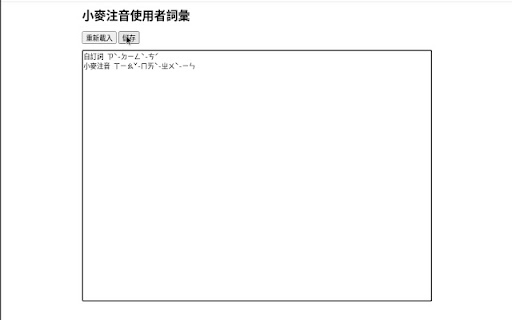
- Custom user phrases: Use Shift and left/right arrow keys to select a range and then press enter key to add a new phrase.You can also edit/delete/copy/paste the phrases in the options page.
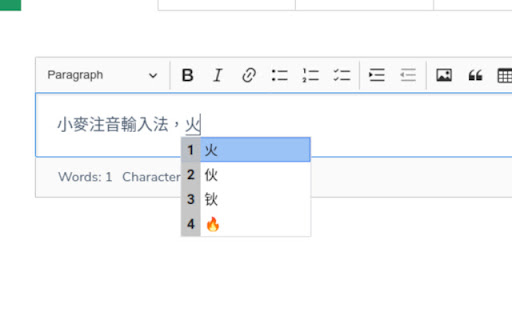
- Emoji: Some Bopomofo syllables are associates with Emojis. For example, you can get 🔥 when typing ㄏㄨㄛˇ.
- Date macros: Just type "今天", "今年" to input dates quickly..
- Dictionary lookup: Press on the question mark key when choosing a candidate, it opens a list of online dictionaries.
- Quick Chinese numbers input: Press Control and Backslash (Ctrl + \) to enter the number input mode, for example, 1234567 becomes 一百二十三萬四千五百六十七.
The extension also supports various text conversion feature, you can use the context menu to convert your selected text to Bopomofo syllables and Taiwanese Braille.
Change log:
- 1.9.2 (Dec 2025): Bug fixes..
- 1.9.0 (Nov 2025): Optimized loading speed. Updated phrase dictionary. Simplified the number input feature.

Reviews
Loading reviews...
Permissions (6)
Permissions
background contextMenusℹ Can add items to the right-click menu input notificationsℹ Can show desktop notifications storageℹ Can store data locally in your browser tabsℹ Can see your open tabs and their URLs
Details
| Version | 2.0.0 |
| Updated | Mar 10, 2026 |
| Size | 1.84MiB |
| First Seen | Mar 30, 2026 |
More by zonble


Popular in tools

Zotero Connector
by Zotero
8M
★ 3.96
tools
8M
★ 3.96
tools

Browsec VPN - Free VPN for Chrome
by Browsec
7M
★ 4.44
tools
7M
★ 4.44
tools

AnyDoc Translator - Translate Web and PDF
by www.wps.com
7M
★ 4.59
tools
7M
★ 4.59
tools

WPS PDF - Read, Edit, Fill, Convert, and AI Chat PDF with Ease
by www.wps.com
7M
★ 4.45
tools
7M
★ 4.45
tools

Video DownloadHelper
by Aclap
5M
★ 4.43
tools
5M
★ 4.43
tools
Popular Extensions

Adobe Acrobat: PDF edit, convert, sign tools
by Adobe Inc.
331M
★ 4.40
workflow
331M
★ 4.40
workflow

AdBlock — block ads across the web
by AdBlock
62M
★ 4.48
workflow
62M
★ 4.48
workflow

迅雷下载支持
by Shenzhen Xunlei Network Technology Co., Ltd.
59M
★ 2.77
workflow
59M
★ 2.77
workflow

Grammarly: AI Writing Assistant and Grammar Checker App
by Grammarly
42M
★ 4.50
communication
42M
★ 4.50
communication

Adblock Plus - free ad blocker
by eyeo GmbH
41M
★ 4.39
workflow
41M
★ 4.39
workflow