
Description


Reviews (30 cached)
Unfortunately doesnt work when opening up local HTML or MHTML files.
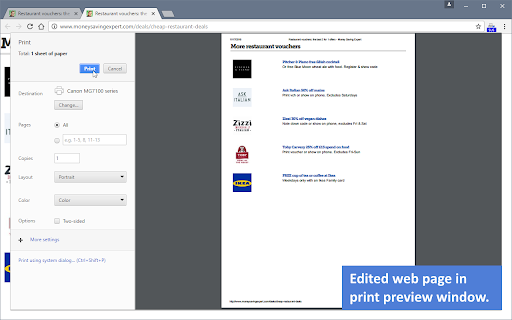
Ohmygosh - this extension has so much promise! But it fails to deliver in a number of ways. Even after I delete all the unwanted elements and the webpage looks _exactly_ as I want it to be, when it gets to the printing stage, it still looks a total mess. There are large amounts of blank spaces that take up valuable paper space. When I preview before printing, I can see several white spaces that say 'Advertisement', despite the fact that I have absolutely removed all elements other than the article itself (I've doublechecked this). Some of the photos are too large to fit on one page, creating huge amounts of wasted blank space on the next page. When I switch to the system printing dialogue and choose "Fit to page", I then become unable to see a preview before printing, which risks a bad printout. I even tried saving a whole-page screenshot after making the clean version of page, but that still resulted in a mess of blank spaces. The native Save option only offers to save as HTML or MHTML. No options at all for PDF, PNG, JPG, or WEBP. For all of these annoying reasons, I AM OUT. (Too bad, I found it so promising! 😿)
It only prints the first page. If you're printing out something like a job description, there will be more than one page's worth of text, but only the first one shows up in the print preview, and also when you hit Ctrl+P. There is an option to save the optimized page as an HTML document (maybe it's possible to print that?), but it only works if you have another extention by the same people.
Not working correctly. Still seeing images and text printed out even when deleted.
I HATE THIS APP its the worst waaay too complicated
I'm getting a message "Print WE" can't used on this html file :-(
You can no longer choose where to save, and it does not remove the deleted sections when it saves, they just are styled as display:none
Does not work.
Why is this so inferior to the Firefox version? Half the time I can't get this version to do anything, and you when it does work, you can't set page size as a percentage of the original. Why?
didnt work with ebay invoices so I can add notes to seller....
Tried to use it just now but for some reason, won't work anymore. Have to find a substitute.
This is absolute junk. This app doesn't even show the part of the page that needs to be printed. Everything that I wanted to print was missing, yet the ads and other nonsense were clearly shown.
Toolbar disappears on load... does no work for me.
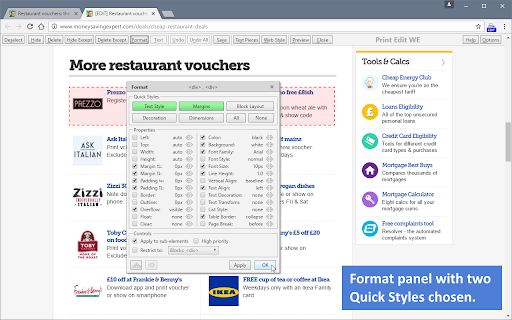
Not intuitive. Very oddly named labels that aren't quite understandable even to a web person like myself. I suggest PrintWhatYouLike, CleanPrint or Print Friendly over this.
Does not lock the page (keep a static copy) when editing the content to determine what to delete or keep. If the page refreshes, especially if scripted, I get an error on loading page while previewing in this extension. The page updated, and this extension allowed the refresh. It should LOCK the page it shows that the user will edit. Users cannot edit an ever changing document, plus a refreshed document may not render while this extension is previewing it.
After I add the extension, the icon appears, but then disappears!?
Unfortunately, this did not work for me on Chrome Version 87.0.4280.88. It looks like a promising extension, but any element selection I made didn't stick when using the Preview button- same System print page preview dialogue shows up just as if the extension was not installed.
It was working fine until I noticed that none of the websites (any website) load and browser status bar says "waiting for Print Edit WE", but when I disabled the extension the pages loaded instantly.... I think it's potentially dangerous extension as they might collect your browser activity and what's on your screen. I don't see any other explanation why this might have happened.
After blacking out some sensitive information, the print result is still the same as original.
Disappointing. Could not edit text to delete specific parts. Can only select and delete whole pieces of text fields. I need to be able to delete specific numbers or letters.
Have used this extension for years on Firefox and it works great, not so much on Chrome. Will sometimes jump to the next page on a site when activated. Is not very intuitive.
Not working properly.
Used to work like a charm, but has stopped responding a few months ago
easy to use, but Chinese characters in printed PDFs can't be selected. I tried several browsers and the only exception is firefox
broken on 87.0.4280.66 (64bit) Uncaught ReferenceError: selectIndex is not defined at resumeEditing (content.js:1183) at startEditing (content.js:1148) at content.js:913
what the hap with not saving to pdf?
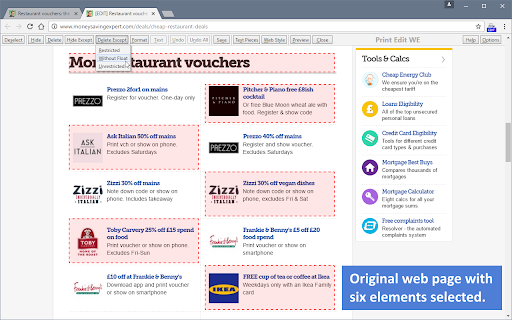
It is somewhat counterintuitive. I thought that "select" meant that it would print only what I select, but, it turns out, that you have to delete what you don't want, so it's exactly the opposite. However, once I did that (you can select pieces or drag the mouse to select entire areas within the page, even if it's off-screen (i.e., it'll scroll in the direction you're going)), I got exactly what I needed. I saved it to a file (which isn't necessary, but, I did it in case something went wrong with the app, browser, or printer), then printed the app's version, and it was perfect, albeit, larger than I thought (the save page was also larger than I thought it would be, even when I changed the page setup). So, all-in-all, it was good. (Windows 10, Chrome 66.0.3359.181 (Official Build) (64-bit))
How can I create a pdf from this page? https://rpubs.com/alecri/258589 It doesn't seem to work.
Good tool. If you like to do everything manually.
Worked better on Firefox. It's cutting images in half across pages. Needs to be able to define page breaks.
Permissions (8)
Permissions
Details
| Version | 31.3 |
| Updated | Sep 4, 2023 |
| Size | 104KiB |
| First Seen | Mar 24, 2026 |
More by DW-dev


Popular in tools




Popular Extensions


