
Description




Reviews (30 cached)
Tiles only 2 tabs
I like the old version that all tab still in same window.
I used to use this in Firefox, it would actually tile the tabs inside one same window, which is what I wanted and expected, this just opens your tabs in separate windows and resizes them side to side, I don't need an extension for that, dissapointed.
shiiiitt why the original has been removed
What does it mean??? "Allow this extension to read and change all your data on websites that you visit:" And "Permissions Read your browsing history Display notifications" Does it mean all data in the browser is now visible to the extension developer? Seriously?....
If there's a way to show more than two tabs as tiles, I couldn't find it in five minutes of trying. What's worse is that although I have about 15 tabs going, it only ever shows the last two as tiles. I don't care if they pop out as new windows, I just want to see more than two of them. Dumb. This is a useless extension, really poorly thought out and executed.
No difference between manage two tabs separately or open two windows... Poor documentation
I was happy to find this for Chrome. However there is a glaring problem that makes this useless. When I have Chrome on my secondary monitor and use Tile Tabs they reopen on my primary. Which means I have to move the tiles back over and get them aligned to the screen. Because of this I'm pretty much doing the same thing I was doing without Tile Tabs.
What the f is that st. The old one is better! Click tile tabs icon-> open two new blank chrome!!! ??? I want to tabs the last two pages as the old but cannot work. New layout is empty!!! But the screenshot show lot of options. Empty layout orientation by default! What???
Not working. Opens tabs in new windows instead.
Sorry, but this extension is a joke compared to the Firefox version. All of it's faults are covered by the other reviewers here so I won't get into the details. Just wanted to express my hate and frustration with it.
Useless! It does not work. Just one tab jumps out. That is it.
Was good until it started the upper tile getting bigger line by line and shrinking the lower tile. In 1 minute there is no lower tile. Reinstalling did not help. Uninstalled
it's buggy, tried to move around tabs between tiles and it broke my browser.
It works just for 2 tabs :(
New layouut goes to screen #1 even if started from screen 1. And it's only ore windows. Watch Tile Tabs on Firefox, that SPLITS a screen, that a big screen space saving. This extension only creates more mess on the screen, and is not good on multi screens.
I am a huge fan of Tile Tabs on Firefox, but unfortunately Chrome does not allow for the same functionality. Instead of representing multiple tabs on the same window, it splits the tabs into new windows. Not only do these windows take up a lot of space that should be used on the webpages, but it makes everything a tad more difficult to navigate. With Windows 10's improved window snapping and multi-desktop features, this extension is redundant for me, and in the end Tile Tabs for Chrome only makes my tasks more complicated. Perhaps this extension is more useful to people running different operating systems, where it is not so easy to manipulate things. My friend, thank you for making such a great add-on for Firefox, a solid 10/10. I could only hope that one day the same functionality is possible here. Probably not.
Doesn't work. Take a look at how it's done on Firefox
This one confuses me. I click once it jumps to the left, I click again and suddenly it merges with the other window??
This DOES NOT work, I don't know what everyone is talking about, but this only split two of my tabs to two windows, and that's all it can do.
With Wayland I get stacked/layered windows instead of tiled. Works great with X11 though.
not working in opera one as under normal opera. problem with workspaces. it takes last 2 tabs from other workspace and brings them to the main workspace and when closing layout it keeps them in main workspace. will not return those tabs to original workspace. previously was working ok. with opera one it is an issue.
Stops working after a while and I need to remove from chrome and re-add it. Clicking on the toolbar button stops working until I uninstall and re-add to chrome. Right clicking doesn't do anything
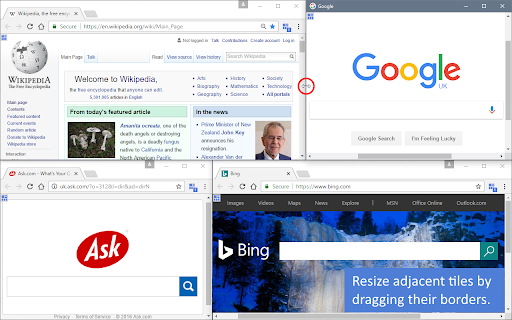
Description says "Take tabs from parent windows and arrange them in layouts of tiled sub-windows." Was expecting the tiles to be sub-windows within one window, like vivaldi browser does. but not sub-windows, it's creating multiple ordinary windows. Each tile is spawned into a whole chrome window of its own. Messy. hard to adjust, have to click multiple x to end your session. Gives a result but it's fewer clicks to just do it manually (if you include closing the windows when done). Could be much better as sub-windows.
I don't see the ability to do 3 tabs across.
WHY THIS DOES NOT WORK THE MOMENT I TRY TO ENTER FULL SCREEN IN CHROME USIN F11 THE OTHER LAYOUT DO NOT COME...
It works great! My issue is that if you have used windows game overlay (Win + g) It will keep spamming you with those pesky notifications.
Okay after you figure out how to get it to work; useful but not very intuitive. And the sync scroll feature is apparently broken.
It was good while it lasted, suddenly stopped working
Firefox's version is better imo. Why does it need to open an extra window every time every time that I want to use it? Why can't I just use it like I could the Firefox extension.
Permissions (6)
Permissions
Details
| Version | 31.3 |
| Updated | Mar 18, 2023 |
| Size | 69.73KiB |
| First Seen | Mar 28, 2026 |
More by DW-dev


Popular in functionality





Popular Extensions


