
Description


Reviews (22 cached)
tf, this extension requires to read my browser history, yea no thank you. removed.
useful, february update ask history access, I will not authorize that
I've happily used this quite well for a few years but I don't see why there's a new requirement to provide browsing history Unfortunately I will now need to find an alternative
It's not working for Referred URL, I've tried a lot of REGEX but it does not work (ps: it was working, but now not working anymore...and I've already tried to uninstall and reinstall the extension, but even...)
Does not work in Vivaldi. Addon version 0.4.2
doesn't work, not even the default rules
dosent works
It's not working?
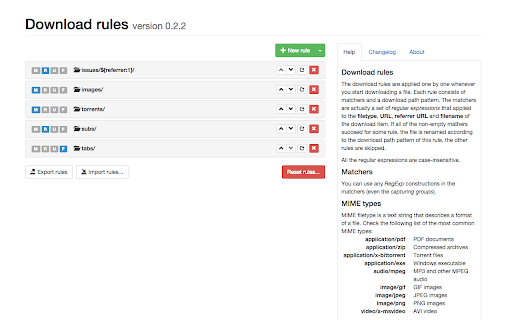
Not sure how this is supposed to work, but it doesn't for me. I set up a rule, clicked a file to download, but it still defaulted to the last directory I saved a file to rather than the directory the rule dictates. Disappointed.
Not entirely sure why this app suddenly need/requires the ability to read my browser history. Before this was a 5/5 extension. Now i'm hesitant to allow access to something i can't understand is needed - and wasn't before.
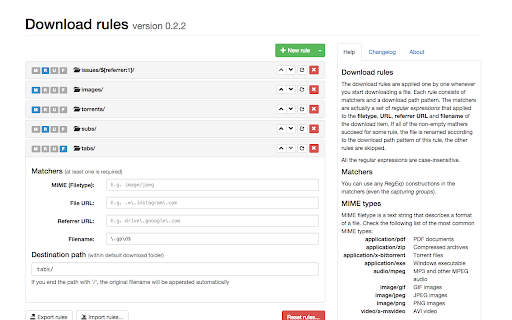
Not intuitive for a windows user. Understanding the logic for file extensions and folder locations aren't friendly to wild cards and colons. Example, I want to move any file with .txt extension to a folder like c:\home. A standard windows user will need some time to understand this logic to make it work. TIME CONSUMING! But once setup properly, it's a reliable too.
It causes a 15-20 second delay for file downloads and right click image > save as commands on Edge.
looks great but just doesnt work - unfortunately all downloads are not routed.
too much delay in starting downloads and not sorting downloads aswell
would be great extension if the save destination was not limited to using the default browser destination folder subfolders, and no symbolic links do not really solve this at least for vivaldi users which like to keep the settings that updates destination when saving as (which is great for consecutive downloads and don't want to disable that) if I was able to make a hard rule that would override the download folder location then it would be useful, but as it is it just creates the path under the currently set download destination so kinda useless for me honestly I do not understand this limitation/behaviour, pretty sure it would be possible to just use hard path instead of relative path that is being appended to the current download destination
After updating to v0.4.0 the date related operations stopped working
needs a browse option
This extension doesn't work!!!!! I'm sure I have all the rules enabled. I even turned off all other extensions to prevent interference. But no matter what the settings are, the files are not automatically grouped into folders.
Used to work flawlessly but lately I've been getting a lot of lag and long delay for a download to start, I disable this extension and all problems go away. Arch linux with KDE on Chromium.
Too bad it: 1) sometimes doesn't catch files by MIME type 2) doesn't work in Edge at all.
RegExp Download Organizer Does not work on edge browser. I wish you can add it to edge addons. and fully support edge browser.
This is cool for basic usage and having all images go to an image folder, or torrents go to torrent folder, etc. For anything more complicated than that, it starts proving difficult to use due to the lack of documentation. For instance, trying to have images downloaded from facebook go into a facebook folder is proving difficult. Trying different regex schemes with no luck trial and error for hours is no fun. Some documentation on advanced techniques for THIS extension would be very valuable, if they are even supported.
Permissions (4)
Permissions
Details
| Version | 0.5.2 |
| Updated | Feb 10, 2026 |
| Size | 200KiB |
| First Seen | Mar 31, 2026 |
Popular in tools



Popular Extensions




