
⚠️Not updated in over 2 years ⚠️Below average rating
Description
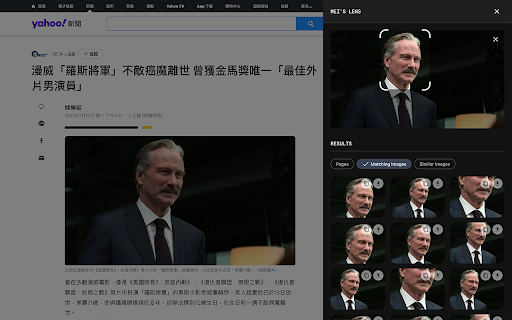
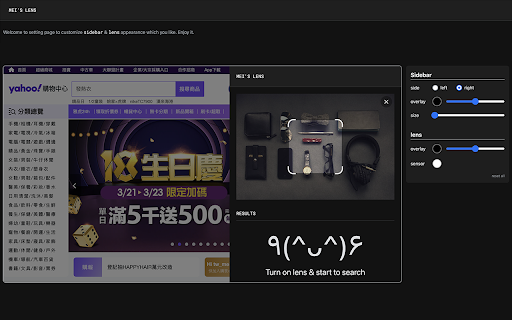
「mei's lens」provides search the web by image feature for web pages.
With 「mei's lens」you could do the following stuff.
- Pick & select image for searching by image.
- Comes with light / dark mode.
※ Usage instructions:
1. Turn on「mei's lens」by context menu or browser bar icon.(「mei's lens」will apply image directly once tap image context menu).「mei's lens」 will ask for google account login for 1st time usage. (This is just for recording request count only)
2. Switch mode to select area which you like to search.
※ How to switch main image source?
1. Drag & drop image file or web page element into main image section.
2. Focus main image section then paste url、image、html string on it.
3. Double click main image section to pick up image you like.
※ Keyboard shortcuts:
- 「ctrl」+「shift」+「L」: toggle「mei's lens」.
- 「esc」: turn off「mei's lens」.
※ Related videos:
- Tutorial: https://www.youtube.com/watch?v=jjUhkBtMGF4
- Switch image source: https://www.youtube.com/watch?v=SDS85iuBDlk
Enjoy it.
※ Change Log:
1.0.5:
a. Add identity permission to connect with user's google account. (This is just for recording request count only)
1.0.4:
a. Add options page for customize appearance.
1.0.3:
a. Keyboard shortcut: 「esc」for turn off「mei's lens」.
b. Performance enhancement.
1.0.2:
a. Keyboard shortcut: 「ctrl」+「shift」+「L」 for toggle「mei's lens」.
b. Add several ways to switch image source. User can copy / paste url、image、html string on main image when focus on it. Besides that,DnD also support drag file or web element into main image to switch its source.
1.0.1
a. fix: data normalize.


Reviews (4 cached)
★☆☆☆☆2022-11-06
Mesut Temel
useless
★☆☆☆☆2022-10-23
Mattia Tonelli
it doesn't work, it just ask you the account and then it does nothing.
★☆☆☆☆2022-10-10
Δ. Σ.
doesn't work
★☆☆☆☆2022-09-08
pseudo David
doesn't work
Permissions (4)
Permissions
contextMenusℹ Can add items to the right-click menu downloadsℹ Can manage and monitor downloads identityℹ Can use your Google account identity storageℹ Can store data locally in your browser
Details
| Version | 1.0.5 |
| Updated | Apr 13, 2022 |
| Size | 2.07MiB |
| First Seen | Mar 26, 2026 |
More by Paul Li

Popular in tools

Browsec VPN - Free VPN for Chrome
by Browsec
7M
★ 4.44
tools
7M
★ 4.44
tools

Microsoft Bing Homepage & Search for Chrome
by Microsoft Corporation
4M
★ 3.72
tools
4M
★ 3.72
tools

IE Tab
by Blackfish Software
4M
★ 4.31
tools
4M
★ 4.31
tools

Monica: All-In-One AI Assist & Smartest AI Agent
by Monica Team
3M
★ 4.89
tools
3M
★ 4.89
tools

Ad Blocker: Stands AdBlocker
by Stands
3M
★ 4.79
tools
3M
★ 4.79
tools
Popular Extensions

Adobe Acrobat: PDF edit, convert, sign tools
by Adobe Inc.
330M
★ 4.40
workflow
330M
★ 4.40
workflow

Chrome Remote Desktop
by Chrome Remote Desktop Release Managers
38M
★ 3.14
workflow
38M
★ 3.14
workflow

Cisco Webex Extension
by cisco.chromestore
24M
★ 2.34
social
24M
★ 2.34
social

Kami for Google Chrome™
by Kami
17M
★ 4.56
education
17M
★ 4.56
education

Read&Write for Google Chrome™
by Texthelp
17M
★ 3.44
accessibility
17M
★ 3.44
accessibility