
⚠️Not updated in over 2 years ⚠️Below average rating
Description
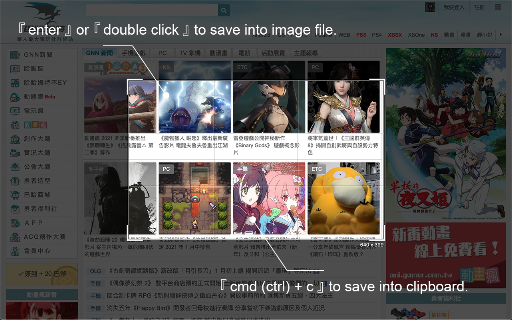
Use 「Crop It!」 to crop the exactly screenshot you need. Users could choose to save the screenshot into a file or clipboard.
- Here comes several ways to turn on 「Crop It!」.
1. Turn on contextMenu & choose 「Crop It!」.
2. Use keyboard shortcut > 「Cmd (Ctrl) + . 」.
- Usage instructions:
1. Turn on 「Crop It!」.
2. Adjust the selection size & position you need. (Users could press keyboard 「Esc」or click overlay to turn off 「Crop It!」)
3. Right-click on selection, there will be many aspect-ratio to choose.
4. Double click the selection or press keyboard 「Enter」 to save screenshot into a image file. Or press 「Cmd (Ctrl) + c」to save screenshot into clipboard.
Otherwise, users could always use options to set overlay's color or opacity they like.
- Change Log:
1.0.8
a. Fix shortcut > f issue.
1.0.7
a. Fix shortcut issue.
1.0.6
a. Migrate to MV3.
b. Performance enhancement.
1.0.5
a. Add keyboard shortcut >「 Shift 」when resize selection for fix its aspect-ratio.
b. Unify system UI & dark mode support.
c. Unfreeze scroll-lock when 「Crop It!」turn on.
d. Minor bug fixed & performance enhance.
1.0.4
a. Add aspect-ratio picker for different usages.
b. Add keyboard shortcut >「 f 」for quick expand / shrink selection to fullscreen.
1.0.3
a. Add keyboard shortcut guide (「 Shift 」 + 「 ? 」) & performance enhance.
1.0.2
a. Add keyboard shortcut > 「 ↑ 」、「 ↓ 」、「 ← 」、「 → 」to move selection strictly.



Reviews (4 cached)
★☆☆☆☆2025-12-30
Titan
does not work!!
★☆☆☆☆2025-07-19
james gloval
Why are all developers this incompetent
★☆☆☆☆2024-03-11
Emmanuel Dsouza
does not work for me bad
★★★☆☆2023-05-09
CatCitizen Citizen
Windows Snipping Tool does this. It would be better if after crop it opened a image search into different search engines for the cropped selection automatically after letting go.
Permissions (4)
Permissions
activeTabℹ Can access the current tab when you click the extension contextMenusℹ Can add items to the right-click menu downloadsℹ Can manage and monitor downloads storageℹ Can store data locally in your browser
Details
| Version | 1.0.8 |
| Updated | Dec 7, 2021 |
| Size | 45.18KiB |
| First Seen | Mar 26, 2026 |
More by Paul Li

Popular in workflow

Adobe Acrobat: PDF edit, convert, sign tools
by Adobe Inc.
330M
★ 4.40
workflow
330M
★ 4.40
workflow

Chrome Remote Desktop
by Chrome Remote Desktop Release Managers
38M
★ 3.14
workflow
38M
★ 3.14
workflow

MetaMask
by metamask
13M
★ 2.68
workflow
13M
★ 2.68
workflow

Microsoft Power Automate
by Microsoft Corporation
10M
★ 1.99
workflow
10M
★ 1.99
workflow

Screencastify - Screen Video Recorder
by castify-ext-dev
9M
★ 3.95
workflow
9M
★ 3.95
workflow
Popular Extensions
Adobe Acrobat: PDF edit, convert, sign tools
by Adobe Inc.
330M
★ 4.40
workflow
330M
★ 4.40
workflow
Chrome Remote Desktop
by Chrome Remote Desktop Release Managers
38M
★ 3.14
workflow
38M
★ 3.14
workflow

Cisco Webex Extension
by cisco.chromestore
24M
★ 2.34
social
24M
★ 2.34
social

Kami for Google Chrome™
by Kami
17M
★ 4.56
education
17M
★ 4.56
education

Read&Write for Google Chrome™
by Texthelp
17M
★ 3.44
accessibility
17M
★ 3.44
accessibility