
YouTube Advanced Playlist Export icon

YouTube Advanced Playlist Export

by piniek435

v1.0.2 Updated Jul 5, 2024 9.57KiB
CWS
3K
Users
★ 2.95
22 reviews
#12921
of 210K
tools
#2627 of 65.7K
⚠️Not updated in over a year ⚠️Below average rating

Description

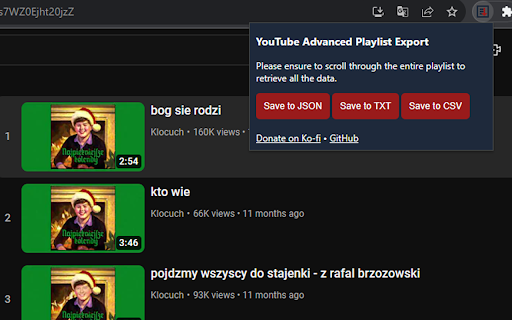
Free and open-source extension for exporting detailed information from YouTube playlists in JSON, CSV or TXT format. Supported data: - Title - View Count - Published Date - Author - Length - Video ID - Video URL - Thumbnail URL How to use: 1. Open YouTube: Go to www.youtube.com and click on the playlist you want to export. Please note that the extension will only work when you click on “view full playlist” to view the details of the playlist. 2. Scroll through the playlist: Scroll through the entire playlist from start to finish. This is important in order to to retrieve all the data from the playlist. 3. Save the data: Now that you’ve scrolled through the entire playlist, you can save the data. You will see three buttons: “Save to JSON”, “Save to TXT”, “Save to CSV”. Each of them allows you to save the data in a different format. Click on the one that suits you best.
YouTube Advanced Playlist Export screenshot 1YouTube Advanced Playlist Export screenshot 2

Reviews (7 cached)

★☆☆☆☆2025-11-06
youutubestinks

fails in begining the download, unknown erros make not possible to get the list to csv, txt, etc

★☆☆☆☆2025-08-12
Mats Kirknes

It does export a (long) list of videos, but not seemlessly, meaning some manual cleaning is required by the user if the list is going to be of any use. Examples: 1) the downloaded file will always be named "playlistExport", and 2) there will be no reference to the playlist inside the exported file (easily leading to confusion if you download several playlists at once). 3) CSV file format is broken with extra text added to the first row, and columns being comma separated without enclosing cell values in quotation marks (any video title with commas will ruin the columns).

★☆☆☆☆2025-05-10
Robert Kidd

Nothing happens when I click the buttons. Useless waste if time.

★☆☆☆☆2025-02-20
Alya Svoboda

It doesn't work

★☆☆☆☆2024-04-17
Andrew W

It didn't save anything. Nothing happened. Where's the saved file??

★★☆☆☆2025-01-28
Ben Segg

Had a playlist with 49 songs. loaded the entire playlist as instructed. The CSV download couldn't detect any songs, file was blank. Other file type, txt, didn't work either.

★★☆☆☆2024-02-26
half-soul `

Works but only for very small playlists <50 or so

Permissions (1)

Permissions

activeTab Can access the current tab when you click the extension

Details

Version 1.0.2
Updated Jul 5, 2024
Size 9.57KiB
First Seen Mar 26, 2026

