FluentTyper: Autocomplete and Spell Checker icon

FluentTyper: Autocomplete and Spell Checker

by Bartosz Tomczyk

v2026.17.0 Updated Mar 25, 2026 52.46MiB
CWS
10K
Users
★ 4.52
46 reviews
#5387
of 207.3K
tools
#993 of 64.5K
Recently updated

Description

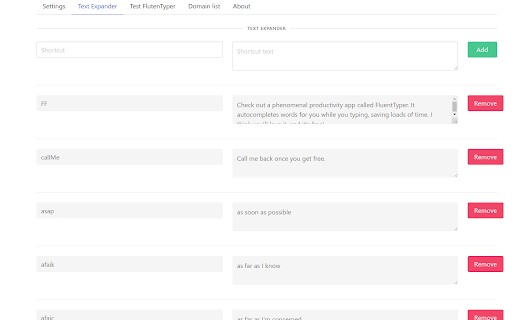
Type faster. Make fewer mistakes. Stop repeating yourself. FluentTyper is a smart autocomplete and text expander Chrome extension that helps you write emails, messages, forms, and documents much faster — directly in your browser. Perfect for developers, freelancers, support agents, sales reps, students, and anyone who types daily. # WHAT YOU GET ## Smart Predictive Autocomplete FluentTyper suggests words and phrases in real time as you type — similar to a smartphone keyboard, but available across most websites in Chrome. Use arrow keys to navigate suggestions and press Tab to accept. ## Automatic Spell Check Catch typos before you send. Misspelled words are underlined and correction suggestions are shown instantly. ## Custom Text Expander Create your own shortcuts for frequently used phrases. Great for: * Email templates * Customer support replies * Code snippets * Addresses * Repeated responses * Frequently used links # WHY CHOOSE FLUENTTYPER * Save time every day * Reduce typing effort * Improve writing accuracy * Eliminate repetitive typing * Increase productivity # PRIVACY FIRST FluentTyper works 100% offline. Your keystrokes are never uploaded. No tracking. No accounts. No data collection. Your writing stays on your computer. # SUPPORTED LANGUAGES: English, Spanish, French, Croatian, Greek, Swedish, Polish, German, Brazilian Portuguese Install FluentTyper today and upgrade the way you type in Chrome.
FluentTyper: Autocomplete and Spell Checker screenshot 1FluentTyper: Autocomplete and Spell Checker screenshot 2FluentTyper: Autocomplete and Spell Checker screenshot 3

Reviews (5 cached)

★☆☆☆☆2025-04-02
Jennifer LaRocco

I have cerebral palsy. I mostly depend on voice recognition software when I am writing. However, sometimes I prefer to write quietly and I was looking forward to using this as a word prediction to help with my typing. I have a Chromebook and this extension is not working when I open and try to type a Google Docs document. It will only work for me when I test it within fluentyper website's tester function. :(

★☆☆☆☆2024-09-07
charlotte

It does not work on discord

★☆☆☆☆2022-09-05
CHIRAG SINGHAL

it is buggy on discord.

★☆☆☆☆2022-01-16
Toren Hohke

It's not working. It does nothing.

★★★☆☆2025-12-17
Justin S

The space bar doesn't leave a space after selecting the word. Which sucks because then I have a string of words that it has to parse and seperate which can sometimes be an issue. I do have it set to leave a space after the word. Hopefully this bug can be fixed because it's not bad (i mean it works, and has a lot of customization) but I can't really rate it until it works.

Permissions (2)

Permissions

activeTab Can access the current tab when you click the extension storage Can store data locally in your browser

Details

Version 2026.17.0
Updated Mar 25, 2026
Size 52.46MiB
First Seen Mar 28, 2026