
Description
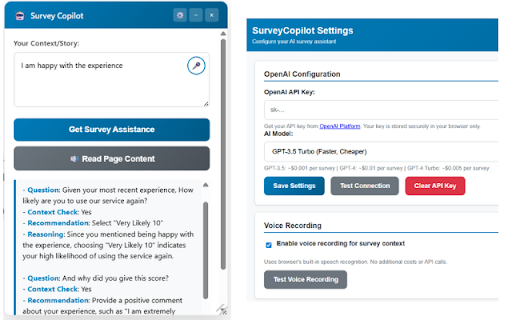
Transform your survey experience with SurveyCopilot - the intelligent assistant that makes completing surveys faster, easier, and more accessible.
🎤 VOICE RECORDING
- Speak your context instead of typing lengthy responses
- Automatic speech-to-text conversion
- Perfect for capturing detailed experiences quickly
🤖 AI-POWERED ASSISTANCE
- Get personalized response recommendations based on your context
- Smart analysis of survey questions
- Authentic, contextual suggestions that sound like you wrote them
🔊 TEXT-TO-SPEECH
- Listen to survey content read aloud
- Accessibility support for visual impairments
- Hands-free survey review
✨ KEY FEATURES
- Drag & drop resizable interface
- Secure OpenAI API integration
- Auto-saves your context between sessions
- Works on all survey platforms (Qualtrics, Medallia, Question Pro, SurveyMonkey, etc.)
- Privacy-focused - your data stays local
📋 PERFECT FOR
- Market research participants
- Customer feedback providers
- Academic survey respondents
- Anyone who regularly completes surveys
- Users seeking accessibility features
🔒 PRIVACY & SECURITY
- API keys stored securely in your browser
- No data sent to our servers
- Voice processing happens locally when possible
- Full control over your information
SETUP REQUIRED: You'll need an OpenAI API key (get one free at platform.openai.com). Detailed setup instructions included.
Transform tedious surveys into effortless conversations with SurveyCopilot!
The "Failed to analyze survey: API request failed" error is most likely one of these common issues:
🔍 Most Common Causes:
1. API Key Issues (90% of cases):
Incorrect key format - Missing characters when copy/pasting
Expired or revoked key - OpenAI deactivated the key
Trial credits exhausted - Free tier limits reached
Billing issues - Payment method problems
2. Network/Firewall Issues:
Corporate firewall blocking OpenAI API calls
VPN interference - Some VPNs block API requests
Browser extensions interfering with requests
3. Rate Limiting:
Too many requests - OpenAI rate limits exceeded
Concurrent usage - Multiple people using same key
🛠️ Quick Diagnostic Steps for Your Friend:
Step 1: Verify API Key
Go to OpenAI Platform
Check if the key is still active (not revoked)
Copy a fresh key directly (don't retype)
Step 2: Test Connection in Settings
Open extension settings
Paste the fresh API key
Click "Test Connection"
See what specific error appears
Step 3: Check Account Status
Go to OpenAI Usage Dashboard
Verify there are credits/usage available
Check if billing is set up correctly
Step 4: Network Test
Try from a different network (mobile hotspot)
Disable VPN temporarily
Test from a different browser
💡 Quick Fixes to Try:
Fresh API Key - Generate a new one from OpenAI
Different Network - Mobile hotspot test
Wait 1 hour - Rate limit cooldown
Reviews
Loading reviews...
Permissions (4)
Permissions
activeTabℹ Can access the current tab when you click the extension notificationsℹ Can show desktop notifications scriptingℹ Can inject scripts into web pages storageℹ Can store data locally in your browser
Details
| Version | 1.0 |
| Updated | Aug 22, 2025 |
| Size | 25.7KiB |
| First Seen | Mar 30, 2026 |
Popular in tools

Zotero Connector
by Zotero
8M
★ 3.96
tools
8M
★ 3.96
tools

Browsec VPN - Free VPN for Chrome
by Browsec
7M
★ 4.44
tools
7M
★ 4.44
tools

AnyDoc Translator - Translate Web and PDF
by www.wps.com
7M
★ 4.59
tools
7M
★ 4.59
tools

Video DownloadHelper
by Aclap
5M
★ 4.43
tools
5M
★ 4.43
tools

Microsoft Bing Homepage & Search for Chrome
by Microsoft Corporation
4M
★ 3.72
tools
4M
★ 3.72
tools
Popular Extensions

Adobe Acrobat: PDF edit, convert, sign tools
by Adobe Inc.
331M
★ 4.40
workflow
331M
★ 4.40
workflow

AdBlock — block ads across the web
by AdBlock
62M
★ 4.48
workflow
62M
★ 4.48
workflow

迅雷下载支持
by Shenzhen Xunlei Network Technology Co., Ltd.
59M
★ 2.77
workflow
59M
★ 2.77
workflow

Grammarly: AI Writing Assistant and Grammar Checker App
by Grammarly
42M
★ 4.50
communication
42M
★ 4.50
communication

Adblock Plus - free ad blocker
by eyeo GmbH
41M
★ 4.39
workflow
41M
★ 4.39
workflow