Quick Copy - most powerful clipboard manager icon

Quick Copy - most powerful clipboard manager

by Ramit Mittal

v2.4.2 Updated Jan 24, 2025 209KiB
CWS
9K
Users
★ 4.02
46 reviews
#8208
of 207.3K
tools
#1609 of 64.5K
⚠️Not updated in over a year

Description

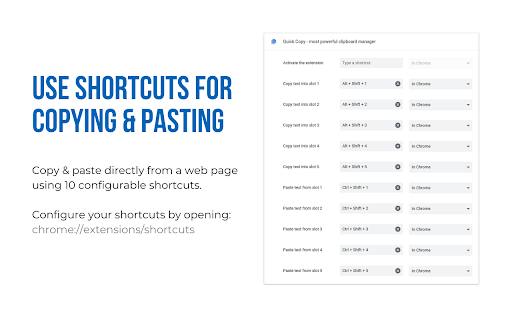
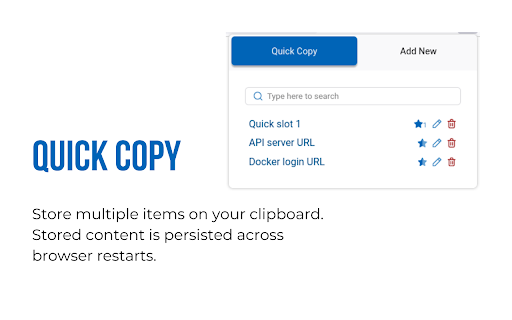
Quick copy allows you to save multiple items on your clipboard and access them using shortcuts. You can label, search, edit, delete previously saved clipboard contents. Management Use the popup UI for managing clipboard contents. The popup allows easy editing of existing clipboard items. Click on any of the items to copy it to clipboard. Quick Slots Access items by using the popup or paste directly into webpages on most websites. Inside a web page, just select the text you want to copy and use the shortcuts. Configure up to 10 shortcuts for copying and pasting with quick slots. Recommended shortcuts are: Alt+Shift+1 ... Alt+Shift+5 for copying into the 5 quick slots Ctrl+Shift+1 ... Ctrl+Shift+5 for pasting from the 5 quick slots Note: Shortcuts need to be enabled from the extensions page before they can be used.
Quick Copy - most powerful clipboard manager screenshot 1Quick Copy - most powerful clipboard manager screenshot 2

Reviews (8 cached)

★☆☆☆☆2025-12-10
Matt Lockey

Doesn't work

★☆☆☆☆2024-12-14
Akarsh Rastogi

doesnt work for pasting

★☆☆☆☆2023-03-29
enjunglipret

Cant backup and restore

★☆☆☆☆2022-10-07
Erika Földi

Does not work. It does not remember the clipboard item. You have to add it manually.

★☆☆☆☆2022-05-18
Jay K

Binded multiple items, went to chrome://extensions/shortcuts, to set shortcuts. didnt work at all. waste of time

★★☆☆☆2024-07-31
Sajib Mia

I have been using this extension for about 2 years But it is working badly now Copies keep popping up The previous system was fine Fix it

★★☆☆☆2024-06-15
Shakoure Char

So far been using this extension for about a year... and there is just one more thing that would make this the perfect 5-star clipboard companion... the ability to re-order the list. Forcing the most recently copied text to the bottom of the list is very impractical. I have a quite a bit on my list, and I would love to have my most recently added copy-text near the top (after the pinned items) so their easier to find. But the rigid listing only adds newly copied items to the bottom. Very counter-intuitive.

★★★☆☆2024-08-23
GoogleLTC

fixed it sir

Permissions (2)

Permissions

clipboardRead Can read from your clipboard storage Can store data locally in your browser

Details

Version 2.4.2
Updated Jan 24, 2025
Size 209KiB
First Seen Mar 30, 2026