
Description



Reviews (12 cached)
export file is .tsv so you can use it on other browsers
WARNING!!!! COMPLETELY USELESS - READ THIS BEFORE INSTALLING I just installed this extension and at first I thought it was very good. But... I started doing lots of cleanup in my history and things SEEMS to be doing very well. This, until I did a checkup by disabling it to revert to the original history from Chrome... E.V.E.R.Y.T.H.I.N.G. I've deleted was still there. The description in the app store says: "Permissions: Read and change your browsing history on all your signed-in devices". That's a lie. It can read and will modify your history, but only within itself. Everything stays embedded, unchanged, into chrome. Total waste of time.... Don't install.
Meh. Works, but the one tab limitation really kills it. It should not matter how many tabs you have it previously opened in.
randomly decided to implode and delete all my history oh and none of the recent back ups work
Very good and intuitive, but it only exports to TSV format! It's a useless file because it doesn't display the date or time!
Seems like a nice app if analysis is your goal, but unless I'm doing something wrong, import is rather useless. Imported history shows up within the extension, but Chrome itself seems to have no knowledge of it.
Really cool extension but the data I have imported is only titled "untitle"? The domain is correct and the data had titles before, but on exporting and importing they lack titles. Also wish I could import my mobile csv history!
It's suddenly started taking over from the normal Chrome History page (i.e. if I press Ctrl + H or the History option in the main Chrome menu), which it didn't do before and I don't want it to. I can't find any setting for (or explanation of) this behaviour, so there seems to be no way of accessing the standard Chrome history page now, other than by actually disabling this extension (which I obviously don't want to do either, as I still want my history saved in some way beyond 90 days)
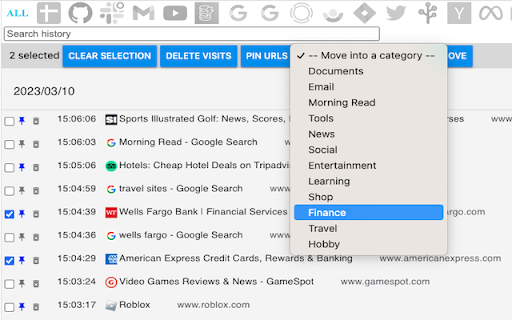
Hi, good idea. It looks mostly as a backup. But it could be much mode. Here are categories... but what logic behind these buttons (left side) with categories? I can't find a way to export only filtered items. Can I select with ctrl and shift some range of filtered items? How to select all filtered items at once at least? What if I need to export only specific items? Is there a button to export selected list of items? Here are some really needed features in my point of view. Hope it could be helpful. BR :-)
Could be really good, you need it so it replaces the default history button, having to click extensions and then history plus is just too much effort.
Fine!
Just needs to be open-source and available on GitHub. Other than that, it's perfect.
Permissions (4)
Permissions
Details
| Version | 2.0.8 |
| Updated | Nov 21, 2024 |
| Size | 698KiB |
| First Seen | Mar 27, 2026 |
More by History+


Popular in tools



Popular Extensions




