
⚠️Not updated in over a year
Description
😊 Welcome to the page of our screenshot on mac. It is the instrument you have been looking for if you seek innovative ways of how to screenshot on mac in a second! This extension is certain to solve the problems of how to take screenshot on mac without wasting your time and effort. Use it for your work, learning or personal tasks - screenshot on mac will speed up all the processes you need!
💯 It provides you with a great variety of opportunities of taking captured images of your pages. You are free to find out how to screenshot on mac any part of the page – choose what suits you best. Our extension will help you save all the necessary information.
🔥 One of its key advantages is that you don’t need to screenshot shortcuts on mac anymore. So how to take screenshot on mac? Just make one click and you’re done!
Top seven reasons to install our screenshot on mac:
1️⃣ Saving screenshots to disk in PDF (with links), PNG, and JPEG formats.
2️⃣ Taking screens of the entire web page, getting the opportunity of how to crop screenshot on mac (capturing the visible part of the web page, or a selective fragment) 🔥 .
3️⃣ The function of automatic capture of all tabs in PDF or image format 🔥 .
4️⃣ The option to capture address lists.
5️⃣ No shortcuts — one click is enough to how to take a screenshot on mac.
6️⃣ The feature to copy captured images to the clipboard .
7️⃣ Printing screenshots 🔥 .
screenshot on mac is a simple and convenient browser screenshot tool thanks to which:
You gain access to how to take a screenshot on mac of the full page.
You can crop the captured image (to learn how to crop screenshot on mac scroll down ⬇️ ).
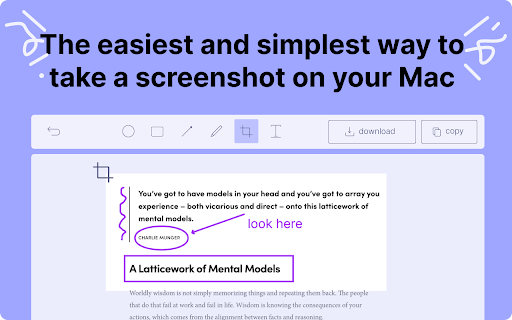
# You can annotate and edit your screenshot on mac. In more detail, provided that there is a need to edit a captured image, you are free to highlight the necessary information with the help our free-to-use instruments. There is a bar of rectangle, oval, round, freehand and arrow tools (all in one color) to draw attention to the most important parts of the screenshot. To put additional information or emphasize something, feel welcome to try our text and pen tools. Show what to pay attention to using arrows.
# You can always cancel the action if necessary! Took the wrong screenshot and now have no idea how to screenshot on a mac again? No problem. 🔥 Use the “undo” option to go back to the previous result.
# You can find out without any problem how to crop screenshot on mac to the necessary size if you don’t need the captured image of the whole page. With our extension it’s easy now how to take screenshot on mac of only what you want!
🤔 Why choose screenshot on mac?
* Enhance team communication by producing and sharing your captured images on mac. Create screenshots from clips of YouTube and other videos to distribute on social networks such as Facebook, Twitter, LinkedIn, and more.
* Capture visual data in one click. Learn how to screenshot on a mac with our extension 🔥 .
* Use your screenshots for teaching, work meetings, personal purposes and so one (there a lot of options for you to choose from) .
* Document and attach your captured image to any online board to share information with your coworkers fast 🔥 .
* Use rapid annotated screenshots to effectively communicate with friends or colleagues.
🤔 How to paste a screenshot on mac?
➡️ There are two options for you after you’ve captured a screenshot – to copy it to the clipboard or download it as an image in PNG format on your computer.
➡️ To paste a captured image, all you need to do is just to copy the screenshot you have downloaded and use the Common-V combination of hotkeys to place it where you want.
🤔 How to crop screenshot on mac?
✂️ There is a special crop tool for you to control the size of a screenshot. Drag it to resize the captured image and there you are, with its cut version!
🤔 Is this extension free?
There is some good news for you: our screenshot on mac has an absolutely free version 🔥 After downloading this extension, you will gain access to a great variety functions:
✔️ you will have the opportunity to create unlimited captured images: scroll down to learn how to take a screenshot on mac⬇️
✔️ there will be an option for you to make unlimited full page screenshots (or cropped ones if necessary)
✔️ you will be allowed to add (information, shapes, highlights, etc.), change the size of your captured image, rotate, zoom: with our extension screenshot on mac, it will be possible to print the necessary text right on the screenshot (and download it like this on your computer or copy it to the clipboard), arrows (point out the most important parts), free hand drawing.
✔️ you will be able to do frame editing for your recordings.
✔️ you will discover the way of how to screenshot on mac in no time: Download, copy, open your captured image 🔥
✔️ you will not have to create captured images with watermarks: they belong to you and you only!
With its intuitive interface and straightforward functionality, our application screenshot on mac provides a seamless working process. It lets you capture an image of any screen area in just one click. Furthermore, you can instantly edit the screenshot using an easy-to-understand editor.
🤔 But how to screenshot on a mac?
✅ Choose the area you are going to take a screenshot on mac of and launch our application.
✅ With the help of a crop tool, arrange the size of the captured image (it may be a full page screenshot or its resized version: it depends on your goals).
✅ Annotate and edit your screenshot🔥Use oval, rectangle, round, hand free drawing, arrow tools to highlight its most significant part — be inventive and creative! Our screenshot on mac provides a great variety of opportunities for creation.
✅ Your most important step: how to take screenshot on mac. There are two possible options for you to select: you can apply Common-V hotkey combination and copy the captured image to the clipboard or save it on your computer in different formats (PNG, PDF, etc.)
Feel free to contact us if you have any questions about screenshot on mac, suggestions, or requests for extra features. You can also reach us through email at proludey@gmail.com. We highly value your input!
Reviews
Loading reviews...
Permissions (4)
Permissions
activeTabℹ Can access the current tab when you click the extension scriptingℹ Can inject scripts into web pages storageℹ Can store data locally in your browser tabsℹ Can see your open tabs and their URLs
Details
| Version | 0.0.1 |
| Updated | Apr 8, 2024 |
| Size | 308KiB |
| First Seen | Mar 31, 2026 |
More by proludey



Popular in tools

Zotero Connector
by Zotero
8M
★ 3.96
tools
8M
★ 3.96
tools

Browsec VPN - Free VPN for Chrome
by Browsec
7M
★ 4.44
tools
7M
★ 4.44
tools

AnyDoc Translator - Translate Web and PDF
by www.wps.com
7M
★ 4.58
tools
7M
★ 4.58
tools

WPS PDF - Read, Edit, Fill, Convert, and AI Chat PDF with Ease
by www.wps.com
7M
★ 4.45
tools
7M
★ 4.45
tools

Video DownloadHelper
by Aclap
5M
★ 4.43
tools
5M
★ 4.43
tools
Popular Extensions

Adobe Acrobat: PDF edit, convert, sign tools
by Adobe Inc.
331M
★ 4.40
workflow
331M
★ 4.40
workflow

AdBlock — block ads across the web
by AdBlock
62M
★ 4.48
workflow
62M
★ 4.48
workflow

迅雷下载支持
by Shenzhen Xunlei Network Technology Co., Ltd.
59M
★ 2.77
workflow
59M
★ 2.77
workflow

Grammarly: AI Writing Assistant and Grammar Checker App
by Grammarly
42M
★ 4.50
communication
42M
★ 4.50
communication

Adblock Plus - free ad blocker
by eyeo GmbH
41M
★ 4.39
workflow
41M
★ 4.39
workflow