RevEye Reverse Image Search icon

RevEye Reverse Image Search

by steven2358

v2.0.0 Updated Sep 3, 2024 29.25KiB
CWS
100K
Users
★ 4.11
157 reviews
#1065
of 201.2K
tools
#178 of 62.5K
⚠️Not updated in over a year

Description

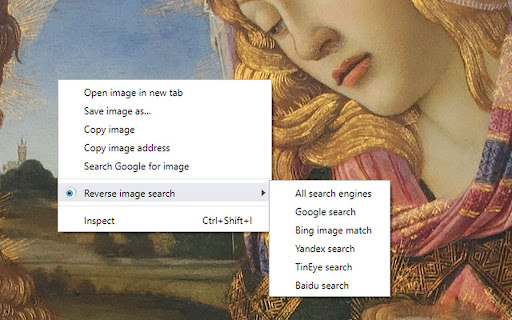
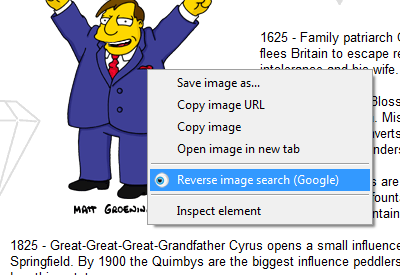
This extension allows to perform an inverse image search by right-clicking onto any image in a web site. You can configure the context menu to contain either a single button with your default search engine, or a cascaded menu with all included search engines. You can also add custom search engines through the options menu. RevEye is free and open source software. To minimize its memory footprint in your browser, it is written in pure vanilla JavaScript and it does not use any of the fancy JavaScript frameworks. RevEye does not track any of your data, and it does not include ads. Source code and more info: https://github.com/steven2358/reveye Changelog: - v2.0.0 (2024-08-30): Updated to manifest v3. Added option to add custom search engines. Refactored code. - v1.5.2 (2022-11-13): Replaced Google Image Search by Google Lens. - v1.5.1 (2021-01-19): Fixed a bug in upgrade/initialization script. - v1.5.0 (2021-01-18): Add checkboxes to enable/disable individual search engines. Removed Baidu (for now). - v1.4.8 (2020-11-24): Fixed Yandex search. - v1.4.7 (2019-06-14): Removed unnecessary permissions. - v1.4.6 (2019-06-14): Fixed Yandex search. - v1.4.5 (2017-07-23): Fixed Baidu search. - v1.4.4 (2015-05-20): Re-included Yandex and Baidu search. - v1.4.3 (2015-05-19): Included Bing image match. - v1.4 (2013-06-28): Performed security changes and updated manifest to v2. Removed Yandex, Baidu, Cydral. - v1.3 (2011-06-17): Included Google (brand new and kicking), Yandex and Baidu image search engines. Removed GazoPa as they discontinued their B2C service. - v1.2 (2011-05-30): Name change to comply with Google's branding policies. Added Cydral search engine. Added option to choose between default engine or cascaded submenu. - v1.1 (2011-03-01): Added option to select between TinEye and GazoPa search engines. - v1.0 (2010-03-02): Added context menu. - v0.2 (2009-12-14): Included new logo. - v0.1 (2009-12-13): Initial version. Performs reverse image search of all images on a page using TinEye.
RevEye Reverse Image Search screenshot 1RevEye Reverse Image Search screenshot 2RevEye Reverse Image Search screenshot 3RevEye Reverse Image Search screenshot 4

Reviews (17 cached)

★☆☆☆☆2024-09-12
L L

This was great up until this last week, every time I right click I don't see the option anywhere, pinterest, google, etc :( I reinstalled and still won't work :(

★☆☆☆☆2024-02-25
Dimitrios K. Sotiropoulos

It doesn't work.

★☆☆☆☆2023-11-10
Elliot B

I like how you replaced google image search with google lens to kneecap your own extension

★☆☆☆☆2023-03-27
Into the Weird Blue Yonder

Identical to the new built-in reverse search feature.

★☆☆☆☆2023-03-20
Joris D

Doesn't work anymore unfortunately... Please fix it!

★☆☆☆☆2022-12-20
Leo Andeson

Extension uses google lens, so it's garbage.

★☆☆☆☆2014-09-22
norio norio

Yandex search removed

★☆☆☆☆2012-10-23
Andrew Voronkov

yandex.ru search is not working again!

★★☆☆☆2023-02-18
M W

Doesn't work on a lot of sites. Uses google lens - worthless. And yandex, almost worthless. And TinEye, which is good. So I uninstalled this and just went with the TinEye extension and I'm nuch happier using that.

★★☆☆☆2023-01-06
Jakub Zieliński

Google reverse image search no longer seems to work. Other search engines work fine but google reverse image search is the most valuable one since google lense sucks to use.

★★☆☆☆2022-11-20
Alexander Poretski

After the last update RevEte started using google lens instead of google search by image, this option at least could be configurable, that is the only reason I switch now to alternatives :( Strongly hate google lens, it is absolutely useless imho.

★★★☆☆2025-01-24
Bernardo

its opening google lens instead of the old reverse image search

★★★☆☆2023-01-06
Pavel K

would be great otherwise but it uses the google lens nonsense instead of the proper google search

★★★☆☆2022-11-12
Mia Viere

Chrome version 107, using google search option has stopped working completely.

★★★☆☆2020-03-10
Aes

Yandex image search is not working on this latest version

★★★☆☆2019-11-02
Jonathan

Very nice but please remove Baidu it's useless for people in the U.S!

★★★☆☆2014-01-03
Darrel Root Carpenter

This does not support all the search engines it's claiming. Now Google's search is gone and this Only Supports TinEye which is useless for my needs. Google has always produced results for me.

Permissions (2)

Permissions

contextMenus Can add items to the right-click menu storage Can store data locally in your browser

Details

Version 2.0.0
Updated Sep 3, 2024
Size 29.25KiB
First Seen Mar 31, 2026