
YouTube Transcript Plus - full transcript, AI chat with video & summary
v1.2.1 Updated May 20, 2025 25.01KiB
⚠️Requests 1 sensitive permission
Description
YouTube Transcript Plus, also called as Youtube Caption Plus, enhances your YouTube viewing experience by providing powerful transcript and AI features in a convenient side panel.
🎯 KEY FEATURES:
🤖 AI-Powered Features
• Generate chapter-based summaries of videos
• Chat with AI about the video content
• Get both overall video summary and per-chapter breakdowns
• Ask questions about specific parts of the video
• Get AI-powered insights and explanations
💡 Easy Youtube Transcript
• View complete video transcripts in a clean, readable format
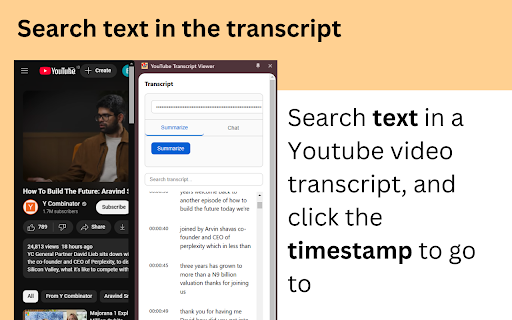
• Click any line to jump to that exact moment in the video
• Search within transcripts to find specific content
• Auto-scrolling transcript follows the video playback
• Works with any YouTube video that has captions enabled
💡 How It Works:
1. Install the extension
2. Go to any YouTube video
3. Click the extension icon to open the side panel
4. Enable captions on the video (CC button)
5. The transcript will automatically appear & you can search any text
6. You can also summarize and chat about video content with AI
🎁 Free Tier:
• Access to transcript viewing and search features
• Limited usage
• Subscribe for unlimited access!
💪 Perfect For:
• Students reviewing lecture videos
• Researchers analyzing content
• Content creators making notes
• Anyone who prefers reading to listening
• Non-native speakers following along with text
✨ Use Cases
Educational use:
• Study more effectively by reading along with educational videos
• Quickly find specific information in long videos
• Create notes and summaries for video content
• Better understand content in non-native languages
• Save time with AI-powered chapter summaries
Professional use:
• Research video content efficiently
• Create meeting notes from video recordings
• Quick review of long presentations
• Extract key points with AI assistance
• Reference specific moments with timestamp links
⚡️ Getting Started:
1. Install the extension
2. Open any YouTube video
3. Click the extension icon to open the icon
4. Enable captions (CC) in the video
🔧 Support:
• Responsive technical support
• Direct developer contact for issues
📧 Contact & Support:
For any questions, issues, or feedback, please contact:
youtubetranscript@terrydjony.com
Free webapp is also available here: http://youtubevideotranscripts.com/
Try YouTube Caption Plus today and transform how you interact with YouTube videos!



Reviews
Loading reviews...
Permissions (4)
Permissions
activeTabℹ Can access the current tab when you click the extension sidePanel storageℹ Can store data locally in your browser webRequestℹ Can observe and analyze network traffic
Details
| Version | 1.2.1 |
| Updated | May 20, 2025 |
| Size | 25.01KiB |
| First Seen | Mar 24, 2026 |
More by goodextension

SnipSolve AI - Screenshot questions & solve with GPT-5 (Vision)!
by goodextension
552
★ 4.43
education
552
★ 4.43
education

InterviewBFF - Interview Copilot with AI
by goodextension
36
★ 0.00
education
36
★ 0.00
education

Compose Better: AI Writing Assistant - Grammarly alternative!
by goodextension
33
★ 5.00
tools
33
★ 5.00
tools
Popular in tools

Zotero Connector
by Zotero
8M
★ 3.96
tools
8M
★ 3.96
tools

Browsec VPN - Free VPN for Chrome
by Browsec
7M
★ 4.44
tools
7M
★ 4.44
tools

AnyDoc Translator - Translate Web and PDF
by www.wps.com
7M
★ 4.58
tools
7M
★ 4.58
tools

WPS PDF - Read, Edit, Fill, Convert, and AI Chat PDF with Ease
by www.wps.com
7M
★ 4.45
tools
7M
★ 4.45
tools

Video DownloadHelper
by Aclap
5M
★ 4.43
tools
5M
★ 4.43
tools
Popular Extensions

Adobe Acrobat: PDF edit, convert, sign tools
by Adobe Inc.
331M
★ 4.40
workflow
331M
★ 4.40
workflow

AdBlock — block ads across the web
by AdBlock
62M
★ 4.48
workflow
62M
★ 4.48
workflow

迅雷下载支持
by Shenzhen Xunlei Network Technology Co., Ltd.
59M
★ 2.77
workflow
59M
★ 2.77
workflow

Grammarly: AI Writing Assistant and Grammar Checker App
by Grammarly
42M
★ 4.50
communication
42M
★ 4.50
communication

Adblock Plus - free ad blocker
by eyeo GmbH
41M
★ 4.39
workflow
41M
★ 4.39
workflow