
Description
🌐 Select to AI: Context Menu for ChatGPT, Gemini & Perplexity
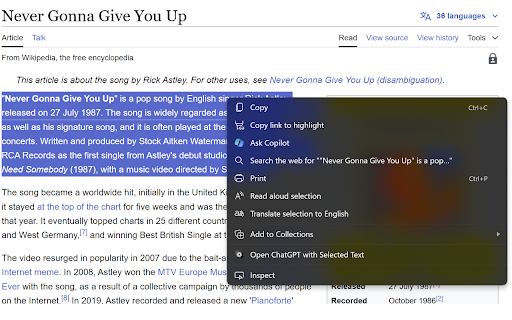
Effortlessly access your favorite AI assistants (ChatGPT, Gemini, or Perplexity) directly from your right-click context menu. Perfect for quick explanations, summaries, translations, or fact-checking without breaking your flow.
✅ Simple, Free, and Privacy-Focused
This lightweight browser extension is designed to boost productivity while respecting user privacy. It’s completely free and does not track or store any user data.
✨ Key Features:
🤖 Multi-Model Support: Choose between ChatGPT, Google Gemini, or Perplexity AI depending on your needs.
🖱️ specific View Modes: Open the AI in the standard Chrome Side Panel (keep your browsing context!), a floating Popup Window, or a New Tab.
⚡ Auto-Send: Option to automatically submit the selected text as soon as the AI opens.
📝 Instant Productivity: Get summaries, translations, or code explanations instantly.
🎨 Customizable: Enable/disable specific services or switch between Light/Dark mode settings.
🔒 No Data Collection: The extension is privacy-focused and does not store, collect, or share any user data.
💯 100% Free: No hidden fees, subscriptions, or restrictions.
🛠️ How It Works:
1. Select text on any webpage.
2. Right-click and hover over "Select to AI".
3. Click your preferred service (ChatGPT, Gemini, or Perplexity).
4. The AI opens in your chosen mode (Side Panel, Window, or Tab) with the text pre-filled and ready to go.
*Pro Tip: If you only enable one service in the settings, the menu item moves to the top level for even faster access!*
🔑 Minimal Permissions: The extension uses minimal permissions (Context Menus, Storage, Side Panel) ensuring a secure experience.
📬 Support and Feedback
For any support, bug reports, or feature requests, feel free to contact arnavprak@gmail.com. We appreciate your feedback to continuously improve the extension.

Reviews
Loading reviews...
Permissions (4)
Permissions
contextMenusℹ Can add items to the right-click menu declarativeNetRequestℹ Can block or redirect network requests sidePanel storageℹ Can store data locally in your browser
Details
| Version | 2.0 |
| Updated | Jan 2, 2026 |
| Size | 146KiB |
| First Seen | Mar 29, 2026 |
Popular in tools

Zotero Connector
by Zotero
8M
★ 3.96
tools
8M
★ 3.96
tools

Browsec VPN - Free VPN for Chrome
by Browsec
7M
★ 4.44
tools
7M
★ 4.44
tools

AnyDoc Translator - Translate Web and PDF
by www.wps.com
7M
★ 4.59
tools
7M
★ 4.59
tools

Video DownloadHelper
by Aclap
5M
★ 4.43
tools
5M
★ 4.43
tools

Microsoft Bing Homepage & Search for Chrome
by Microsoft Corporation
4M
★ 3.72
tools
4M
★ 3.72
tools
Popular Extensions

Adobe Acrobat: PDF edit, convert, sign tools
by Adobe Inc.
331M
★ 4.40
workflow
331M
★ 4.40
workflow

AdBlock — block ads across the web
by AdBlock
62M
★ 4.48
workflow
62M
★ 4.48
workflow

迅雷下载支持
by Shenzhen Xunlei Network Technology Co., Ltd.
59M
★ 2.77
workflow
59M
★ 2.77
workflow

Grammarly: AI Writing Assistant and Grammar Checker App
by Grammarly
42M
★ 4.50
communication
42M
★ 4.50
communication

Adblock Plus - free ad blocker
by eyeo GmbH
41M
★ 4.39
workflow
41M
★ 4.39
workflow