
⚠️Not updated in over a year
Description
SaveIG is a revolutionary extension designed to enhance your Instagram experience by allowing you to effortlessly download Videos, Stories, Photos, Reels, and Profile Pictures with ease and speed.
Key Features of SaveIG:
👉 Video Downloader: Download Instagram videos in the highest quality available, up to an impressive 4K resolution.
👉 Photo Downloader: Easily save full-size photos from Instagram posts with just a few clicks.
👉 Stories Downloader: Effortlessly download Instagram Stories and Highlights to ensure you never miss a moment.
👉 Reels Downloader: Download Reels and IGTV videos for free, so your favorite content is always at your fingertips.
👉 Profile Downloader: Save Instagram profile pictures in high-definition quality.
How to Use SaveIG on Chrome Browser?
1. Open Chrome and Navigate to Instagram: Launch your Chrome browser and go to Instagram.com.
2. Select the Desired Content: Browse through Instagram and find the photo or video you wish to download.
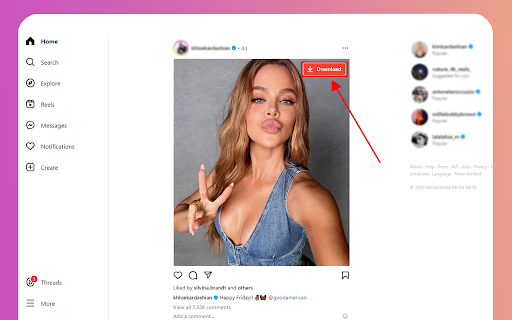
3. Download with Ease: Click the "Download" button located in the top right corner of the selected photo or video.
4. Save to Your Device: A new tab will open displaying the content ready for download. Save it directly to your device from this tab.
Important Note:
After installing the SaveIG extension, be sure to reload the Instagram tab where you wish to download content. This step is crucial for the extension to recognize and process the file correctly.
We highly value your feedback and suggestions to improve SaveIG’s performance. If you encounter any issues or have ideas for enhancement, please do not hesitate to contact us.
Experience the convenience and power of SaveIG today, and never miss out on your favorite Instagram content again!


Reviews
Loading reviews...
Permissions (1)
Permissions
storageℹ Can store data locally in your browser
Details
| Version | 1.1 |
| Updated | Sep 20, 2024 |
| Size | 76.77KiB |
| First Seen | Apr 1, 2026 |
Popular in tools

Zotero Connector
by Zotero
8M
★ 3.96
tools
8M
★ 3.96
tools

Browsec VPN - Free VPN for Chrome
by Browsec
7M
★ 4.44
tools
7M
★ 4.44
tools

AnyDoc Translator - Translate Web and PDF
by www.wps.com
7M
★ 4.58
tools
7M
★ 4.58
tools

WPS PDF - Read, Edit, Fill, Convert, and AI Chat PDF with Ease
by www.wps.com
7M
★ 4.45
tools
7M
★ 4.45
tools

Video DownloadHelper
by Aclap
5M
★ 4.43
tools
5M
★ 4.43
tools
Popular Extensions

Adobe Acrobat: PDF edit, convert, sign tools
by Adobe Inc.
331M
★ 4.40
workflow
331M
★ 4.40
workflow

AdBlock — block ads across the web
by AdBlock
62M
★ 4.48
workflow
62M
★ 4.48
workflow

迅雷下载支持
by Shenzhen Xunlei Network Technology Co., Ltd.
59M
★ 2.77
workflow
59M
★ 2.77
workflow

Grammarly: AI Writing Assistant and Grammar Checker App
by Grammarly
42M
★ 4.50
communication
42M
★ 4.50
communication

Adblock Plus - free ad blocker
by eyeo GmbH
41M
★ 4.39
workflow
41M
★ 4.39
workflow