
⚠️Not updated in over 2 years
Description
🔲 Introduction
KeyPress Live is a powerful Google Chrome extension that allows you to display real-time keyboard inputs on any webpage you visit. Whether you're demonstrating steps, recording tutorials, or sharing your web browsing experience with others, this extension provides an intuitive way to showcase your keyboard inputs, ensuring that your audience can clearly follow your actions.
🔲Usage
🔘 Install the Extension: Go to the Chrome Web Store and install the "KeyPress Live" extension.
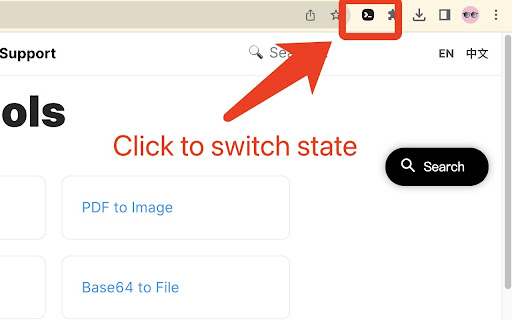
🔘 Enable the Extension: Once installed, you'll see the "KeyPress Live" icon in your browser's toolbar, that is, the activation is successful.
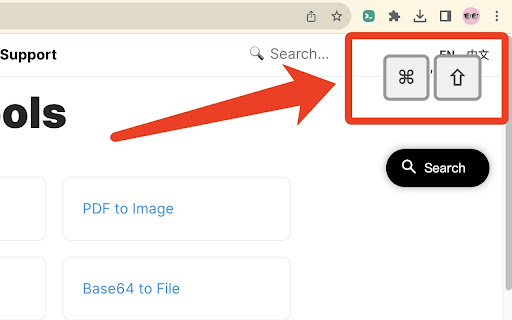
🔘 Real-Time Display: As you press keys on your keyboard while browsing any webpage, the pressed keys will be displayed in real-time as text in a corner or a designated location on the current webpage.
🔘 Customize Settings: [TODO supports me to speed up updates] The extension offers customization options to tailor the display according to your preferences. You can choose the size, color, and font style of the displayed keyboard inputs, as well as adjust the display position to avoid interference with your browsing experience.
🔘 Toggle Visibility: If you want to temporarily hide the displayed keyboard inputs, simply click the extension icon to toggle the display on and off.
🔘 End Usage: When you no longer need to show the keyboard inputs, click the "KeyPress Live" icon in the browser toolbar to disable the extension.
KeyPress Live aims to provide a simple yet effective way for you to share your keyboard actions with others, enhancing clarity and visualization in your demonstrations and tutorials, whether you're working, learning, or enjoying entertainment activities.
Reviews
Loading reviews...
Permissions (1)
Permissions
storageℹ Can store data locally in your browser
Details
| Version | 1.0 |
| Updated | Sep 6, 2023 |
| Size | 20.36KiB |
| First Seen | Apr 1, 2026 |
More by openHacking

一键复制csdn代码
by openHacking
10K
★ 4.82
developer
10K
★ 4.82
developer

ExportGPT: Export ChatGPT Conversation
by openHacking
10K
★ 3.40
tools
10K
★ 3.40
tools

ChatGPT to Markdown
by openHacking
7K
★ 4.00
developer
7K
★ 4.00
developer

Web2Markdown - Markdown Web Clipper
by openHacking
1K
★ 5.00
workflow
1K
★ 5.00
workflow

知乎去除登陆弹窗
by openHacking
1K
★ 3.00
workflow
1K
★ 3.00
workflow
Popular in tools

Zotero Connector
by Zotero
8M
★ 3.96
tools
8M
★ 3.96
tools

Browsec VPN - Free VPN for Chrome
by Browsec
7M
★ 4.44
tools
7M
★ 4.44
tools

AnyDoc Translator - Translate Web and PDF
by www.wps.com
7M
★ 4.58
tools
7M
★ 4.58
tools

WPS PDF - Read, Edit, Fill, Convert, and AI Chat PDF with Ease
by www.wps.com
7M
★ 4.45
tools
7M
★ 4.45
tools

Video DownloadHelper
by Aclap
5M
★ 4.43
tools
5M
★ 4.43
tools
Popular Extensions

Adobe Acrobat: PDF edit, convert, sign tools
by Adobe Inc.
331M
★ 4.40
workflow
331M
★ 4.40
workflow

AdBlock — block ads across the web
by AdBlock
63M
★ 4.48
workflow
63M
★ 4.48
workflow

迅雷下载支持
by Shenzhen Xunlei Network Technology Co., Ltd.
59M
★ 2.77
workflow
59M
★ 2.77
workflow

Grammarly: AI Writing Assistant and Grammar Checker App
by Grammarly
42M
★ 4.50
communication
42M
★ 4.50
communication

Adblock Plus - free ad blocker
by eyeo GmbH
41M
★ 4.39
workflow
41M
★ 4.39
workflow