
WhoisExtractor: Email Tool
v1.0.2 Updated Nov 14, 2025 116KiB
Description
WhoisExtractor: Email Tool - Professional Email Address Extractor
Extract thousands of email addresses from raw text data in seconds with our powerful, privacy-focused Chrome extension. Perfect for marketers, sales professionals, recruiters, and anyone who needs to quickly parse email addresses from large datasets.
KEY FEATURES
Smart Email Extraction
• Extract email addresses from any text, files, or documents
• Process large files (up to 100MB+) without freezing your browser
• Accurate regex pattern matching - no invalid emails
• Real-time extraction progress with live count
Advanced Filtering Options
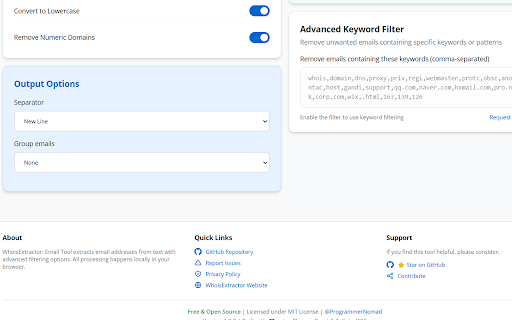
• Remove duplicate emails automatically
• Filter by keywords (include/exclude specific terms)
• Remove emails with numeric domains
• Filter out unwanted strings
• Case-sensitive or lowercase conversion
• Sort alphabetically for easy organization
Modern, Intuitive Interface
• Clean, professional design with dark/light theme
• Full-page workspace for maximum productivity
• Responsive layout works on any screen size
• Real-time preview of results
• Drag & drop file support (coming soon)
Privacy-First Approach
• 100% LOCAL processing - nothing sent to servers
• Your data never leaves your browser
• No tracking, no analytics, no data collection
• Open source and transparent
Flexible Export Options
• Copy to clipboard with one click
• Export as .TXT file
• Export as .CSV for spreadsheets
• Export formatted data with separators (comma, newline, semicolon, etc.)
Performance Optimized
• Handles files up to 100MB+
• Background processing for large inputs
• Streaming results display
• No browser freezing or crashes
PERFECT FOR
✓ Marketing professionals building email lists
✓ Sales teams extracting leads from documents
✓ Recruiters parsing candidate emails
✓ Data analysts cleaning datasets
✓ Researchers organizing contact information
✓ Anyone working with bulk email data
HOW TO USE
1. Click the extension icon to open the tool page
2. Paste your text or upload a file containing emails
3. Adjust filtering options as needed
4. Click "Extract" and watch emails appear instantly
5. Copy or export results in your preferred format
ADVANCED OPTIONS
• Extraction Type: Email addresses (focused tool)
• Basic Options: Deduplicate, lowercase, remove numeric domains
• Output Options: Sort alphabetically, choose separator
• Advanced Filters: Keyword filtering, string removal
• Real-time Statistics: Count, file size, processing status
TECHNICAL HIGHLIGHTS
• Built with modern web technologies (React, TypeScript, TailwindCSS)
• Manifest V3 compliant for security and performance
• Keyboard shortcuts for power users
• Persistent settings saved locally
• Session recovery - resume work after closing tab
COMPLETELY FREE
• No hidden costs or premium features
• No account registration required
• No credit card needed
• Open source (MIT License)
• Community-driven development
COMING SOON
• Email validation & quality scoring
• Smart duplicate detection (Gmail variations)
• Domain analytics dashboard
• Search & filter within results
• Advanced export formats (Excel, vCard, CRM templates)
• Drag & drop file upload
• Keyboard shortcuts
• Extraction history
OPEN SOURCE
This extension is free and open source! Contribute, report issues, or request features on GitHub:
https://github.com/ProgrammerNomad/WhoisExtractor-Email-Tool
PRIVACY POLICY
We respect your privacy:
• No data collection or tracking
• No external server communication
• All processing happens locally in your browser
• Settings stored only on your device
• You are in complete control of your data
SUPPORT & FEEDBACK
Love the extension? Please leave a review!
Found a bug? Report it on GitHub Issues.
Have suggestions? We'd love to hear from you!
IMPORTANT NOTES
• This tool extracts emails from TEXT data - it doesn't scrape websites
• All extraction is local; no internet connection required after installation
• For best performance, use Chrome/Edge on desktop
• Large files (>10MB) will process in background mode
WHY CHOOSE WhoisExtractor?
Unlike online tools that send your data to unknown servers, WhoisExtractor processes everything locally in your browser. Your sensitive contact lists, customer databases, and proprietary data remain 100% private and secure. No subscriptions, no data limits, no privacy concerns.
Perfect for professionals who value privacy, speed, and accuracy in their email extraction workflow.
Download now and start extracting emails faster than ever! ⚡


Reviews
Loading reviews...
Permissions (2)
Permissions
offscreen storageℹ Can store data locally in your browser
Details
| Version | 1.0.2 |
| Updated | Nov 14, 2025 |
| Size | 116KiB |
| First Seen | Apr 1, 2026 |
More by NomadProgrammer

Popular in tools

Zotero Connector
by Zotero
8M
★ 3.96
tools
8M
★ 3.96
tools

Browsec VPN - Free VPN for Chrome
by Browsec
7M
★ 4.44
tools
7M
★ 4.44
tools

AnyDoc Translator - Translate Web and PDF
by www.wps.com
7M
★ 4.58
tools
7M
★ 4.58
tools

WPS PDF - Read, Edit, Fill, Convert, and AI Chat PDF with Ease
by www.wps.com
7M
★ 4.45
tools
7M
★ 4.45
tools

Video DownloadHelper
by Aclap
5M
★ 4.43
tools
5M
★ 4.43
tools
Popular Extensions

Adobe Acrobat: PDF edit, convert, sign tools
by Adobe Inc.
331M
★ 4.40
workflow
331M
★ 4.40
workflow

AdBlock — block ads across the web
by AdBlock
63M
★ 4.48
workflow
63M
★ 4.48
workflow

迅雷下载支持
by Shenzhen Xunlei Network Technology Co., Ltd.
59M
★ 2.77
workflow
59M
★ 2.77
workflow

Grammarly: AI Writing Assistant and Grammar Checker App
by Grammarly
42M
★ 4.50
communication
42M
★ 4.50
communication

Adblock Plus - free ad blocker
by eyeo GmbH
41M
★ 4.39
workflow
41M
★ 4.39
workflow