SearchJumper - Highlight & Selection Search icon

SearchJumper - Highlight & Selection Search

by Hoothin

v1.9.3.63 Updated Feb 11, 2026 1.44MiB
CWS
4K
Users
★ 4.65
65 reviews
#11618
of 204.4K
tools
#2317 of 63.5K
Highly rated

Description

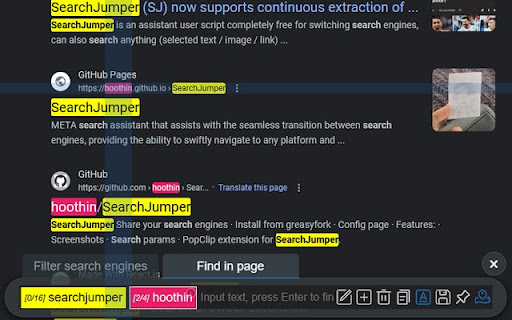
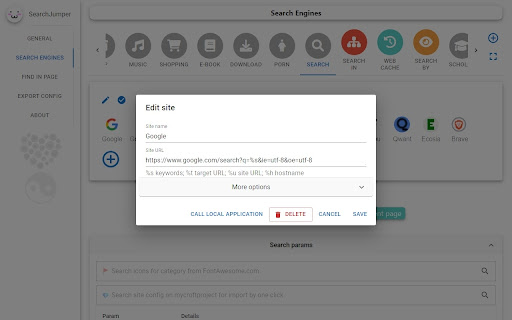
*To the guys trying to sell me paid reviews: Knock it off. I've already gotten two mysterious one-star reviews from you. This is a free, open-source project—you can't get blood from a stone. SearchJumper is a selection search and right-click search extension built for fast, accurate web search. Highlight text on any page and run an instant selection search across multiple search engines in one click, without leaving your tab. Use the context menu, right-click search, or keyboard shortcuts to launch multi-engine search with Google, Bing, DuckDuckGo, Yahoo, or any custom engine. This selection search tool is perfect for researchers, students, marketers, analysts, and power users who compare sources, prices, and viewpoints. SearchJumper combines selection search, contextual search, and AI search into a single, lightweight workflow. It is a multi search engine extension that lets you compare results side by side and save time on every query. Key features and benefits: - Selection search and right-click search for instant lookups on any website. - Multi-engine search for fast comparison and verification. - AI-assisted search to summarize, translate, and answer faster. - Batch search to query multiple engines at once. - Find in page for on-page search and quick validation. - Keyword highlighting with regex and fuzzy matching. - Image search and link search for richer discovery. - Full customization: search engines, groups, context menu, and hotkeys. Why SearchJumper: - 100% free and open source search extension. - Privacy-first: no ads, no tracking, settings stored locally. - Lightweight and fast selection search for everyday browsing. If you rely on web search for work or study, SearchJumper helps you search faster and smarter. Install this selection search extension today and build your fastest multi-engine search workflow. Project and community: https://github.com/hoothin/SearchJumper
SearchJumper - Highlight & Selection Search screenshot 1SearchJumper - Highlight & Selection Search screenshot 2SearchJumper - Highlight & Selection Search screenshot 3SearchJumper - Highlight & Selection Search screenshot 4SearchJumper - Highlight & Selection Search screenshot 5

Reviews (5 cached)

★☆☆☆☆2026-01-26
Янъ Русъ

A crude, unfinished extension. THERE is NO way to disable unnecessary searches. 50% of the queries are displayed with errors, displayed incorrectly. When you select text, a window pops up (which is convenient), but the icons in it are displayed incorrectly - a gray circle with a cross, only the Google icon is displayed correctly. The popup window itself is displayed with a defect, half of the strip is duplicated and goes above the border of the popup window. Developer's selfishness - an additional vertical panel is displayed on the left. And if a user uses a browser in virtual systems that more often force the gaze to turn to the right, what should they do? What should other ethnic groups do, whose language is written not from left to right, but from right to left? Where is the button for selecting the side of the vertical panel?

★☆☆☆☆2025-09-08
OPSeaSpray

malware

★☆☆☆☆2025-07-14
Ilkin Abbasov

very bad

★★★☆☆2025-06-24
Feral Berry

The extension works well overall, but there's one major flaw: it doesn't retain user settings when it's temporarily disabled. Every time I disable and re-enable it, I have to reconfigure everything from scratch — which makes it really inconvenient to use regularly. I was excited to rely on this extension, but this issue is a dealbreaker for me. Hope the developer addresses it in future updates.

★★★☆☆2025-06-22
Kerem S

very very compicated and detailed. I liked it very much but I can not understand everything. best search tool. it would be better if there was a right click circle menu.

Permissions (3)

Permissions

contextMenus Can add items to the right-click menu notifications Can show desktop notifications storage Can store data locally in your browser

Details

Version 1.9.3.63
Updated Feb 11, 2026
Size 1.44MiB
First Seen Mar 31, 2026

