
Description
# Salesforce Validation Doc Generator
Do you like doing documentation? If you do, awesome! For the rest of us, here's a tool to at least help with making sure that we can still get documentation fast and accurately even when it may be on the bottom of our list of to do items!
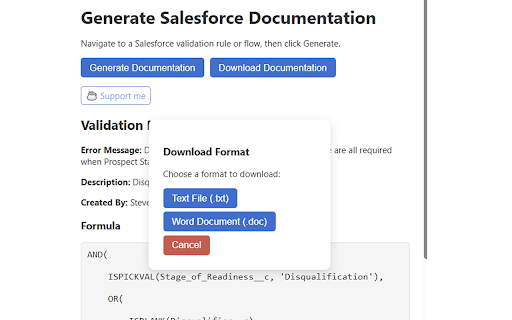
1. **Extracts** your active Salesforce Validation Rule page (name, formula, error message, description, author).
2. **Generates** a clean, formatted HTML doc in your popup, complete with:
- A 💡 concise “Purpose” written by AI
- A 📝 real-world example scenario
- A beautifully styled formula block
3. **Downloads** your rule documentation as:
- Microsoft Word (.doc) — opens directly in Word
- Plain Text (.txt) — for any editor
All AI calls are proxied through your own secure server. **No API keys in the client**, and **no data persists** on our servers—once the AI response returns, it’s sent straight to your browser.
---
## Features
- **One-Click Extraction**
Automatically detect and pull down all key fields from any “Validation Rule Detail” page in Salesforce Classic or Lightning.
- **AI-Powered Summaries**
Leverage Fireworks.ai to explain the *purpose* of your rule in 1–2 sentences and craft a *real-world example* showing exactly when a user hits that error.
- **Download Options**
Choose between a `.doc` file (Word-compatible HTML) or a plain `.txt` file—both generated instantly in your browser.
- **Clean, Consistent Styling**
– Sticky header with Generate/Download buttons
– Subtle blue ribbon accents on AI sections
– Monospaced, scrollable code block for formulas
- **Privacy & Security**
– No client-side API keys
– All AI requests forwarded server-side with CORS locked to your extension
– Zero persistent storage—your validation rules and AI results live only in your browser session
---
## How to Use
1. Navigate to any Salesforce Validation Rule Detail page (Classic or Lightning).
2. Click the **Generate Documentation** button in the toolbar popup.
3. Watch the spinner as your rule is processed.
4. Read the formatted output and AI-powered sections right in the popup.
5. Click **Download Documentation** (now visible) to grab a `.doc` or `.txt` file.
Get back those hours of manual work and keep your team aligned with up-to-date, shareable rule docs!
---


Reviews
Loading reviews...
Permissions (2)
Permissions
activeTabℹ Can access the current tab when you click the extension scriptingℹ Can inject scripts into web pages
Details
| Version | 1.0 |
| Updated | Apr 25, 2025 |
| Size | 34.44KiB |
| First Seen | Mar 28, 2026 |
More by StevenMLam


Popular in tools

Browsec VPN - Free VPN for Chrome
by Browsec
8M
★ 4.44
tools
8M
★ 4.44
tools

Zotero Connector
by Zotero
8M
★ 3.96
tools
8M
★ 3.96
tools

AnyDoc Translator - Translate Web and PDF
by www.wps.com
7M
★ 4.58
tools
7M
★ 4.58
tools

WPS PDF - Read, Edit, Fill, Convert, and AI Chat PDF with Ease
by www.wps.com
7M
★ 4.45
tools
7M
★ 4.45
tools

Video DownloadHelper
by Aclap
5M
★ 4.43
tools
5M
★ 4.43
tools
Popular Extensions

Adobe Acrobat: PDF edit, convert, sign tools
by Adobe Inc.
322M
★ 4.40
workflow
322M
★ 4.40
workflow

AdBlock — block ads across the web
by AdBlock
62M
★ 4.48
workflow
62M
★ 4.48
workflow

迅雷下载支持
by Shenzhen Xunlei Network Technology Co., Ltd.
59M
★ 2.77
workflow
59M
★ 2.77
workflow

Grammarly: AI Writing Assistant and Grammar Checker App
by Grammarly
42M
★ 4.50
communication
42M
★ 4.50
communication

Adblock Plus - free ad blocker
by eyeo GmbH
40M
★ 4.39
workflow
40M
★ 4.39
workflow