
Description
🚀 VisiOS offers two main features: 🚀
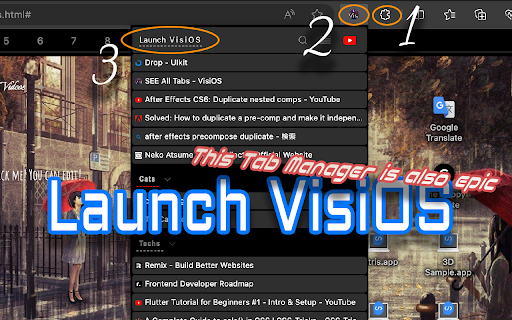
A tab manager of epic proportions and an OS that legends are made of.
🟢 Main functions of the tab manager:
✅ Sort tabs and tab groups
✅ Search tab titles and copy tab links
✅ Directly restore 404 tabs with Internet Archive
✅ YouTube top mode
🟢 Main functions of the OS
✅ 20+ languages available
✅ 9 desktops (toggle between 2D and 3D modes)
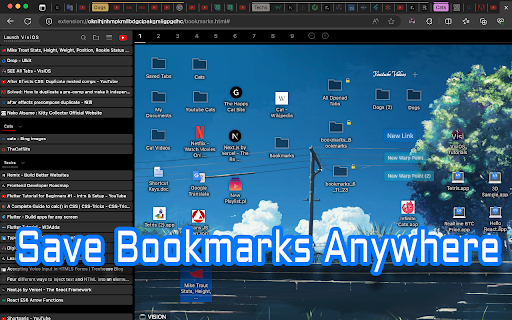
✅ Save bookmarks from the tab list, toolbar, and HTML files
✅ Generate bookmark HTML files for all browsers
✅ Sync, add, and merge bookmarks to your browser
✅ Create folders that maintain the hierarchy of all currently open tabs or all bookmarks
✅ Password-lock desktops and folders
✅ Built-in video player (37 video sites supported, including YouTube, TED, and Spotify)
✅ Create video playlists (supports YouTube playlist URLs)
✅ Playlist lets YouTube work like an iPod, with shuffle support
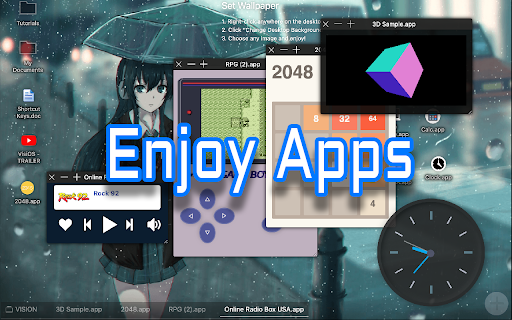
✅ Free App Store (download various apps to your OS for free)
✅ Draw on desktops, apps, and folders with 2D painting functionality
✅ Code editor for developing your own apps on the OS
✅ Quicklook like on MacOS
✅ Hypersearch (search across all 9 desktops at once)
✅ Robo-sort (sort folder hierarchies all at once)
✅ Word processor (supports LaTeX for advanced formula editing)
✅ Fully customizable fonts and icons
✅ Wide range of backup and reset options
✅ Add texts and lists anywhere on your desktops and folders
✅ Infinite scrolling (desktops behave almost like Google Maps)
✅ ChatGPT and various AIs will be more easier to use
✅ Warp points (navigate directly to specific coordinates across all desktops)
✅ Sidebar OS
You can save bookmarks anywhere on the 9 desktops.
It's really easy to import, export, sync, and merge bookmarks.
You can also install various VisiOS apps for free, including games, utilities, language learning apps, cryptocurrency tools, and more.
<VisiOS Official Tutorials:>
https://beta-japan.com/tutorials
🚀 Usage Instructions (VisiOS): 🚀
When you first install the extension, click on the extension icon, and then select "Launch VisiOS" in the pop-up menu. (NOTE: Recommended to pin the VisiOS extension)
🚀 How to change your preferred language: 🚀
Right-click anywhere on any desktop and select “Settings” to change your preferred language.


Reviews
Loading reviews...
Permissions (8)
Permissions
bookmarksℹ Can read and modify your bookmarks declarativeNetRequestℹ Can block or redirect network requests sessionsℹ Can access recently closed tabs and windows sidePanel storageℹ Can store data locally in your browser tabGroupsℹ Can organize tabs into groups tabsℹ Can see your open tabs and their URLs unlimitedStorage
Details
| Version | 1.3.4 |
| Updated | Dec 2, 2025 |
| Size | 781KiB |
| First Seen | Mar 31, 2026 |
More by center


Popular in tools

Zotero Connector
by Zotero
8M
★ 3.96
tools
8M
★ 3.96
tools

Browsec VPN - Free VPN for Chrome
by Browsec
7M
★ 4.44
tools
7M
★ 4.44
tools

AnyDoc Translator - Translate Web and PDF
by www.wps.com
7M
★ 4.58
tools
7M
★ 4.58
tools

WPS PDF - Read, Edit, Fill, Convert, and AI Chat PDF with Ease
by www.wps.com
7M
★ 4.45
tools
7M
★ 4.45
tools

Video DownloadHelper
by Aclap
5M
★ 4.43
tools
5M
★ 4.43
tools
Popular Extensions

Adobe Acrobat: PDF edit, convert, sign tools
by Adobe Inc.
331M
★ 4.40
workflow
331M
★ 4.40
workflow

AdBlock — block ads across the web
by AdBlock
62M
★ 4.48
workflow
62M
★ 4.48
workflow

迅雷下载支持
by Shenzhen Xunlei Network Technology Co., Ltd.
59M
★ 2.77
workflow
59M
★ 2.77
workflow

Grammarly: AI Writing Assistant and Grammar Checker App
by Grammarly
42M
★ 4.50
communication
42M
★ 4.50
communication

Adblock Plus - free ad blocker
by eyeo GmbH
41M
★ 4.39
workflow
41M
★ 4.39
workflow