
Description
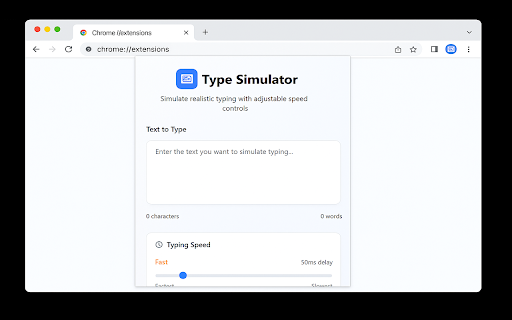
Transform any clipboard text into lifelike, human-style typing across websites. Control speed, timing, sounds, and field detection—no more robotic pastes.
✨ What’s New in v2.3.0
Smart Field Detection – Automatically find and prioritize all input fields on the page
Batch Typing – Fill multiple forms in one click with custom ordering
Recording Mode – Hide the extension UI for seamless video demos
⚠️ Note on Compatibility
Works with input fields, textareas, and most editable areas (like Google Docs or text boxes in Google Slides).
Not supported in canvas-based editors (e.g., main Google Slides canvas outside text boxes).
🚀 Core Features
Authentic Human Typing – Realistic speed variation, natural mistakes, and auto-corrections
Precision Speed Control – Adjustable from ultra-slow to lightning fast with per-character delays
Full Playback Control – Start, pause, resume, or stop typing anytime
Typing Sounds – Optional keystroke audio for immersive demos
Two Powerful Modes:
– Basic Typing – Single-field focus with classic controls
– Advanced Typing – Auto-detect and batch fill multiple fields with timing and delays
🎯 Perfect For
Content creators – Tutorial and demo recordings
Developers – Form testing and automation
Presenters – Polished, paste-free video walkthroughs
Repetitive Data Entry – Speed up workflows on paste-blocked sites
💼 Why You’ll Love It
Type Simulator elevates form-filling from mechanical to organic, delivering professional-grade demos and efficient automation. Whether you need realistic typing for user guides or rapid batch entry for testing, this extension adapts to your workflow.
Install now and leverage v2.3.0’s Smart Field Detection and Recording Mode to streamline your demos and automation—experience precision typing anywhere it’s supported!

Reviews
Loading reviews...
Permissions (2)
Permissions
activeTabℹ Can access the current tab when you click the extension scriptingℹ Can inject scripts into web pages
Details
| Version | 2.3.0 |
| Updated | Sep 9, 2025 |
| Size | 350KiB |
| First Seen | Mar 25, 2026 |
Popular in tools

Zotero Connector
by Zotero
8M
★ 3.96
tools
8M
★ 3.96
tools

Browsec VPN - Free VPN for Chrome
by Browsec
7M
★ 4.44
tools
7M
★ 4.44
tools

AnyDoc Translator - Translate Web and PDF
by www.wps.com
7M
★ 4.58
tools
7M
★ 4.58
tools

WPS PDF - Read, Edit, Fill, Convert, and AI Chat PDF with Ease
by www.wps.com
7M
★ 4.45
tools
7M
★ 4.45
tools

Video DownloadHelper
by Aclap
5M
★ 4.43
tools
5M
★ 4.43
tools
Popular Extensions

Adobe Acrobat: PDF edit, convert, sign tools
by Adobe Inc.
331M
★ 4.40
workflow
331M
★ 4.40
workflow

AdBlock — block ads across the web
by AdBlock
62M
★ 4.48
workflow
62M
★ 4.48
workflow

迅雷下载支持
by Shenzhen Xunlei Network Technology Co., Ltd.
59M
★ 2.77
workflow
59M
★ 2.77
workflow

Grammarly: AI Writing Assistant and Grammar Checker App
by Grammarly
42M
★ 4.50
communication
42M
★ 4.50
communication

Adblock Plus - free ad blocker
by eyeo GmbH
41M
★ 4.39
workflow
41M
★ 4.39
workflow