
⚠️Not updated in over 2 years
Description
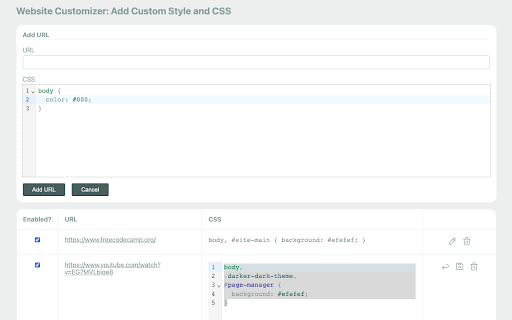
This Chrome extension is designed to modify the visual presentation of websites by adding custom CSS and styles. It provides users with the ability to customize the appearance of web pages according to their preferences. Through the extension's features, users can adjust various design elements, including colors, fonts, spacing, and layout. By leveraging the extension's capabilities, users can tailor the visual experience of websites to better suit their individual needs and preferences.
Features: ⭐
1. Add CSS for one or more site URLs.
2. Add CSS to a group of URLs, such as an entire domain name.
3. Enable/disable CSS rules without removing them.
4. Manage URLs in the extension popup or as a list on the options page.
5. CSS code highlighting and line numbers.
6. Synchronization of data between devices.
7. Secure and Privacy-Focused 🛡️: privacy is a top priority. The extension does not track or store user data, ensuring a secure and private browsing experience.
How to Use: 📔
1. Start by installing the extension from the Chrome Web Store.
2. After installation, you should see the extension's icon in the Chrome toolbar, typically located in the top-right corner of your browser. It might look like a puzzle piece, a gear, or another icon, depending on your browser version and theme.
3. Click on it and pin the extension to the top bar.
4. Click on the extension icon to open the popup.
5. To manage all URLs, right click on the extension icon and click on options button.

Reviews
Loading reviews...
Permissions (2)
Permissions
storageℹ Can store data locally in your browser tabsℹ Can see your open tabs and their URLs
Details
| Version | 1.0.2 |
| Updated | Oct 13, 2023 |
| Size | 1.45MiB |
| First Seen | Mar 26, 2026 |
More by jsoceandiver



Popular in tools

Zotero Connector
by Zotero
8M
★ 3.96
tools
8M
★ 3.96
tools

Browsec VPN - Free VPN for Chrome
by Browsec
7M
★ 4.44
tools
7M
★ 4.44
tools

AnyDoc Translator - Translate Web and PDF
by www.wps.com
7M
★ 4.58
tools
7M
★ 4.58
tools

WPS PDF - Read, Edit, Fill, Convert, and AI Chat PDF with Ease
by www.wps.com
7M
★ 4.45
tools
7M
★ 4.45
tools

Video DownloadHelper
by Aclap
5M
★ 4.43
tools
5M
★ 4.43
tools
Popular Extensions

Adobe Acrobat: PDF edit, convert, sign tools
by Adobe Inc.
331M
★ 4.40
workflow
331M
★ 4.40
workflow

AdBlock — block ads across the web
by AdBlock
63M
★ 4.48
workflow
63M
★ 4.48
workflow

迅雷下载支持
by Shenzhen Xunlei Network Technology Co., Ltd.
59M
★ 2.77
workflow
59M
★ 2.77
workflow

Grammarly: AI Writing Assistant and Grammar Checker App
by Grammarly
42M
★ 4.50
communication
42M
★ 4.50
communication

Adblock Plus - free ad blocker
by eyeo GmbH
41M
★ 4.39
workflow
41M
★ 4.39
workflow