
✅Recently updated
Description
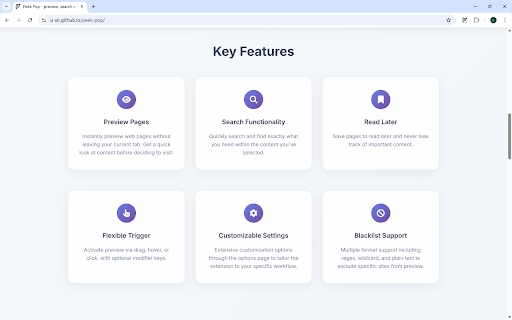
Features:
Security and unrestricted: Cross-origin access without any modification.
No repetitive login: No need to log in again when previewing websites.
Multiple trigger methods:
- Double click (default)
- Drag
- Hover
- Click
- Hold
- And allows adding modified-key combinations.
Flexible popup operations:
- Close:
-- press `Esc` key
-- clicking the original window
-- scroll on original window
- Send back:
-- Double-click a specified key
-- Select from the right-click menu
-- Click send back button
-- Middle click on blank area
- Shortcut key support: Supports all browser shortcut keys like forward, backward, reading mode, etc. (some shortcuts require the window type to be set to "normal").
Free popup display:
- Customizable background blur effect.
- Popup size and position can be customized and automatically saved, supporting separate records by domain and multi-screen display.
- Supports selecting popup window type.
- Popup buttons: Options to copy the current page URL or send the page back in a 'popup' window.
Blacklist:
- Allows customization for both links and pages.
- Supports blacklist settings in regular expressions, wildcard, and plain text forms.
Supports preview in incognito mode.
Link indicator: Shows an indicator when hovering over a link.
Link Collection:
- Ctrl + Right-click to add a link without container info.
- Alt + U (default) to view the collected links.
Customizable tooltip behavior for selected text search.
Search by image: Option to search by image during drag and hover triggers (not available on DuckDuckGo and Wikipedia).
FAQ
- Is it possible to set a popup always on top?
Due to browser add-on limitations, this can't be done directly by the add-on. However, you can use third-party software like PowerToys to achieve this. Don't forget to uncheck "Close popup when origin window is focused" on the settings page.
- Why are other actions triggered during preview?
Try disabling other add-ons to see if the issue persists. If you're using Edge, also check edge://settings/superDragDrop. If the problem continues, please create an issue.


Reviews (1 cached)
★★★☆☆2025-06-02
Opack Bright
Really perfect: has all the options you could think of, except one: open in a "real" popup (as a popup frame inside the current tab) and not another window. It quickly takes up space in the OS app bar as there are multiple windows opened, and makes it difficult to use this on multiple tabs. In the current form, you replace having multiple tabs by having multiple windows, which is worse IMHO. It's really too bad, because otherwise it's perfect!
Permissions (3)
Permissions
contextMenusℹ Can add items to the right-click menu storageℹ Can store data locally in your browser tabsℹ Can see your open tabs and their URLs
Details
| Version | 1.2.6 |
| Updated | Mar 23, 2026 |
| Size | 95.88KiB |
| First Seen | Mar 26, 2026 |
More by Peek Pop

Popular in tools

Zotero Connector
by Zotero
8M
★ 3.96
tools
8M
★ 3.96
tools

Browsec VPN - Free VPN for Chrome
by Browsec
7M
★ 4.44
tools
7M
★ 4.44
tools

AnyDoc Translator - Translate Web and PDF
by www.wps.com
7M
★ 4.58
tools
7M
★ 4.58
tools

WPS PDF - Read, Edit, Fill, Convert, and AI Chat PDF with Ease
by www.wps.com
7M
★ 4.45
tools
7M
★ 4.45
tools

Video DownloadHelper
by Aclap
5M
★ 4.43
tools
5M
★ 4.43
tools
Popular Extensions

Adobe Acrobat: PDF edit, convert, sign tools
by Adobe Inc.
331M
★ 4.40
workflow
331M
★ 4.40
workflow

AdBlock — block ads across the web
by AdBlock
62M
★ 4.48
workflow
62M
★ 4.48
workflow

迅雷下载支持
by Shenzhen Xunlei Network Technology Co., Ltd.
59M
★ 2.77
workflow
59M
★ 2.77
workflow

Grammarly: AI Writing Assistant and Grammar Checker App
by Grammarly
42M
★ 4.50
communication
42M
★ 4.50
communication

Adblock Plus - free ad blocker
by eyeo GmbH
41M
★ 4.39
workflow
41M
★ 4.39
workflow