
⚠️Not updated in over a year
Description
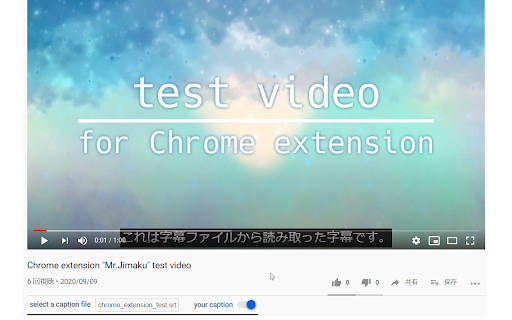
- If you have a caption file, you can watch the video with the caption
- Of course, you can also use files that were given by someone else
- You can turn on or off the display of the caption
**⚠ We're assuming UTF-8 character set for the caption file.**
1. View YouTube video page in chrome
2. Select a caption file in the box under the title
You can turn off the caption by pressing the switch next to the box.
Here's how to write a caption file. It's the format of the srt file.
```text
1
00:00:00,000 --> 00:00:07,560
これは字幕ファイルから読み取った字幕です。
2
00:00:10,230 --> 00:00:14,700
This is a test video
```
1. Write timestamp for start time and end time of the text to be displayed
2. Write the text one line below the timestamp
Timestamp is written like `hh:mm:ss,sss --> hh:mm:ss,sss`.
`hh` is the hour, `mm` is the minute, `ss` is second, and `sss` is millisecond.
`:` is a delimiter for `hh`, `mm` and `ss`,
and `,` is a delimiter for `hh:mm:ss` and `sss`.
Start time, ` --> `, and end time, in that order.
Actually, if it's written in this format,
you don't have to worry about the file extension.
Reviews
Loading reviews...
Details
| Version | 1.2 |
| Updated | May 10, 2024 |
| Size | 66.84KiB |
| First Seen | Mar 29, 2026 |
More by eetann

Amazing Searcher
by eetann
666
★ 5.00
workflow
666
★ 5.00
workflow

Notion Tweaks
by eetann
201
★ 5.00
workflow
201
★ 5.00
workflow

Choomame
by eetann
194
★ 4.00
workflow
194
★ 4.00
workflow

URL Copy Helper
by eetann
147
★ 5.00
tools
147
★ 5.00
tools

Thumbnail To Eagle
by eetann
52
★ 5.00
tools
52
★ 5.00
tools
Popular in tools

Zotero Connector
by Zotero
8M
★ 3.96
tools
8M
★ 3.96
tools

Browsec VPN - Free VPN for Chrome
by Browsec
7M
★ 4.44
tools
7M
★ 4.44
tools

AnyDoc Translator - Translate Web and PDF
by www.wps.com
7M
★ 4.58
tools
7M
★ 4.58
tools

WPS PDF - Read, Edit, Fill, Convert, and AI Chat PDF with Ease
by www.wps.com
7M
★ 4.45
tools
7M
★ 4.45
tools

Video DownloadHelper
by Aclap
5M
★ 4.43
tools
5M
★ 4.43
tools
Popular Extensions

Adobe Acrobat: PDF edit, convert, sign tools
by Adobe Inc.
331M
★ 4.40
workflow
331M
★ 4.40
workflow

AdBlock — block ads across the web
by AdBlock
63M
★ 4.48
workflow
63M
★ 4.48
workflow

迅雷下载支持
by Shenzhen Xunlei Network Technology Co., Ltd.
59M
★ 2.77
workflow
59M
★ 2.77
workflow

Grammarly: AI Writing Assistant and Grammar Checker App
by Grammarly
42M
★ 4.50
communication
42M
★ 4.50
communication

Adblock Plus - free ad blocker
by eyeo GmbH
41M
★ 4.39
workflow
41M
★ 4.39
workflow