All in one web searcher icon

All in one web searcher

by Aakash Chakravarthy

v5.0 Updated Nov 7, 2023 63.63KiB
CWS
3K
Users
★ 4.48
83 reviews
#12921
of 210K
tools
#2627 of 65.7K
⚠️Not updated in over 2 years

Description

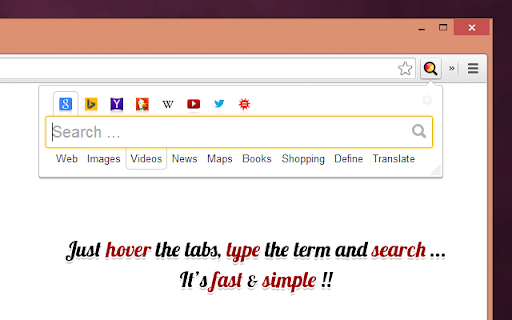
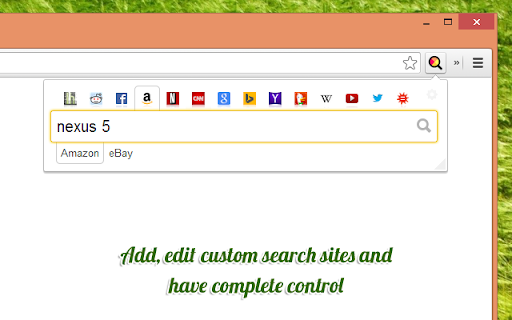
All in one web searcher allows to search any website easily by typing in one search box. All in one web searcher is a simple yet powerful extension to search multiple sites with ZERO click. Add sites to search, customize the order and search anywhere quickly. USING THE EXTENSION ---------------------------------- - Click the extension icon, simply hover over the search tabs and type the search term. - Press enter to search the keyword in the selected search engine. - Press "tab" or "alt" keys to cycle through tabs if needed. - Add custom search engine sites as you need. - Simple and quick way to search any page without a click ! FEATURES --------------- - Simple and fast UI for quick searches - Add multiple search sites easily and customize the order. - Add sub search sites like "Images" search, "Map" search etc. for easy search. - Keyboard shortcuts to cycle through the tabs. - Custom/Automatic icons for the tabs can be used. - No unwanted background process and memory. Light and fast extension. - Available in two themes - Text free extension and hence multilingual DEFAULT SEARCH ENGINES --------------------------------------- All popular search engines like Google, Bing, Wikipedia, DuckDuckGo are available out of the box. You can customize and add any search engine you want to this list with "sub search" engines like searching images, books, news etc. as needed. PRIVACY -------------- All in one web searcher extension does NOT collect any kind of information. The last used search keyword is saved locally. For any concerns, please contact me at aakashweb.com NOTE -------- After installing, please go to options page and change the "Tab selection method" to hover or click according as per your preference. Set a keyboard shortcut for opening the popup under "Manage extensions" page for even quicker search. CHANGE LOG ------------------- 5.0: - New: Move to manifest version 3.0 - New: Modernized search form styles. - Included new search engines as default. - Fix: Remove unused and old search engines from the default list. - Fix: Minor code refactoring - Fix: Last search term was not saved when button was clicked 4.1: - New option to open the results in new/same tab. - Minor enhancements to design and options page. - Updated jQuery and jQuery UI to the latest versions. - Fix issue where 'alt' key not cycling through tabs. - Replace deprecated events. 4.0: - Removed tabs permission. - Reorganized the assets used by the extension. - Updated default search URLs to HTTPS - Minor changes to the options page. 3.1: - Added feature to export and import search engine customization settings 3.0: - New simple Icon. - Reorder tabs easily. - Libraries updated to newest version. - Small interface changes. 2.0: - Core code re-written from bottom. - New Icon. - Instant popup load - Customize the default order of the list. 1.0: - Initial Version
All in one web searcher screenshot 1All in one web searcher screenshot 2All in one web searcher screenshot 3All in one web searcher screenshot 4

Reviews (7 cached)

★★☆☆☆2017-06-25
Ƹ̵̡Ӝ̵̨̄Ʒ

if it can searchs in multiple sites with one search and opens in multiple tabs then maybe i add it next time.. daymmmm such a pro it geeki wrapper hardcore searcher that i am... daymmmm

★★☆☆☆2017-04-14
Warmuser

The extension doesn't work as expected.. If I try to made a search from duckduckgo, the extension redirects me on Google search.

★★☆☆☆2014-10-23
Meg S

+5 for power -3 for SLOOOOOOOOW

★★★☆☆2025-10-24
Alworu Berzenge

This extension is basically an alternative to bookmarked popular Search engines like: Google, Bing, Duckduckgo, Yahoo, Wikipedia, YouTube, Twitter/X, WonframAlpha, You.com, etc.. But: 1) No option to search for a selected text/phrase. 2) Have to retype a same search term for every search no option to click and search for the same search term.

★★★☆☆2018-07-30
blue

1) I want a keyboard shortcut. There are shortcuts after entering this searcher (Tab, Alt), but there isn't a shortcut for opening this extension at the first step. 2) I want to see all the results at once like the Korean mobile application named "굿모닝 영어사전" in the Play Store. Please make this kind of extension too.

★★★☆☆2016-05-08
Dennie Kirtley

to the creators: kudos for coming up with something different. definitely wonderful potentially powerful functionality here but there is are two critical fx'n/s missing 1. you should be able to highlight text on a page and then when you click the extension icon the search phrase should be there already. you shouldn't have to cut/paste. 2. it defaults to google word search - should be "sticky" in that it remembers your last search config that was diff frm default. you implement these suggestions and your search becomes rocket science. capice?

★★★☆☆2014-04-02
Seunghyun Kim

Good for multisearch, but no function to import/export user's settings. I can't use my custome_settings on another computer via chrome sync...

Details

Version 5.0
Updated Nov 7, 2023
Size 63.63KiB
First Seen Mar 27, 2026