
Description
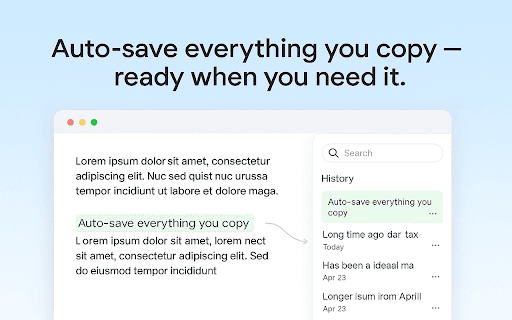
Keep everything you copy — text notes, snippets, links, or ideas — always available and neatly organized. Paste History is your simple yet powerful clipboard manager that automatically saves everything you copy, allowing you to search and reuse items anytime.
This app works entirely inside your browser — fast, private, and distraction-free. No sign-ups, no cloud storage, no tracking. All your browser clipboard log stays local on your device, ensuring complete privacy.
You can:
1️⃣ View your copied text history at any time.
2️⃣ Pin important items for quick access.
3️⃣ Search through all clipboard items instantly.
4️⃣ Delete or organize entries when needed.
5️⃣ Paste any saved snippet back into any text field.
Core features
Forget losing copied notes, links, or code again! Paste History gives you full control over your text snippets and quick notes.
Key benefits include:
➤ Auto-save every copied text
➤ Instant search and filter options
➤ One-click paste directly into forms or editors
➤ Pin, delete, and manage clipboard items easily
➤ Clean and minimalistic UI that feels native to Chrome
Whether you’re using Windows paste history, Mac copy paste history, or just need a lightweight browser clipboard history — this tool is made for you.
Your data is secure
Your privacy is important. Paste History keeps your copied content stored locally in your browser, so the text you save never leaves your device or is uploaded to remote servers.
▸ Your clipboard items are stored locally, not transmitted online
▸ No third parties have access to your saved text
▸ Basic diagnostic or usage data may be processed under our Terms of Service
We keep your clipboard data private while maintaining transparency about how general app usage is monitored for quality and reliability. It’s built for users who value both confidentiality and a smooth experience.
Designed for Productivity
The Paste History Chrome extension helps you move faster when writing, coding, researching, or managing content.
Use it to:
💎 Reuse repetitive snippets
💎 Recover recently copied text
💎 Keep cut and paste history organized
💎 Manage your buffer effortlessly
It’s your go-to Clipboard Manager for work, study, or daily browsing tasks.
Key Features
1️⃣ Auto Capture – Records every copied text automatically
2️⃣ Pin Items – Keep your favorite snippets always on top
3️⃣ Search & Filter – Quickly find any saved text
4️⃣ Delete & Organize – Manage clipboard history in seconds
5️⃣ Clean UI – Focused, minimal, and distraction-free
Paste History is a full-featured clipboard tracker built directly into your browser.
How to Use
Using Paste History is as easy as it gets:
1️⃣ Install the extension.
2️⃣ Copy any text — it’s saved instantly.
3️⃣ Open the sidebar to view your copy clipboard history.
4️⃣ Click to copy again or paste wherever you need.
You can use:
💠 Ctrl + C or ⌘ + C
💠 Right-click → Copy
💠 Context menu actions
All methods are automatically tracked in your clipboard history.
Smart Organization
The copy paste history manager comes with smooth filtering options:
➤ Show all or only pinned items
➤ Sort by recency
➤ Search keywords instantly
➤ Delete single or multiple entries
These small but powerful features turn your copied text history into a personal productivity dashboard.
Who is Paste History for?
⚡ Developers – store code snippets and templates
⚡ Writers – reuse phrases, notes, and drafts
⚡ Students – collect quotes and research data
⚡ Office Workers – keep your copy paste history tidy
⚡ Everyone – who copies text daily!
No matter your workflow, Paste History boosts focus and efficiency.
Minimal and Beautiful UI
Enjoy a refined, minimalistic design inspired by modern productivity tools.
➤ Clean typography
➤ Smooth sidebar transitions
➤ Simple item cards with clear text previews
Every part of the clipboard tool is designed for comfort and clarity.
Technical Highlights. Paste History integrates tightly with Chrome’s APIs for reliability and speed.
▸ Runs purely client-side
▸ Requires no permissions beyond clipboard access
▸ Works even offline
▸ Optimized for fast load and minimal resource use
Perfect for both casual users and professionals who rely on mac or windows paste history tools.
Restore and Reuse Instantly. Once copied, your text stays available until you delete it manually. You can:
➤ Recopy snippets
➤ Paste saved notes
➤ Keep my copy paste history organized
➤ Access even older text entries easily
It’s your memory for the things you copy most often.
Everything inside Paste History stays local. But you can still:
1️⃣ Clear all history anytime
2️⃣ Export or back up your saved items
3️⃣ Manage pinned and unpinned sections
4️⃣ Customize display layout
Complete freedom without risking your data.
Use Paste History as:
🔹 A clipboard viewer
🔹 A quick note collector
🔹 A writing helper
🔹 A research organizer
🔹 A clipboard history manager
No matter what you copy, this chrome clipboard tool keeps it safe, private, and always ready to use.
Try Paste History for Chrome today and make your workflow faster, smarter, and completely private.
Reviews
Loading reviews...
Permissions (9)
Permissions
activeTabℹ Can access the current tab when you click the extension clipboardReadℹ Can read from your clipboard clipboardWriteℹ Can write to your clipboard offscreen scriptingℹ Can inject scripts into web pages sidePanel storageℹ Can store data locally in your browser tabsℹ Can see your open tabs and their URLs unlimitedStorage
Details
| Version | 1.0.3 |
| Updated | Dec 19, 2025 |
| Size | 169KiB |
| First Seen | Mar 27, 2026 |
More by ryanfriedman301

Quick Grammar Corrector
by ryanfriedman301
3K
★ 4.96
communication
3K
★ 4.96
communication

AI Study Helper
by ryanfriedman301
706
★ 4.33
education
706
★ 4.33
education

Screenshot Solver
by ryanfriedman301
255
★ 5.00
education
255
★ 5.00
education

Excel Compare Columns
by ryanfriedman301
115
★ 0.00
tools
115
★ 0.00
tools

Copy Paste History
by ryanfriedman301
75
★ 5.00
tools
75
★ 5.00
tools
Popular in tools

Browsec VPN - Free VPN for Chrome
by Browsec
8M
★ 4.44
tools
8M
★ 4.44
tools

Zotero Connector
by Zotero
8M
★ 3.96
tools
8M
★ 3.96
tools

AnyDoc Translator - Translate Web and PDF
by www.wps.com
7M
★ 4.58
tools
7M
★ 4.58
tools

WPS PDF - Read, Edit, Fill, Convert, and AI Chat PDF with Ease
by www.wps.com
7M
★ 4.45
tools
7M
★ 4.45
tools

Video DownloadHelper
by Aclap
5M
★ 4.43
tools
5M
★ 4.43
tools
Popular Extensions

Adobe Acrobat: PDF edit, convert, sign tools
by Adobe Inc.
322M
★ 4.40
workflow
322M
★ 4.40
workflow

AdBlock — block ads across the web
by AdBlock
62M
★ 4.48
workflow
62M
★ 4.48
workflow

迅雷下载支持
by Shenzhen Xunlei Network Technology Co., Ltd.
59M
★ 2.77
workflow
59M
★ 2.77
workflow

Grammarly: AI Writing Assistant and Grammar Checker App
by Grammarly
42M
★ 4.50
communication
42M
★ 4.50
communication

Adblock Plus - free ad blocker
by eyeo GmbH
40M
★ 4.39
workflow
40M
★ 4.39
workflow