
Description

Reviews (9 cached)
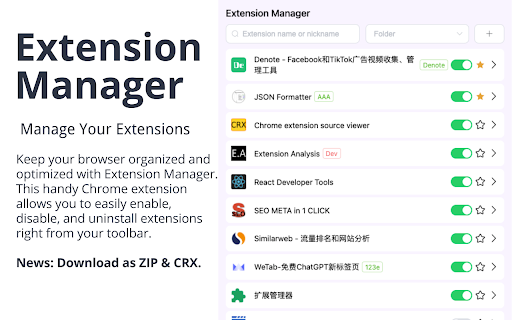
I have been comparing all of the extensions manager extensions from the chrome webstore and testing them to find out the best one. Since there is no popular 'winner' and they all have similar download numbers, I was curious as to why. After a lot of testing, I have come to the conclusion that none of them (so far) offer every feature we all want (I comb the comments for other people's opinions, too). I compiled a list of needed features & functionality and then mark them off for each manager, here is this one's: DESIGN & FUNCTIONALITY ❌- Can easily access an extension's webstore page, drop down settings/external settings page, and extension manager's page from the drop down menu. (Had download options but not anything but the chrome webstore). ❌- When an extension is toggled off, it either stays in place or waits until you close and open the menu so that if you misclick an extension. you don't have to immediately scroll down to find it. ❌- Extension itself has a menu and customization options. ❌- Nice compact design. (Could be more compact in list mode). ✅- Intuitive on/off toggle for extensions (not too small or too many clicks - allows for efficiency). (Semi-efficient - whole bar would be better) ❌- Dark mode toggle (if not default). ✅- Visible pinned icon for dark chrome themes. (MANUAL) GROUPS / SCENES CREATION ✅- Allows the creation of groups. ❌- Allows you to recorder groups. ❌- Groups can be mass-toggled on or off. - The groups, if not moved to another tab, can be collapsed. (Way too hard to access). TOGGLE AUTOMATION / URL-BASED RULES ❌- Has the ability to create auto-profiles for certain URLs. (i.e. When I open a YouTube page, enable all of the extension I have marked as relevant in order to save CPU when those sites are not in use). ❌- Extensions will toggle off when leaving that URL. CONCLUSION: This is the definition of 'the bare minimum' in an extension manager. There isn't even a category break between you enabled and disable extensions and the groups are pointless for the features that it offers.
I create a folder and a green message confirms its creation, but then I dont SEE the folder. I can assign a extension to the folder, but you never get to browser a folder with plugins as nothing seems to really move....sad
After I choose all extension to group, use 2 times, then all extension auto out of group !
I had high hopes for this extension. Extensions now need a .pem file and copying or saving as crx doesn't work anymore. Chrome automatically deletes them. The only way it'll work is if you "pack" the extension. But even to save as .crx isn't intuitive in the extension. Saving as a zip file is useless given there is no way to export the file back into Chrome, and no instructions too. What I was looking for was an extension which lists my extensions (there was one but it was removed from the store a few years ago) in a text or html file.
I used to like this extension and spent a lot of time grouping all my extensions and getting them organized, but after the update, all that data is completely gone and when I try to add a new folder, it will not save. Don't waste your time.
👋 Thanks for software! Hope you're OK! As a user when I select input select values from "Save to folder" I want to be able to add values without having to click a "Save" button - this (inter)action of effectively adding tags shouldn't need to be saved; either the tags are added or removed and clicking/focusing *anywhere* outside this input should automatically save progress FYR I just spend *whole minutes* going one by one through my extensions/items to - what I thought was update the "Save to folder" values - then discover I had neglected to click a "Save" button 😤 Also, there seems no way to delete folder(s) (names)?! If you agree then please consider implementing this UX across your extension Hope this is useful 🙏 PS will update rating to 5 stars if/when I get a reply (ie either fixed or justification why no fix)
Would be perfect / best of it's kind.... but in my case, it doesn't add / remember extensions assignment to groups and favorites, so it's more or less useless :(
This tool is user-friendly, practical,etc.However, but I am having trouble with the categorization feature as the categories I added keeps disappearing.
I was hoping to be able to pin/unpin :(
Permissions (4)
Permissions
Details
| Version | 2.7.0.0 |
| Updated | Jan 26, 2025 |
| Size | 448KiB |
| First Seen | Mar 30, 2026 |
More by Hongyuan Cao

Popular in tools




Popular Extensions




