
⚠️Requests 1 sensitive permission ⚠️Below average rating
Description
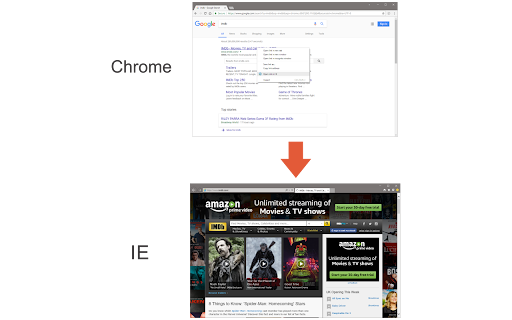
Open in IE™ addon gives you the ability to open any link in an Internet Explorer page from Chrome.
Note 1: after installing the addon, you need to connect it with native applications (i.e. IE) on your machine. To make this connection, a separate patch is provided in GitHub. Please download and install this patch from: https://github.com/alexmarcoo/open-in-native-client/releases
Follow the instruction on the above GitHub page to download and install the related patch to your system. After installing, the "Open in IE™" addon in your Chrome browser can communicate with IE on your Windows machine.
Note 2: before using the addon, please open the option's page and make sure the path to IE is correct based on your Operating System. For example, the path to IE in Windows 10 is: C:\Program Files\Internet Explorer\iexplore.exe
Next, please follow the below steps to open desired links in IE.
a. Right-click on any link and then click on the Open link in IE (from the context-menu).
b. You can choose to open the window in private (incognito) or normal mode (see the addon's options page).
c. It captures the link from any text content within the page (i.e. for those links that are not hyperlinked).
d. You can set the IE path in your machine from the options page.
Note 3: please note that the Open in IE™ addon, does NOT belong or relate to Internet Explorer, IE, or Microsoft corp at all. It is an unofficial extension that is developed and maintained independently by its author.
To report bugs, please fill out the bug report form on the addon's homepage (https://mybrowseraddon.com/open-in-ie.html).
Reviews (6 cached)
★☆☆☆☆2024-07-24
Am I An Idiot
it didnt work, fix this. i can still use yt, you cant use yt with internet explorer.
★☆☆☆☆2020-01-09
杨帆
dose not work
★☆☆☆☆2020-01-06
Gsimonis Wisdot-Gmail
DOES NOT WORK! I keep seeing the error message "An error has occurred. Please make sure native-client patch is installed on your machine." I would remove this from the store.
★☆☆☆☆2018-11-27
DOES NOT WORK.......................
★☆☆☆☆2018-10-27
davu cooked
"An error has occurred. Please make sure native-client patch is installed on your machine." Doesn't belong in the store
★★☆☆☆2018-04-05
Abhishek Malik
Right click is disabled on many websites so this extension won't work there. So much installation just for redirecting links to IE browser instead of opening those links within chrome.
Permissions (4)
Permissions
contextMenusℹ Can add items to the right-click menu nativeMessagingℹ Can communicate with programs on your computer notificationsℹ Can show desktop notifications storageℹ Can store data locally in your browser
Details
| Version | 0.1.7 |
| Updated | Feb 22, 2026 |
| Size | 31.79KiB |
| First Seen | Mar 31, 2026 |
More by Lynn

Open in PDF Viewer
by Lynn
100K
★ 3.22
tools
100K
★ 3.22
tools

Proxy Switcher
by Lynn
40K
★ 3.86
tools
40K
★ 3.86
tools

Open in VLC™
by Lynn
20K
★ 3.54
tools
20K
★ 3.54
tools

Smart HTTPS
by Lynn
20K
★ 4.41
tools
20K
★ 4.41
tools

Disable Autoplay for YouTube™
by Lynn
20K
★ 3.14
tools
20K
★ 3.14
tools
Popular in tools

Zotero Connector
by Zotero
8M
★ 3.96
tools
8M
★ 3.96
tools

Browsec VPN - Free VPN for Chrome
by Browsec
7M
★ 4.44
tools
7M
★ 4.44
tools

AnyDoc Translator - Translate Web and PDF
by www.wps.com
7M
★ 4.58
tools
7M
★ 4.58
tools

WPS PDF - Read, Edit, Fill, Convert, and AI Chat PDF with Ease
by www.wps.com
7M
★ 4.45
tools
7M
★ 4.45
tools

Video DownloadHelper
by Aclap
5M
★ 4.43
tools
5M
★ 4.43
tools
Popular Extensions

Adobe Acrobat: PDF edit, convert, sign tools
by Adobe Inc.
331M
★ 4.40
workflow
331M
★ 4.40
workflow

AdBlock — block ads across the web
by AdBlock
63M
★ 4.48
workflow
63M
★ 4.48
workflow

迅雷下载支持
by Shenzhen Xunlei Network Technology Co., Ltd.
59M
★ 2.77
workflow
59M
★ 2.77
workflow

Grammarly: AI Writing Assistant and Grammar Checker App
by Grammarly
42M
★ 4.50
communication
42M
★ 4.50
communication

Adblock Plus - free ad blocker
by eyeo GmbH
41M
★ 4.39
workflow
41M
★ 4.39
workflow