
⚠️Below average rating
Description
Website Theme Manager customizes a website(s) appearance; you can choose your desired style from the userstyles.org website or write your own.
Note: "Website Theme Manager" addon is NOT affiliated with the userstyles.org website at all. But, users can choose desired styles available in userstyles.org and use them with this addon.
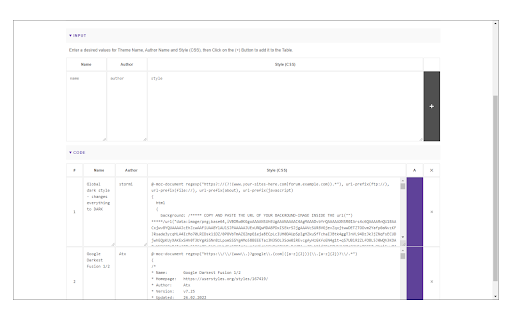
Once you install the addon, please visit userstyles.org and find your desired theme, then click on "Add this Theme" (appears only after you install Website Theme Manager). The theme will be automatically added to the extension's options page, where you can easily edit, remove or inactivate it.
Few features:
1. Enables you to easily manage (add, edit or remove) styles.
2. Enhances your browsing experience by allowing you to customize the way a website looks.
3. By using custom styles (CSS) you can change colors, fonts, and almost all HTML contents within a page; meaning completely redesigning the entire page.
4. To add styles, there are two options available:
a. writing your custom style (CSS) or
b. adding it from the userstyles.org site.
5. Toolbar button can easily enable or disable the extension.
6. An example of how to add a style is available on the options page (top-section).
To report bugs, please visit the addon's homepage (http://mybrowseraddon.com/website-theme-manager.html) and fill out the bug report form.



Reviews
Loading reviews...
Permissions (2)
Permissions
storageℹ Can store data locally in your browser unlimitedStorage
Details
| Version | 0.1.9 |
| Updated | Jan 27, 2026 |
| Size | 50.56KiB |
| First Seen | Mar 31, 2026 |
More by Jorvi

Block Site
by Jorvi
100K
★ 3.85
tools
100K
★ 3.85
tools

Password Lock for Messenger™
by Jorvi
30K
★ 3.45
social
30K
★ 3.45
social

Print Button
by Jorvi
20K
★ 4.20
tools
20K
★ 4.20
tools

Piano Prime
by Jorvi
10K
★ 4.53
entertainment
10K
★ 4.53
entertainment

Block Image|Video
by Jorvi
7K
★ 3.68
tools
7K
★ 3.68
tools
Popular in tools

Browsec VPN - Free VPN for Chrome
by Browsec
8M
★ 4.44
tools
8M
★ 4.44
tools

Zotero Connector
by Zotero
8M
★ 3.96
tools
8M
★ 3.96
tools

AnyDoc Translator - Translate Web and PDF
by www.wps.com
7M
★ 4.58
tools
7M
★ 4.58
tools

WPS PDF - Read, Edit, Fill, Convert, and AI Chat PDF with Ease
by www.wps.com
7M
★ 4.45
tools
7M
★ 4.45
tools

Video DownloadHelper
by Aclap
5M
★ 4.43
tools
5M
★ 4.43
tools
Popular Extensions

Adobe Acrobat: PDF edit, convert, sign tools
by Adobe Inc.
331M
★ 4.40
workflow
331M
★ 4.40
workflow

AdBlock — block ads across the web
by AdBlock
62M
★ 4.48
workflow
62M
★ 4.48
workflow

迅雷下载支持
by Shenzhen Xunlei Network Technology Co., Ltd.
59M
★ 2.77
workflow
59M
★ 2.77
workflow

Grammarly: AI Writing Assistant and Grammar Checker App
by Grammarly
42M
★ 4.50
communication
42M
★ 4.50
communication

Adblock Plus - free ad blocker
by eyeo GmbH
40M
★ 4.39
workflow
40M
★ 4.39
workflow