
Description
💡 Instant Typography Insights
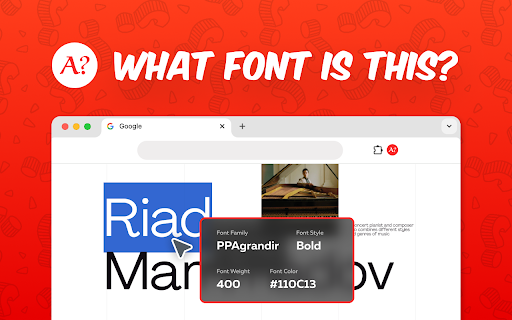
Ever wondered, what font is this while browsing a website? Now you can find what text style this is simply by hovering your cursor over the text. No extra software or guesswork needed—discover type details in seconds.
⚙️ Quick-Start Features
1. Ideal for pinpointing what is this font on any webpage
2. Great for investigating what font.is.this across multiple sites
3. Helpful if you ask yourself what kind of font is this daily
4. Efficient at answering what type of font is this without guesswork
🛠️ More Handy Options
- Perfect for those who want to find perfect typefaces
- Useful to recognize text style with no complicated steps
- Handy for what’s font is this queries if you love exploring typography
👨💻 Use Cases
⭐ Web visuals
⭐ Brand identity
⭐ Print previews
⭐ Logo updates
⭐ Creative research
💎 Why Use This Extension?
By installing the tool, you can reveal type details instantly and address what font is this website or what letter style is this. Enjoy real-time find dont and skip tedious trial-and-error with multiple tools.
🧰 Smooth Integration
▸ Excellent for quick references search
▸ Built with a font identifier to distinguish subtle differences
▸ Linked to a powerful detector that highlights exact names
▸ Enhanced with whatthefont-like capabilities for comprehensive identification
💡 How It Works in a Glimpse
Curious about a bold headline or a unique body text? Hover over it. The extension’s engine pinpoints the name right away. You can also rely on advanced fontfinder functionality to break down style attributes at a granular level.
📌 Q: What does extension do?
A: Identifies site typefaces.
📌 Q: How does it work?
A: Hover to detect.
📌 Q: Is extra software needed?
A: No, just Chrome.
📌 Q: Who benefits most?
A: Designers, everyone.
🚀 Top Advantages
1) Great for design teams needing to detect font families fast
2) Perfect for content creators wanting to identify font for brand consistency
3) Helpful for students or hobbyists using a font recogniser to learn about typography
🫰 Extended Applications:
🔸 Identify unknown typefaces with ease
🔸 Compare multiple text styles for cohesive designs
🔸 Unify brand look across different platforms
🔸 Explore advanced lettering possibilities
🔸 Evaluate diverse style variations in real time
⚡ Eliminate the Mystery
1️⃣ Ideal if you often wonder, tell me what font this is when you see something inspiring
2️⃣ Suitable for investigating typefaces in real time
3️⃣ Flexible if you need to confirm what font style is this before starting a project
4️⃣ Efficient for quick identify text style checks in brainstorming sessions
💼 No Extra Tools Required
Stop juggling multiple apps or web searches. The tool serves as a one-stop vector for your questions. With a single hover, you get direct answers about the type family, weight, and even potential licensing.
📌 Best Practices
🔹 Use fontfinder logic
🔹 Classify type categories
🔹 Compare multiple sections
🔹 Apply letter type recogniser
🔹 Enhance design workflows
🌐 Extended Compatibility
• Compatible with modern Chrome versions for smooth detect symbol usage
• Works seamlessly on dynamic websites
• Integrates with advanced detector modules for reliable accuracy
• Embodies typefaces without leaving your page
💡 Why Trust Our Tool?
We understand how crucial accurate text type can be. Our text recognition technology stands out by providing immediate, reliable results. Whether you’re a beginner or pro, you’ll appreciate the intuitive interface.
🔧 How to Install
🟢 Add the extension: Look for What Font is This in the Chrome Web Store
🟢 Pin it for easy access: Keep the icon visible to get quickly answer
🟢 Hover and discover: Start using the font finder feature on any webpage in seconds
🎉 Refine Your Typography Know-How
This extension isn’t just for professionals. Explore new typefaces, gather inspiration, and perfect your style knowledge with minimal effort.
⚙️ Advanced Capabilities
➤ Breaks down subtle distinctions
➤ Provides immediate feedback
➤ Helps confirm text style is this
➤ Pairs well with brand audits to maintain consistent typography
💁♂️ Additional Tips
- Check style
- Compare sections
- Tag categories
- Maintain synergy
- Save time
🚀 Install The Tool Today
Whether you need to recognize text style, or you want a tool that can tell you letter type in real time, we’ve got you covered. Turn every website visit into a mini typography lesson with the help of extension functionality. Get the extension now and identify symbols whenever curiosity strikes!
Reviews
Loading reviews...
Permissions (3)
Permissions
activeTabℹ Can access the current tab when you click the extension scriptingℹ Can inject scripts into web pages tabsℹ Can see your open tabs and their URLs
Details
| Version | 1.1.8 |
| Updated | Jun 14, 2025 |
| Size | 195KiB |
| First Seen | Mar 29, 2026 |
More by redactpdf

Popular in tools

Zotero Connector
by Zotero
8M
★ 3.96
tools
8M
★ 3.96
tools

Browsec VPN - Free VPN for Chrome
by Browsec
7M
★ 4.44
tools
7M
★ 4.44
tools

AnyDoc Translator - Translate Web and PDF
by www.wps.com
7M
★ 4.58
tools
7M
★ 4.58
tools

WPS PDF - Read, Edit, Fill, Convert, and AI Chat PDF with Ease
by www.wps.com
7M
★ 4.45
tools
7M
★ 4.45
tools

Video DownloadHelper
by Aclap
5M
★ 4.43
tools
5M
★ 4.43
tools
Popular Extensions

Adobe Acrobat: PDF edit, convert, sign tools
by Adobe Inc.
331M
★ 4.40
workflow
331M
★ 4.40
workflow

AdBlock — block ads across the web
by AdBlock
63M
★ 4.48
workflow
63M
★ 4.48
workflow

迅雷下载支持
by Shenzhen Xunlei Network Technology Co., Ltd.
59M
★ 2.77
workflow
59M
★ 2.77
workflow

Grammarly: AI Writing Assistant and Grammar Checker App
by Grammarly
42M
★ 4.50
communication
42M
★ 4.50
communication

Adblock Plus - free ad blocker
by eyeo GmbH
41M
★ 4.39
workflow
41M
★ 4.39
workflow