
⚠️Not updated in over 2 years
Description
🌐 Have you accidentally closed your browser tab?
This Chrome Extension was designed to effortlessly reopen your recently closed tabs. Have you ever accidentally closed a tab and immediately wished you could get it back? With Reopen Closed Tab you can do just that with a single click! This extension is a must-have for anyone who juggles multiple tabs and needs a quick way to recover their lost work or pages.
💻 How to use Reopen Closed Tab extension
🔸 Click the Add to Chrome button in the upper right corner and pin it to the toolbar for easy access.
🔸 Enjoy the simplicity on restoring your closed tabs!
🔍 How to restore recently closed tab?
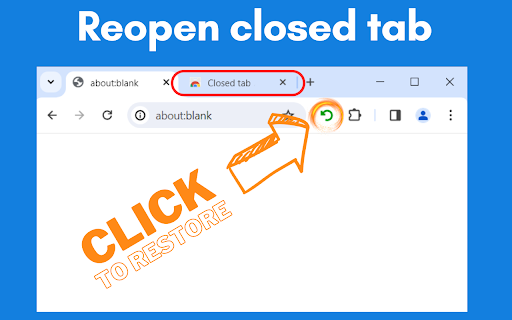
The Reopen Closed Tab extension is incredibly user-friendly. Once installed, the extension adds a small icon to your Chrome toolbar. If you close a tab, simply click on the Reopen Closed Tab button, and your most recently closed tab will reopen instantly. It's that easy! No more losing important tabs or struggling to find your way back to a specific page.
🔗 Seamless Integration with Chrome
Reopen Closed Tab is designed to feel like a native part of your Chrome experience. It integrates seamlessly with the browser, ensuring that it doesn't slow down your computer or interfere with your browsing. The extension works quietly in the background, ready to spring into action when you need it.
🛡️ Safe and Secure Usage
Your online safety is our priority. Reopen Closed Tab respects your privacy and security. The extension doesn’t track your browsing history or store any personal data. It simply keeps a temporary record of closed tabs for restoration purposes. Browse with peace of mind, knowing your information is safe.
🔄 Unlimited closed tabs restoration
There's no limit to how many times you can use Reopen Closed Tab to restore recently closed tabs. Whether you've closed a tab by accident or purposefully but need it back later, the extension is always at your service. Unlimited restorations mean you never have to worry about losing access to a tab again.
🌟 User-Friendly Interface of extension
The interface of Reopen Closed Tab is clean, simple, and intuitive. There's no steep learning curve. The extension is designed for ease of use, ensuring that even the least tech-savvy users can take advantage of its features without any hassle.
📊 Enhance Productivity
Extension is more than a convenience tool; it's a productivity booster. By reducing the time and frustration involved in retrieving closed tabs, the extension helps you stay focused and efficient. Keep your workflow uninterrupted and smooth with Reopen Closed Tab.
💡 Constant Updates and Improvements
We are committed to making Reopen Closed Tab the best it can be. Regular updates ensure that the extension stays compatible with the latest version of Chrome and incorporates new features and improvements based on user feedback. Enjoy a constantly evolving tool that adapts to your needs.
📝 Feedback and Support
Your feedback is invaluable to us. If you have suggestions, questions, or need support with Reopen Closed Tab, our dedicated team is here to help. We strive to provide quick and helpful responses to enhance your experience with the extension.
👨💻 Developed by Experts
This extension to restore closed tab is developed by a team of experienced software engineers and UX designers who understand the nuances of web browsing. Their expertise ensures that the extension is not only functional but also optimized for the best user experience.
🌍 Making Browsing Easier
Our mission with Reopen Closed Tab is to make your online browsing experience as smooth and hassle-free as possible. We believe that by providing a tool to quickly restore closed tabs, we can significantly enhance your productivity and browsing enjoyment.
📥 Install Reopen Closed Tab Today!
Ready to revolutionize the way you browse? Install Reopen Closed Tab extension from the Chrome Web Store today and experience the convenience of easily restoring your closed tabs. It's fast, free, and incredibly useful!
Reviews (3 cached)
★☆☆☆☆2025-08-18
JCDenton Alex Melyon
Useless
★★☆☆☆2024-12-31
GS D
Browser crashed and lost all my tabs. It only restores tabs that YOU willingly closed, not tabs that crashed.
★★★☆☆2025-03-07
William Murderface
Opens ads on install: chrome.runtime.onInstalled.addListener((details) => { if (details.reason === chrome.runtime.OnInstalledReason.INSTALL) { // Code to be executed on first install // eg. open a tab with a url chrome.tabs.create({ url: "https://due-date-calculator.online/extensions/reopen-tab/",
Permissions (1)
Permissions
sessionsℹ Can access recently closed tabs and windows
Details
| Version | 0.1.1 |
| Updated | Jan 14, 2024 |
| Size | 47.43KiB |
| First Seen | Mar 30, 2026 |
More by serg.ch


Popular in tools

Zotero Connector
by Zotero
8M
★ 3.96
tools
8M
★ 3.96
tools

Browsec VPN - Free VPN for Chrome
by Browsec
7M
★ 4.44
tools
7M
★ 4.44
tools

AnyDoc Translator - Translate Web and PDF
by www.wps.com
7M
★ 4.59
tools
7M
★ 4.59
tools

WPS PDF - Read, Edit, Fill, Convert, and AI Chat PDF with Ease
by www.wps.com
7M
★ 4.45
tools
7M
★ 4.45
tools

Video DownloadHelper
by Aclap
5M
★ 4.43
tools
5M
★ 4.43
tools
Popular Extensions

Adobe Acrobat: PDF edit, convert, sign tools
by Adobe Inc.
331M
★ 4.40
workflow
331M
★ 4.40
workflow

AdBlock — block ads across the web
by AdBlock
62M
★ 4.48
workflow
62M
★ 4.48
workflow

迅雷下载支持
by Shenzhen Xunlei Network Technology Co., Ltd.
59M
★ 2.77
workflow
59M
★ 2.77
workflow

Grammarly: AI Writing Assistant and Grammar Checker App
by Grammarly
42M
★ 4.50
communication
42M
★ 4.50
communication

Adblock Plus - free ad blocker
by eyeo GmbH
41M
★ 4.39
workflow
41M
★ 4.39
workflow