Glarity ChatGPT: Summary & Translate AnyPage icon

Glarity ChatGPT: Summary & Translate AnyPage

by Felo株式会社

v4.46.4 Updated Feb 10, 2026 14.12MiB
CWS
100K
Users
★ 3.97
266 reviews
#1098
of 207.1K
tools
#183 of 64.4K
⚠️Requests 1 sensitive permission

Description

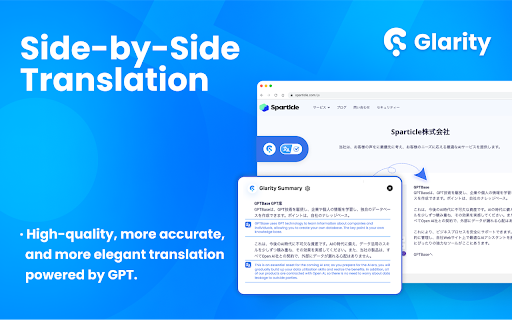
Glarity : an open-source ChatGPT Summary extension for YouTube, Google, Twitter, and any webpage. It provides cross-language summaries to effortlessly summarize videos, searches, PDFs, emails, and webpages. It supports free side-by-side translations, email writing assistance, Web Content Q&A, and much more! Source code: https://github.com/sparticleinc/chatgpt-google-summary-extension ⭐️Key Features⭐️ 📺 YouTube Summary ✅ Generate video summaries in over 12 languages. ✅ Produce video highlights with timestamps. ✅ Create FAQs for Youtube videos. ✅ Generate market subtitles for Youtube videos. ✅ Engage in AI chat with YouTube videos. 🔍 Google Summary ✅ Search Summary: AI delivers comprehensive explanations and answers to questions. ✅ Google Cross-Language Search: Expand the language scope of searches, with AI assisting in assessing content relevance. 📄 Web Summary ✅ Generate webpage summaries for any webpage. ✅ Engage in conversations with AI about web content, supporting custom prompts such as extracting page content. 📑 PDF Summary ✅ Generate PDF Summaries: Facilitates the creation of multilingual summary content for local PDF files. ✅ Chat with PDF: Allows interactive conversations with PDF content using customized prompts, such as "ask anything about PDF." ✅ Text Selection Analysis and PDF Translation: Provides functionality for extracting and translating text from selected areas within PDF documents. 🌐 Translation ✅ Mirror Translation /Side-by-Side Translation:Effortlessly compare original and translated text side by side ✅ 4 Translation Engines: Easily switch between LLM Enhanced, Google, DeepL and Microsoft engines. ✅ Webpage Translation / Selected Text Translation:: Customize translation prompts and translation areas for an immersive translation experience ✅ YouTube Bilingual Subtitles ✅ Quick Translation Options 🖱️ ⭐️ Shortcut Key Translation: Hover over text and press a designated shortcut key (supports Ctrl, Alt, Shift, Tilde, etc.) to translate. ⭐️ Mouse Translation: Trigger translation by double-clicking, long-pressing, or clicking the mouse wheel. ⭐️ Touch Translation: Supports translation with two, three, or four-finger taps, as well as double and triple taps. 🖼️Screenshot &Ask AI ✅Image Translation:Capture screenshots and translate text within the images into different languages seamlessly ✅Screenshot Capture* allows users to capture the current tab interface and save it to their local computer. ✅AI Inquiry: Enables translation of text, interpretation of mathematical formulas, and answering questions within images using AI. ✍️Writing Assistant ✅ Gmail Email AI reply ✅ Web Page Rewriting Capability ✅ Twitter Post Composition 👍ChatGPT Model: ✅ Support for seamless switching between ChatGPT-4o and ChatGPT 4o-mini. ✅ Enable interaction with ChatGPT on any interface (shortcut key: Ctrl+M). 👍Claude.ai Model: ✅The Claude WebApp is free to use, without the need to consume any tokens. Users only need to have a Claude account and authorize access to Claude.ai cookies for seamless usage. ✅Claude WebApp excels at summarizing long texts, offering faster and better performance. 🆕 Update (2026/02/07) 1. Fixed an issue where some users were unable to summarize YouTube videos. --- 1. Significant improvements have been made to the webpage translation functionality. The translation experience is now greatly enhanced with the use of the AI-LLM translation model. 2. Added multiple translation style options. Users can now choose from different translation display styles according to their preferences. 📙--------------FAQ-------------- 1. How to summarize YouTube? Install and pin Glarity extension, open a YouTube video, then click 'Generate Summary' with glarity to instantly receive highlights, key moments, FAQs, and more, or ask questions about any part of the video. 2. Is Glarity free to use? Yes, using the extension is completely free. However, if you employ the Glarity mode or the OpenAI key mode, service providers will charge a certain fee based on token consumption. At present, the ChatGPT mode is completely free of charge; you can choose different modes according to your situation. 3. Do I need a ChatGPT/OpenAI account? No, you do not. Glarity offers a Glarity mode, allowing you to enjoy Google/YouTube summaries without the need for a ChatGPT/OpenAI account. Of course, if you do have a ChatGPT/OpenAI account, you can still select the ChatGPT mode or OpenAI key mode in the extension. Both of these options remain free and powerful by default. 🔐 Privacy and Security At Glarity, we prioritize your privacy. We have implemented strict measures to ensure that your data stays within your browser and is not shared with anyone. Our focus is on protecting your privacy, which is why we don't display ads or sell your data. We have put in place various online security measures to safeguard your information. Here are the specific types of data we handle: 1. Personally Identifiable Information: If you decide to create an account with Glarity, we will securely transmit your username and password to our server for authentication purposes. 2. Web page data and prompts: Glarity uses the GPT language model provided by OpenAI. When you interact with the AI through the extension, we only exchange data related to your actions, such as the prompts you provide and the content of the web pages you're browsing. 3. Anonymized extension usage statistics: We collect anonymous usage statistics and monitor various metrics to analyze feature usage and identify any bugs or issues that need improvement. This helps us enhance the product and provide a better experience for our users. 📪 Contact us: Any questions or suggestions? Please contact us at 💌 Support@felo.ai Experience the incredible capabilities of AI assistants powered by ChatGPT—try it out now!!
Glarity ChatGPT: Summary & Translate AnyPage screenshot 1Glarity ChatGPT: Summary & Translate AnyPage screenshot 2Glarity ChatGPT: Summary & Translate AnyPage screenshot 3Glarity ChatGPT: Summary & Translate AnyPage screenshot 4Glarity ChatGPT: Summary & Translate AnyPage screenshot 5

Reviews (34 cached)

★☆☆☆☆2026-02-08
Bert Stevens

Doesn't work, just shows "no transcript available" when there is.

★☆☆☆☆2026-02-08
Martin Holecek

Does not work at all, always fails to create transcript. Tried on Chrome and Edge, while i was logged and using ChatGPT in the same browser. In both cases the Glasp extension does not work. When i try Glasp it works well.

★☆☆☆☆2025-11-23
Amine El Bikri

takes infinite time to answer unfortunately ! 0/5

★☆☆☆☆2025-06-07
Alan Yong

broken again, cannot detect any transcripts when it is there

★☆☆☆☆2025-04-20
Sam S

I barely opened a video and it says you have used up your tokens. So there is no free summary. I can understand premium features for paid plans but there is hardly anything they offer in free. Uninstalling the extension.

★☆☆☆☆2024-12-12
Oleg Levitski

Today youtube stopped loading videos after 59 seconds with this extension enabled. Everything works without it.

★☆☆☆☆2024-08-05
李建興(Bruce)

so great !

★☆☆☆☆2024-06-19
Pablo Bermudez

it wants my credit card and charge me 170$

★☆☆☆☆2024-03-21
Kathy Long

Didn't work. Slowed down the Youtube video so badly you can't even watch it.

★☆☆☆☆2024-03-03
Ahmed Thapa

It doesn't work at all, nothing worth.

★☆☆☆☆2023-11-20
Jim bridger

works well. but not a fan that it pretends to be free, yet only works a few times until it forces you to make an account. so then you make an account and it literally works one more time then asks you to pay. and $15 a month? not worth it. "Straightforward, transparent pricing" is a joke.

★☆☆☆☆2023-11-07
Koolee Lee

The toolbar icon do not work after icon update

★☆☆☆☆2023-11-05
Artem Gordinskiy

Just restricted the YouTube summarization for non-Glarity users, so I can't do more than 30 minutes even with my ChatGPT account. Not cool.

★☆☆☆☆2023-10-27
Marko

This extension just suddenly stopped working... across all my browsers...

★☆☆☆☆2023-10-12
Erik Jacobsen

Ruins reddit. Causes a bunch of loading circles and causes comments to show doubled up text that is rephrased, which indicates they are sending every single comment into chatgpt and asking it to rephrase... really weird behavior, seems super shady.

★☆☆☆☆2023-10-11
Alarge Corgi2

This extension is making any page on reddit display a ton of spinning circles and must be disabled.

★☆☆☆☆2023-05-29
Lê Tuấn Linh

It's not working!

★☆☆☆☆2023-04-25
Ad Min

New Update make me feel annoying, while everytime block my site...

★☆☆☆☆2023-04-24
Joe LIU

Start getting like a spamware, the popup shows up whenever you highlight a text on any website, you can't even disable this "feature".

★☆☆☆☆2023-04-12
Marcin Gołembiewski

Seems it doesn't work when ChatGPT's account is created with Google authentication. Each time pligin want to me to log in to OpenAI, but I'm logged in.

★☆☆☆☆2023-02-28
Nyimbo Okar

It seems to just be a portal to the chat gpt website, I don't understand.

★☆☆☆☆2023-02-25
Fifty Pound Chicken

collects: "IP address when accessing our online sites and add-ins" Name, Physical address, Instant messenger, Telephone numbers, Beware, this is not okay! Why so much information to simply summarize YouTube videos, I think some of these reviews are fake because they are all generic?

★☆☆☆☆2023-02-21
Giant Heron

doesn't work, it just shows the ChatGPT website in the popup

★★☆☆☆2024-06-24
Jay Neu

Does not take my prompt anymore. When I summarize, it only does the default prompt the extension came with

★★☆☆☆2024-01-16
Max Adres

It consumes a lot of resources. My browser becomes slow when I use this extension. I recommend disabling most functions to obtain better performance and only leaving activated those that you consider essential.

★★☆☆☆2023-09-05
Zerudite

the glarity section now bugs out on youtube using brave (chromium) it rarely shows up anymore; and when it does, it has a habit of disappearing for a few seconds (clearing out any summary it has produced)

★★☆☆☆2023-04-29
Nadeem Munshi

Doesn't work with videos over 10 minutes. All this does is copy and paste the transcript into chat-gpt, but adds no additional features.

★★★☆☆2025-07-27
yolas

At the moment the extension can't access Youtube transcripts anymore, which was my only use for this extension. I hope it'll work again. Also I had to create a Tampermonkey script to hide the extension from every web page because it was way too intrusive, and I only want to use the extension when I press the shortcut Ctrl+M

★★★☆☆2024-05-21
何立

Sorry, the PDF file failed to load, you can try refreshing or downloading the PDF file to use.

★★★☆☆2024-03-29
Laittala Teid

it works, which is fine, but causing youtube video heavy loading, usually unplayable and black screen until refreshing the browser. And it's prettty annoying.

★★★☆☆2023-09-05
John Alvin Jr Ang

how do I use it on youtube????

★★★☆☆2023-05-27
Kaito Sumishi

Works on most sites but when the video or transcript is long, it does not work.

★★★☆☆2023-05-11
Curie Wilhelm

Failed to load response from ChatGPT: {"detail":"Error getting system message: 'NoneType' object is not iterable"} Retry If this keeps happening, change AI provider to OpenAI API in the extension options.

★★★☆☆2023-03-20
Gonçalo Ferreira

It works, however it's very slow compared with other ones on the market like Rio, VidSummarize and ChatGPT for Youtube

Permissions (17)

Permissions

activeTab Can access the current tab when you click the extension contextMenus Can add items to the right-click menu cookies Can read and modify browser cookies offscreen scripting Can inject scripts into web pages sidePanel storage Can store data locally in your browser tabs Can see your open tabs and their URLs

Host Permissions

https://*.felo.ai/* Can access felo.ai websites https://*.felo.me/* Can access felo.me websites https://*.glarity.app/* Can access glarity.app websites https://account.felo.ai/* Can access account.felo.ai websites https://api.glarity.app/* Can access api.glarity.app websites https://glarity.app/api/* Can access glarity.app websites https://glarityapi.com/* Can access glarityapi.com websites https://vi2vocal.s3.ap-northeast-1.amazonaws.com/* Can access vi2vocal.s3.ap-northeast-1.amazonaws.com websites https://www.google-analytics.com/* Can access www.google-analytics.com websites

Details

Version 4.46.4
Updated Feb 10, 2026
Size 14.12MiB
First Seen Mar 28, 2026