
⚠️Not updated in over 2 years
Description
Zoho Calendar is an online web-based calendaring application which allows you schedule, manage and track your appointment, meetings, birthdays and other important dates. And also collaborate,share and publish your daily activities. Zoho Calendar also provides you an unified calendar view across other Zoho Apps, like Zoho CRM, Zoho Projects and Zoho Recurit.
Features
Reminders:
Zoho Calendar enables you to schedule multiple reminders for every event. Get your event reminders in your preferred mail box, as a pop up, or both. You can choose to receive reminders up to 90 days prior to or after the commencement of the event.
Embed a calendar:
Publish your calendar on your website or blog for every visitor to see. At the same time, retain your privacy with various level of access privileges. You can display either free/busy information alone or the event details. You can also enable your viewers to request an appointment with you.
Integrate with Zoho Apps:
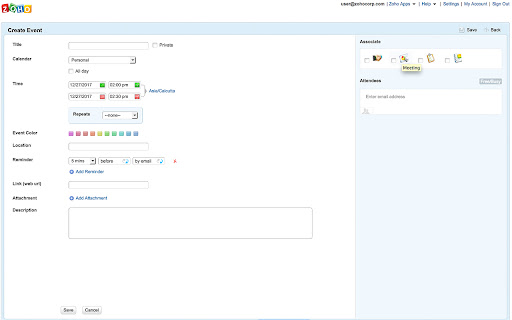
When you create events, you can save the event details as a note, add it as a task and schedule it as a meeting. This makes Zoho Calendar your access portal to other Zoho applications. Not only can you add, but you can also view the note and task from within Zoho Calendar itself.
Share a calendar:
Calendars can either be shared with individuals or shared publicly. You can choose one of the permissions like "View free busy", "View Event Details", "Edit event details" and "Manage/Delegate". If your calendar is exposed to unauthorized people, you can revoke the access permission by resetting your private URL.
Send Invitation:
Meetings and family gatherings can never be complete without attendees. On Zoho Calendar, you can invite others to your event as and when you create it. An invitation email will be sent to the invitees to which they can respond and update their availability status.



Reviews (6 cached)
★☆☆☆☆2021-07-13
Brandy Shay
do not want to have to sign in to a stupid calender!!!! All I want is a SIMPLE calender
★☆☆☆☆2020-09-06
Wylma Harmon
Avoid this like a plague.this is good for businesses and companies so don't even add it. it's hard to uninstall on the Subscribe. They want to know if your business and all of that so don't even added to Chrome cuz it's not worth it.
★☆☆☆☆2020-08-09
Lyric
it sucked so much
★☆☆☆☆2020-03-21
jake brake
How do I get rid of this app? Why is there no option to remove it?
★☆☆☆☆2017-11-15
olero1709
It doesn't show up anywhere after install. Nor can I re-install.
★☆☆☆☆2014-03-31
Anna Libera
not to bad
Details
| Version | 1.2 |
| Updated | Dec 28, 2017 |
| Size | 23.34KiB |
| First Seen | Mar 30, 2026 |
More by Zoho Corporation

Zoho Vault - Password Manager
by Zoho Corporation
100K
★ 3.84
workflow
100K
★ 3.84
workflow

Writer - Extension & Clipper
by Zoho Corporation
90K
★ 4.20
workflow
90K
★ 4.20
workflow

Notebook Web Clipper – Sticky Notes & Save Articles
by Zoho Corporation
70K
★ 4.19
workflow
70K
★ 4.19
workflow

Zoho CRM
by Zoho Corporation
30K
★ 3.93
Other
30K
★ 3.93
Other

Zoho Writer
by Zoho Corporation
30K
★ 3.72
Other
30K
★ 3.72
Other
Popular Extensions

Adobe Acrobat: PDF edit, convert, sign tools
by Adobe Inc.
331M
★ 4.40
workflow
331M
★ 4.40
workflow

AdBlock — block ads across the web
by AdBlock
62M
★ 4.48
workflow
62M
★ 4.48
workflow

迅雷下载支持
by Shenzhen Xunlei Network Technology Co., Ltd.
59M
★ 2.77
workflow
59M
★ 2.77
workflow

Grammarly: AI Writing Assistant and Grammar Checker App
by Grammarly
42M
★ 4.50
communication
42M
★ 4.50
communication

Adblock Plus - free ad blocker
by eyeo GmbH
41M
★ 4.39
workflow
41M
★ 4.39
workflow