Writer - Extension & Clipper icon

Writer - Extension & Clipper

by Zoho Corporation

v2.1 Updated Nov 16, 2024 163KiB
CWS
90K
Users
★ 4.20
45 reviews
#413
of 49.1K
workflow
#137 of 6.1K
⚠️Not updated in over a year ⚠️Requests 1 sensitive permission

Description

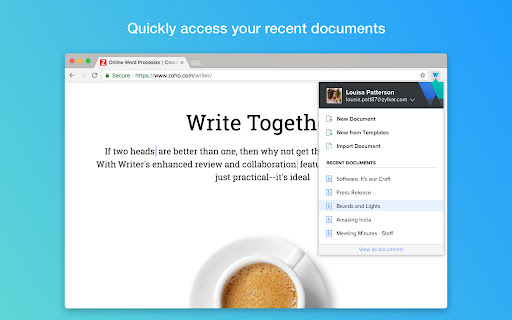
Love using Writer? Here's a great time saver for you! Use the Writer extension to quickly create and access Writer documents in just a couple of clicks. Here's everything you can do with it: - Quickly access the list of your most recent documents. - Clip interesting content to Writer by converting it to a new document. - Import your existing MS Word documents to Writer. - Quickly start with a new template. - Import MS Word or other supported files directly to Writer as you download them. - Go to the Writer dashboard to view all your Writer documents. Install the extension to get the most out of Writer (and also save time!). What are you waiting for? Get started. Write away! Learn more about Writer at zoho.com/writer Send us your feedback to support@zohowriter.com Happy writing!
Writer - Extension & Clipper screenshot 1Writer - Extension & Clipper screenshot 2Writer - Extension & Clipper screenshot 3

Reviews (7 cached)

★☆☆☆☆2024-10-21
Joanne Gray

Not user friendly at all Installed the extension and it still is not working

★☆☆☆☆2022-06-19
Obrad Nikolich

Installed on Chrome, but it does not work. When I click to clip some web page to my zoho writer, it asks me whether I want to open a new blank document, or new from template, or import a document. I just can't clip any page?

★☆☆☆☆2021-04-11
Ray Rohrbach

Not user friendly

★☆☆☆☆2019-03-13

It does not work at all. I can't even copy and paste

★★☆☆☆2020-03-24
Neal Gaskins

it didn't work for me

★★☆☆☆2018-03-15
Michael Rhum

This is a neat idea and will probably fine after further development, but as it now stands I don't find it useable. Three specific problems stand out with documents created from selected text. 1. The extension cannot correctly render Unicode characters above the ANSI range. For instance – (em dash) is rendered as –. 2. Links are not preserved. 3. Formatting is not preserved. There is also no way of appending text to an existing document, which would be a very useful feature. Given that this is the first iteration of the extension it's not surprising that it has some shortcomings, though I wouldn't expect them to be this serious. Still, I like the idea and will keep it installed and check periodically for updates.

★★★☆☆2018-06-19
Linda Moreno

It was ok

Permissions (9)

Permissions

background clipboardRead Can read from your clipboard contextMenus Can add items to the right-click menu cookies Can read and modify browser cookies downloads Can manage and monitor downloads downloads.open notifications Can show desktop notifications storage Can store data locally in your browser tabs Can see your open tabs and their URLs

Details

Version 2.1
Updated Nov 16, 2024
Size 163KiB
First Seen Mar 23, 2026