Week Plan icon

Week Plan

by Wisplan INC

v3.0.5 Updated Jan 15, 2026 89.55KiB
CWS
10K
Users
★ 3.83
121 reviews
#5376
of 207.1K
tools
#989 of 64.4K

Description

This Chrome extension for Week Plan allows you to conveniently access your tasks directly from your browser. Week Plan – Weekly Tasks & Goals is a Task Management app that makes entrepreneurs and teams more effective in their tasks and in achieving their goals. Rather than focusing on completing all the tasks and be productive, this task tracker for work app lets you focus on essential tasks. This ensures that you put your best foot on tasks that are in line with your business objectives. Try Week Plan – Weekly Tasks & Goals Today! Inspired by the book, 7 Habits of Highly Effective People by Stephen Covey and OKR (Objective, Key Results) framework, the weekly planner is designed to make you and your team more efficient at work. Trusted by over half a million users, the weekly calendar planner app has everything you and your team need to plan and achieve your company’s objectives and goals effectively. Tons of capabilities to make you and your team more effective at work **Week Goals Planning** Plan and Track the progress on your week goals Add and Track your Goals: Add as many goals as you like on this goal planner and tracker for an individual member, project or your entire team. Add High Impact Tasks with Each Goal: Keep your team focused by pushing towards the goals and all the important tasks required to reach there. Add your Vision and Mission: Rather than keeping your vision and mission statements in file cabinets, make them part of where all action happens in this work management app. Prioritize using Quadrant: This goal planner and tracker app has the built-in Eisenhower Quadrant that lets you structure your week goals and tasks based on priority. ** Objective Key Results ** Plan your high impact tasks and objectives using the revolutionary OKR (Objective, Key Results) Framework. Setup Weekly Objectives: Setup and add as many weekly objectives you want to set for each workspace. Track Key Results: Add and track key results on objectives and monitor you and your team’s progress on them. Setup OKR for each team: Add and track separate OKR’s for each team individually. ** Task Management ** Add and manage high impact tasks, subtasks and weekly to do list for you and your team. High Impact Tasks: The weekly schedule planner helps you to integrate all your high impact tasks into your schedule easily. Add Sub Tasks: Add as many subtasks as you want with their description, deadlines, priority and more. Set Repetitive Tasks: Add any recurring task like weekly meetings or reporting once and it will be automatically added to the schedule, whenever you want it to be. ** Weekly Task Planner ** This weekly calendar planner is the best Team Shared Weekly Task Plan ever! Weekly Tasks Calendar: Get a birds-eye view of all the planned tasks for a week across your projects and teams. Recurring Tasks Review: This task tracker for work makes it simple to add weekly recurring tasks and automatically add it to your staff or team’s schedule. See Tasks for Team Members: Within a single glimpse, get to know the tasks of your entire team spread across the week. ** Increase Your Productivity with Time Tracking ** Setup and Track time took on each task, project, and goal of your entire team. Track your and your Team’s Time on each Task: This work management application helps you to get a complete view of each task and subtask of your team. Track Time across High Impact Tasks & Goals: Tracking the time on high impact tasks and goals helps you to focus and evaluate your time on important tasks and goals. Pomodoro Timer: Increase your productivity by achieving more in short bursts of time using the Pomodoro timer. ** Team Task Manager and Collaboration Tool ** Cultivate team collaboration and let the people do great things together. Team Task Manager: Create goals for your team and set a twelve-week plan for your projects that you can track weekly. Add as Many Team Members You Like: Add and manage all your team members even if you have 10 or 1000 employees in your team. Easily Share Progress and Deliverables with the Team. Download Week Plan – Weekly Tasks & Goals Now!
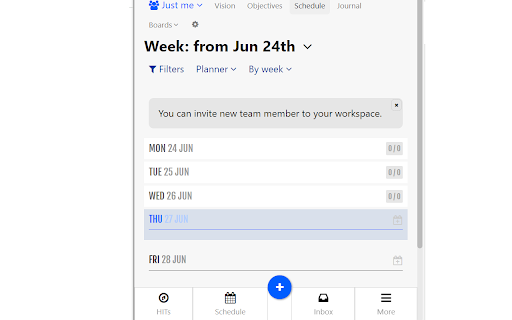
Week Plan screenshot 1

Reviews (19 cached)

★☆☆☆☆2016-10-18
Jasper Greene

didn't work, couldn't add any tasks

★☆☆☆☆2016-09-08
Ruth Willshire

didn't work

★☆☆☆☆2015-10-26
Amir Ali

Should mention upfront that it is paid and expensive. Automatic 14 day trial is very misleading and should be disclosed up front with permission from the user to get on a trial or cancel.

★☆☆☆☆2015-02-28
Brett Followell

Used this program for a few weeks and was very useful. I got the the end of my free trial period and continued to use the program to keep track of day to day business. Shortly after the free trial period ended though numerous aspect stopped working that are not listed as premium only, such as being able to plan for next week. I dont know about you but being able to look a few weeks in advance to plan things is pretty important aspect of a planner in my eyes.

★☆☆☆☆2015-01-18
Rhiannon B.

Major glitches - a number of the functions didn't work at all. I notifyed support hoping for a solution and got none. My request was acknowledged but never followed up with, simply ignored. After reading around online, there are numerous other people who had the same issues. The price is also double most other 'to do' services similar, which I would have paid had it worked - or had I received even the most basic customer support, but alas - apparently he couldn't be bothered.

★☆☆☆☆2013-08-09
Sean McNally

Absolute waste of money. Does not work as advertised, especially when combined with the phone app. It's clunky and not user friendly. And tech support is like a ghost. They'll respond to your initial email about a problem with the product and then never follow through. Buyer beware.

★☆☆☆☆2013-03-06
Charles Gutman

Unfortunately when logging on there is no indication as to how to install or use on a smartphone or tablet. There needs to be good integration between these devices in order =for a task management system to work for me, and I guess most others as well.

★★☆☆☆2016-01-02
Peri Lyons

I was really excited to use this, and, like a foo, paid to upgrade. It is overcomplicated, not at all efficient, and I wish I could get a refund.

★★☆☆☆2015-12-26
Jose Garcia

Too many glitches, erases tasks leading to losing input. not worth it

★★☆☆☆2014-12-29
Shari Douglas

Nice idea but glitchy and slow.

★★☆☆☆2014-11-09
AVXtra

Often problems loading. Other lesser bugs. Repeat tasks are a paid option.

★★☆☆☆2014-10-21
Me

Wow, possibly one of the buggiest chrome store apps I've ever used. After multiple workspaces appearing out of nowhere, buttons not responding. Lists vanishing that took me ages to put together. I gave up. And they way to charge for this?!?! I'm not even going to waste my time with the mobile app. Reviews show it's going to be the same story.

★★☆☆☆2014-09-19
t k

Unable to do pertinent functions unless I upgrade.

★★☆☆☆2012-08-08
Paul Snyder

You have to get a premium account to set recurrent tasks. You my as well ask people to pay for it up front. Otherwise, there is great potential here.

★★★☆☆2016-01-18
Chrysovalantis Tsantsas

Very nice idea and quite promising. But it feels a bit slow....

★★★☆☆2015-03-05
Ryan Carson

Still working with it. I kinda like it, but there can be improvements. Need to prioritize tasks and if not completed it reschedule automatically.

★★★☆☆2014-02-25
Ronda Meritt

Sounds good, but have to check it out.

★★★☆☆2013-07-19
dp 1205

What is the real reason I cannot register with a sign up instead of having to use my google account,you will have access to everything in my account including all my contacts, emails etc.? I will sign up when I don't have to use my google account. If I'm wrong let me know, Thank You.

★★★☆☆2013-06-19

Glitchy! Some tasks seem to disappear for no reason. Other times I try to delete one task and the programme deletes a couple, then the tasks reappear again. It would also be useful to assign times for each task e.g. 9:30-10:30 Meeting with Sue etc. Also, no biggie but the icon or button looks absolutely terrible. Simple and useful but needs a bit more work.

Details

Version 3.0.5
Updated Jan 15, 2026
Size 89.55KiB
First Seen Mar 26, 2026

